6. Grids and repetition
Grids give generative art its order, and repetition gives it rhythm. The tools here place, turn, fold, and clip your shapes. The twenty-five medallions at the top all come from one crooked arm, drawn once and then placed, turned, folded, and trimmed. After them come a whole sketch run inside a cell, grids of hexagons and triangles, uneven panels split by recursion, and a spiral of numbers.
One loop, not two: grid
You have already built grids twice, the long way. Chapter 2's color field and Chapter 4's disorder grid both did the same chores. Pick a margin, then divide the leftover width into cells. Run a loop inside a loop, and rebuild each cell's x and y from the indices. Those chores are what grid is for:
import Ollin

final class ColorTiles: Sketch {
    let ramp = Ramp([
        Color(hex: 0x14213D), Color(hex: 0x5E60CE),
        Color(hex: 0xF77F00), Color(hex: 0xFCBF49),
    ])

    override func draw() {
        background(Color(hex: 0xF2EDE4))
        noStroke()
        for cell in grid(columns: 12, rows: 12, padding: 70, gutter: 10).cells {
            let diagonal = Double(cell.column + cell.row) / 22
            fill(ramp.color(at: diagonal))
            drawRect(cell.frame)
        }
    }
}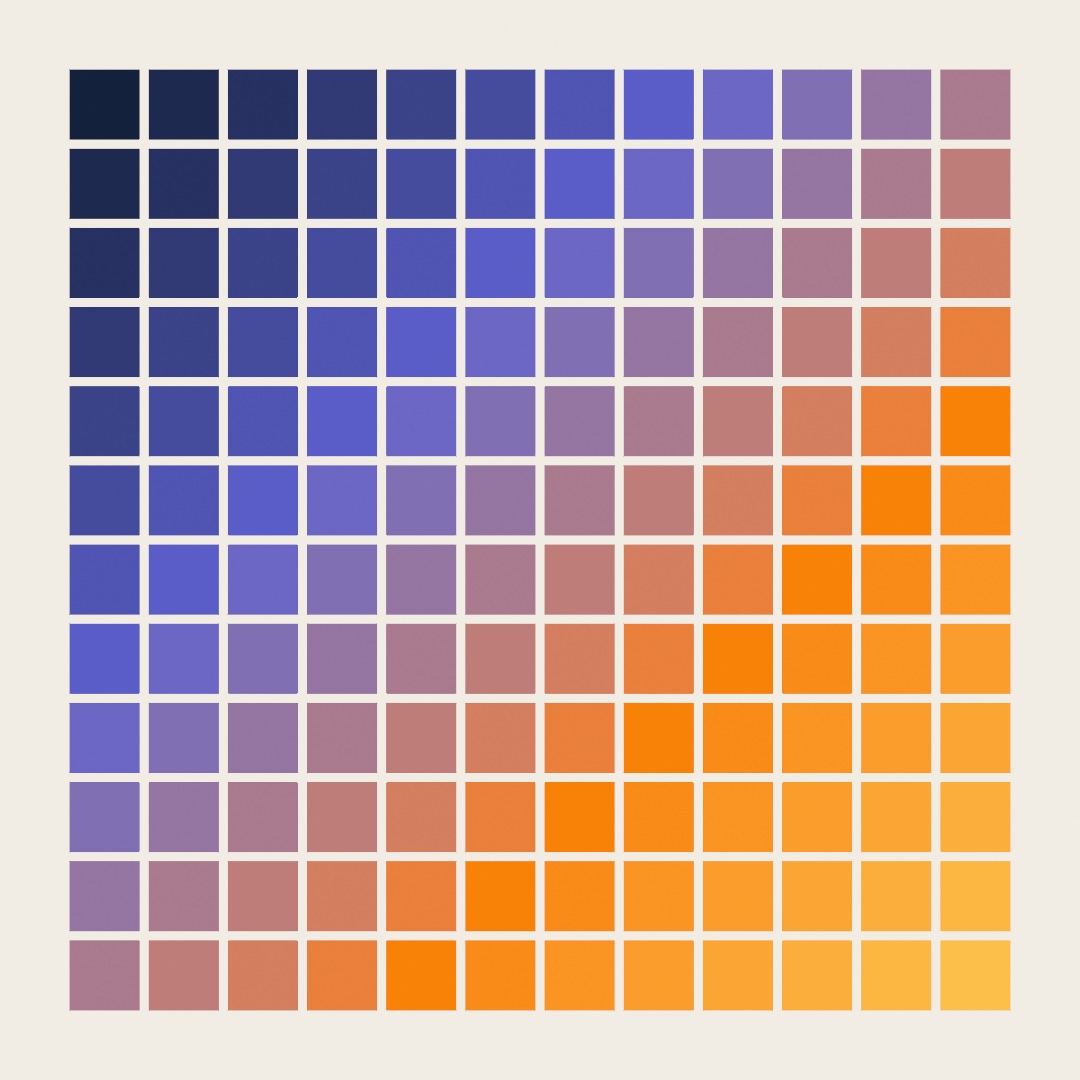
One loop does it. grid(columns:rows:padding:gutter:) lays a grid over the canvas, where padding is the outer margin and gutter the gap between tiles. Its cells is a list you loop, and every cell arrives knowing everything about itself. It carries its frame, the rectangle to draw, plus its center, its column and its row. Those indices are the point. The old nested loops existed mostly so you would have a column number and a row number in hand. Here every cell carries its own, so the indexed tricks stay one-loop simple. A checkerboard from (cell.column + cell.row) % 2 is one, and this diagonal fade is another. The 22 in the code is the far corner, column 11 plus row 11.

The grid offers two things to loop, and you pick by what you are drawing. cells are the tiles. points are the dots, one per cell center by default. Pass distribution: .spanning for a lattice that reaches the edges, the layout you want when the sketch is a grid of dots. A dot field is two lines:
for p in grid(columns: 12, rows: 12, padding: 70, distribution: .spanning).points {
    drawCircle(center: p.position, radius: 6)
}
Two more things are useful to know. grid(...) covers the whole canvas, but Grid(in: someRectangle, ...) lays one inside any rectangle. Since a cell's frame is itself a rectangle, grids nest. A grid where each cell holds a smaller grid is one more loop, and a classic look. For margins that differ per edge, padding: takes more than a bare number. It also takes .symmetric(horizontal: 40, vertical: 20), or any mix of edges through Insets.
Swift note.
grid(...).cellschains a call and a property, building the grid and then asking for its cells. You can also drop the.cellsand loop the grid itself:for cell in grid(columns: 12, rows: 12). As far as Swift is concerned a grid is its cells. It walks them in the same order, working each one out as the loop asks for it, so it never builds the array. Everything Swift can do to a list it reads, it can do to a grid. So afterlet g = grid(columns: 12, rows: 12),g.countworks too. Thecellin the loop is a small value with named parts you read with a dot, such ascell.frameandcell.column. ThedrawRectcall accepts the frame whole, with no unpacking into x and y.p.positionis aVector2, a pair of coordinates carried as one value, anddrawCircle(center:radius:)takes it directly. Chapter 10 teaches vectors properly, and until then you can readVector2as "a point".
Moving the paper: translate, rotate, and scale
The grid raises a question. How do you draw something rotated inside a cell? drawRect and friends do not take an angle. The answer is one of the oldest ideas in computer graphics. You do not rotate the shape, you rotate the paper.

Three calls move the paper. translate(x, y) slides the origin, the point that counts as (0, 0), somewhere else. rotate(angle) turns the paper around that origin (angles work like Chapter 3: .tau / 4 is a quarter turn). scale(factor) stretches it. After any of them, every drawing call is measured on the moved paper, which is what the diagram shows. All four flags are the same drawRect at the same numbers, drawn on paper that had been slid, turned, and stretched first.
The moves accumulate as draw() runs, and reset at the start of every frame. Within a frame you also need the undo, and that is withState:
withState {
    translate(cell.center)      // origin to this cell's middle
    rotate(.tau / 8)            // paper turns an eighth
    drawRect(-40, -40, 80, 80)  // a tilted square, centered on (0, 0)
}                               // paper snaps back as if nothing happened
Everything inside the braces draws on the moved paper. At the closing brace the paper is restored, along with any fill or stroke you changed inside. This is the cell-drawing recipe you will use for the rest of the guide. Translate to the cell's center, turn or stretch as the sketch demands, then draw around the origin. Coordinates like (-40, -40) straddle (0, 0). Put the recipe in a grid, add a seeded pick from Chapter 4, and identical parts start composing figures nobody drew:
import Ollin

final class Pinwheels: Sketch {
    let ink = Color(hex: 0x232020)
    let accent = Color(hex: 0xC1272D)

    override func draw() {
        randomSeed(11)
        background(Color(hex: 0xF2EDE4))
        noStroke()

        for cell in grid(columns: 10, rows: 10, padding: 70).cells {
            let quarter = randomChoice([0, 1, 2, 3])
            withState {
                translate(cell.center)
                rotate(Double(quarter) * .tau / 4)
                fill(random() < 0.12 ? accent : ink)
                let h = cell.frame.width / 2
                drawPolygon([Vector2(-h, -h), Vector2(h, -h), Vector2(-h, h)])
            }
        }
    }
}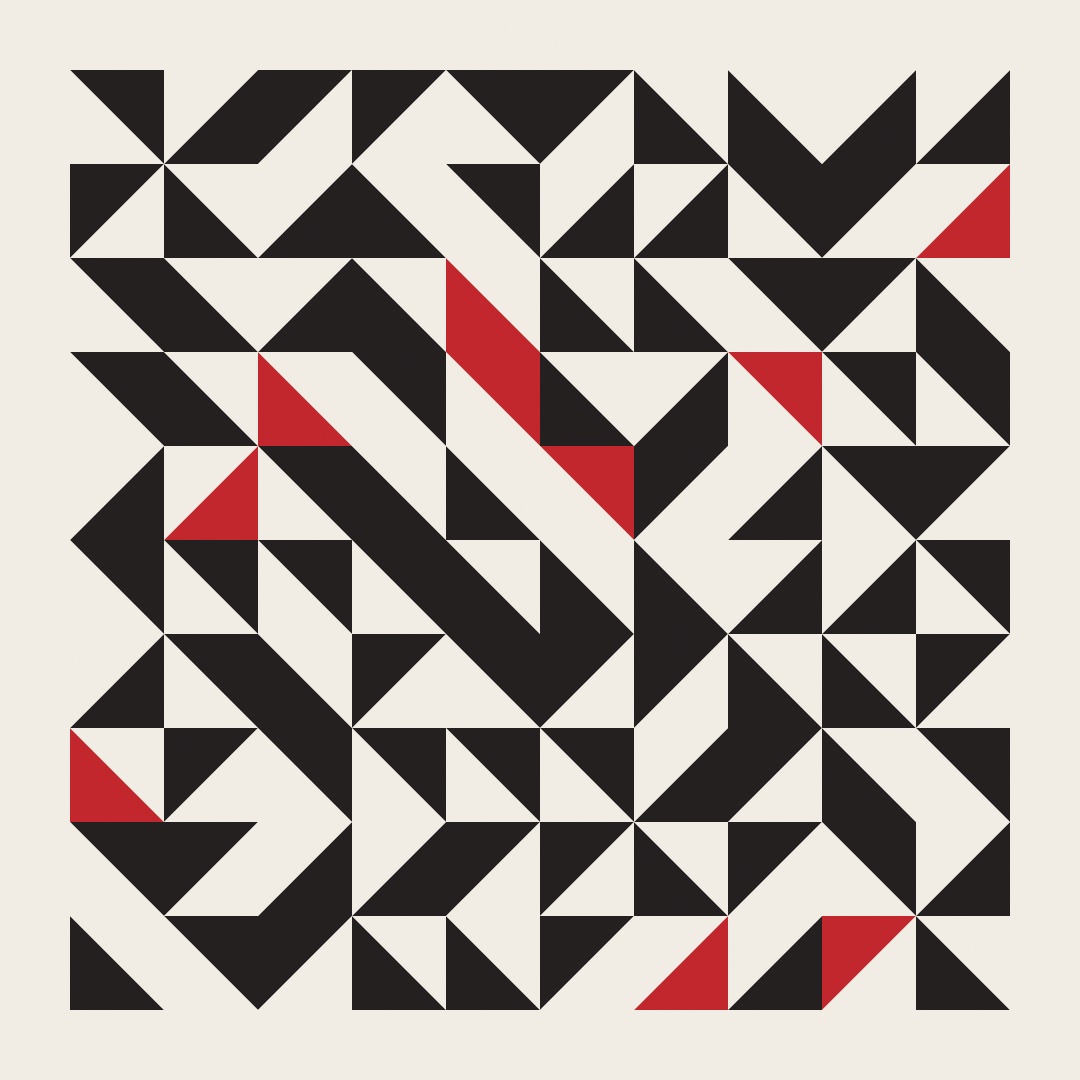
It is one right triangle, half a cell. drawPolygon draws a closed shape through a list of points, and here the list is the triangle's three corners. There are four possible spins, and the neighbors do the rest. Hourglasses, pinwheels, and arrows assemble themselves wherever the spins happen to agree. Nobody placed those figures. That is the effect this chapter keeps returning to. It only works because every triangle is the same size in the same place in its cell, so any two spins fit together. Chapter 7's Truchet tiles rest on the same fact.
Swift note.
withState { ... }takes a block of code in braces, likedraw()itself. Running the block with the paper moved and then restoring it is the whole trick.random() < 0.12 ? accent : inkis the compact if, which reads as the condition, then the value when true, then the value when false.
Symmetry by hand: rotating around the center
Rotating the paper around a cell gave a quilt. Rotate around the canvas center instead, and repetition becomes symmetry. Every sketch carries that center as a property called center, which is the Vector2 at width / 2, height / 2 and saves you writing it out:
import Ollin

final class Rosette: Sketch {
    let ink = Color(hex: 0x232020)
    let accent = Color(hex: 0xE4572E)

    override func draw() {
        background(Color(hex: 0xF2EDE4))
        translate(center)

        for _ in 0..<12 {
            rotate(.tau / 12)
            drawArm()
        }
    }

    func drawArm() {
        stroke(ink)
        strokeWeight(5)
        drawLine(70, 0, 340, 0)
        drawLine(250, 0, 300, -52)

        noStroke()
        fill(accent)
        drawCircle(340, 0, 26)
        fill(ink)
        drawCircle(300, -52, 13)
        drawCircle(160, 0, 9)
    }
}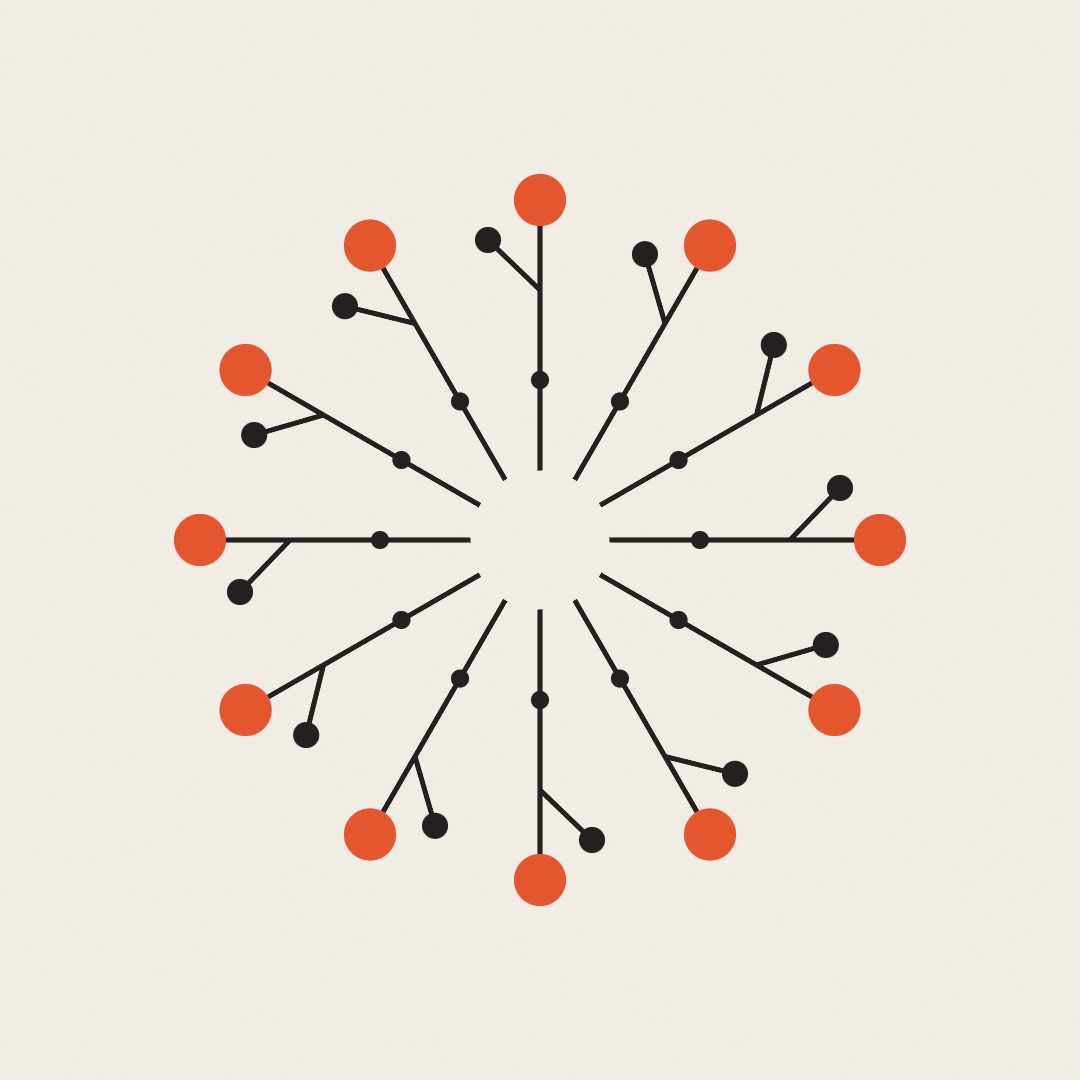
This time there is no withState, on purpose. Each rotate(.tau / 12) adds to the last. So the twelve copies of the arm land a twelfth of a turn apart and close the circle. The arm itself is deliberately lopsided, a stem along the x axis, one branch reaching up, disks of different sizes. A symmetric arm makes a boring rosette. The symmetry comes from the repetition, so the part is free to be as crooked as it likes. Change both 12s to 5 or 48, redraw the arm, drop time into the rotation. Every mandala, snowflake, and kaleidoscope pattern you have seen is some cousin of this loop.
Swift note.
func drawArm()declares a helper function on your sketch, a named block you call like any built-in. It is the same move as Chapter 4'sroll(). Pulling the arm out of the loop keepsdraw()readable and gives you one place to redesign the arm.
The fold, done for you: symmetry
Write that loop yourself once, because it shows you what symmetry is. After that there is a shortcut, and it can do something the loop makes awkward.
symmetry(8)                  // every draw call now happens eight times
symmetry(8, mirrored: true)  // sixteen times, alternate copies flipped
noSymmetry()                 // back to normal
Like fill or a transform, symmetry is drawing state. So it applies to everything you draw until you turn it off, and withState { } scopes it. Once it is on you stop thinking about repetition. You draw one wedge, and every circle, line, and shape in it lands in all the folds at once.

The mirrored form is the one to use. A plain rotation copies your wedge around like a pinwheel, and every copy still leans the same way. Mirroring flips alternate copies, so neighbors face each other and the seams between them close. That is the difference between a pinwheel and a kaleidoscope. Doing it by hand means a negative scale on every other copy. That flip also runs each shape's corners the other way round, a mess you now do not have to write.
The folds pivot on the origin as it stands at the call, the top-left corner unless you translate first. And because it is drawing state rather than a loop you write, a whole composition folds as easily as a single arm.
Drawing inside a shape: withClip
Repetition fills space. Sometimes you want it to fill only part of the space, a part with a shape of its own: a star, a disc, a letter. Profile.star hands back the corners of a star around (0, 0), and Shape turns a list of points into a closed outline:
let star = Shape(Profile.star(points: 5, outerRadius: 300, innerRadius: 130)
                     .map { center + $0 })     // five points, around the middle
withClip(star) {
    // everything here lands only inside the star
}
Swift note.
.map { center + $0 }runs the code in the braces once per point and hands back the new list. Inside the braces,$0stands for that point.center + $0slides each corner to the middle of the canvas, since adding twoVector2values adds their x's and their y's. Chapter 10 covers that arithmetic properly.

withClip takes a Shape, a Rectangle, or a Circle, and confines everything drawn inside the block to that region. You never work out the intersection yourself. The stripes in the figure are the same handful of long diagonal lines in all three panels. They are drawn straight past the edges, and the region decides what survives.
Nesting is the other half. A clip inside a clip keeps only what falls in both. So the third panel stripes only where the star lies inside the circle, with no geometry on your part. Letters make good clips too, since Chapter 8's textToShapes hands back shapes, so you can pour a whole pattern into a word.
Putting it together: a wall of rosettes
Now you can build the image at the top. The plan uses the grid, the transforms, symmetry, and a clip, in the order you met them. A grid hands you the blocks, and inside each one the transforms place, turn, and shrink the work. Then a clip opens around the arm, and inside it symmetry folds the arm into a medallion cut to a disc. Make a new file, MySketches/RoseWall.swift:
import Ollin

final class RoseWall: Sketch {
    @Param("Columns", 2...8) var columns = 5
    @Param("Seed", 1...9999) var wallSeed = 7
    @Param("Mirrored") var mirrored = true

    let paper = Color(hex: 0xF2EDE4)
    let ink = Color(hex: 0x232020)
    let ramp = Ramp([
        Color(hex: 0xE4572E), Color(hex: 0xF3A712),
        Color(hex: 0x2A9D8F), Color(hex: 0x3D348B),
    ])

    override func draw() {
        seed(wallSeed)
        background(paper)

        let blocks = grid(columns: columns, rows: columns, padding: 60, gutter: 18)
        for cell in blocks.cells {
            let radius = cell.frame.width / 2
            let folds = [5, 6, 8, 12][Int(random(4))]
            let reach = Double(cell.column + cell.row) / Double(2 * columns - 2)

            withState {
                translate(cell.center)
                rotate(random(.tau))
                scale(random(0.88, 1.0))

                noStroke()
                fill(ramp.color(at: reach))
                drawCircle(0, 0, radius)

                withClip(Circle(center: .zero, radius: radius)) {
                    symmetry(folds, mirrored: mirrored)
                    drawArm(radius: radius)
                }
            }
        }
    }

    // One arm, deliberately lopsided, drawn well past the edge of its block so
    // the clip is what gives every medallion its rim.
    func drawArm(radius: Double) {
        stroke(paper)
        strokeWeight(radius * 0.07)
        strokeCap(.round)
        drawLine(radius * 0.10, 0, radius * 1.30, 0)
        drawLine(radius * 0.58, 0, radius * 0.94, -radius * 0.34)

        noStroke()
        fill(paper)
        drawCircle(radius * 1.30, 0, radius * 0.10)
        fill(ink)
        drawCircle(radius * 0.94, -radius * 0.34, radius * 0.05)
        drawCircle(radius * 0.36, 0, radius * 0.045)
    }

    override func mousePressed() {
        wallSeed += 1
    }
}
Run it, then click. What each part contributes:
blocks.cellsis the one loop. Each cell arrives knowing its ownframeandcenter, so nothing here rebuilds an x and a y from indices. The sumcell.column + cell.rowis the diagonal you already used for the color tiles.withStateis what makes the block independent. The position, the turn, the shrink, the fold, and the clip inside it are all undone at the closing brace. So the next cell starts fresh.translatethenrotatethenscaleis the usual order, and the order matters. The turn and the shrink both happen around the cell's center becausetranslatemoved the origin there first.- The arm reaches to
radius * 1.30, well outside its own block. That is deliberate. The clip is what cuts it back, which is why every medallion has a crisp rim and no two rims are cut the same way. foldsis one of four counts, picked by[5, 6, 8, 12][Int(random(4))]. The innerInt(random(4))rolls 0, 1, 2, or 3, sinceInt(...)drops the fraction as in Chapter 4's walk. The brackets then take that entry of the list. The clip isCircle(center: .zero, radius: radius), and.zerois theVector2(0, 0). That point is the cell's center oncetranslatehas moved the origin there.symmetry(folds, mirrored:)is inside the clip, so the fold happens to the arm and not to the disc under it. TurnMirroredoff and the medallions become pinwheels: same arms, but every copy leaning the same way, and the seams between them stop closing.- Calling
seed(wallSeed)at the top ofdraw()pins the fold counts, the turns, and the shrinks, so the wall holds still. It is the reseed-every-frame fix from Chapter 4. The Seed parameter, or a click, deals a whole new wall.
When a wall is a keeper, export it as a still:
swift run OllinLive MySketches/RoseWall.swift --export wall.pngBefore moving on, make it yours:
- Redraw
drawArm. It is the one place the sketch's character comes from, and a straighter or busier arm changes all twenty-five medallions at once. - Swap
[5, 6, 8, 12]for[3, 4]and the wall goes from lace to heraldry. - Give the disc a stroke in
inkand drop the gutter to4, so the medallions crowd their neighbors like tiles rather than floating. - Drive
reachfromnoiseat the cell center instead of the diagonal, and the color arrives in patches (Chapter 5) rather than a clean gradient.
A cell that is a whole canvas: withViewBox
The wall moved the paper into each cell by hand and clipped what it drew there. A clip keeps drawing inside a region. A view box goes one step further and moves the coordinates too, so the block inside believes the region is the canvas. In the listing, drawPetals() stands for a drawing of your own, written for the whole canvas, under whatever name you gave it:
for cell in grid(columns: 3, rows: 2, padding: 40).cells {
    withViewBox(cell.frame) {
        randomSeed(cell.column + cell.row * 3)
        drawPetals()
    }
}
Inside that block width and height still report the whole canvas, and center is still the middle of it. A circle at (width / 2, height / 2) lands in the middle of the cell. That is the point. You hand a sketch written for the whole window to a box, and it runs there unchanged.
Two more things are quietly remapped so that stays true. background fills the box rather than the whole canvas. The canvas belongs to every box at once, and one of them wiping it would take the others with it. And the mouse arrives in the box's own coordinates, so an interactive sketch works in each box separately.
The virtual canvas has the sketch's shape, not the box's, so in a box shaped like the canvas everything lands as drawn. When the shapes differ, the fit: argument of withViewBox decides, using the same words a picture uses in Chapter 9. .contain, the default, leaves the box showing along two edges, .cover fills it and crops, and .stretch squashes.
Labels belong outside the block, in canvas coordinates, or they get scaled down with everything else, so a caption under each box stays one size.
Change one number, run six of it, and the seeds that do not work show at once.
Other ways to divide and walk a grid
The wall's grid divided the canvas into equal blocks and read them the way a page is read, left to right, top to bottom. Neither is the only choice, and the wall needs no other. Hexagons and triangles divide the plane evenly too, a layout wants panels of different sizes, and a picture of numbers wants a different reading order.
Grids that aren't square: hexGrid and triangleGrid
grid divides a rectangle into rectangles, which covers a great deal but not everything. Two more regular divisions come with Ollin, and both read the same way. Ask for the cells, then loop over them once.

for cell in hexGrid(columns: 12, rows: 10, gutter: 6).cells {
    drawPolygon(cell.corners)
}
for cell in triangleGrid(columns: 21, rows: 10).cells {
    fill(cell.pointsUp ? .white : .black)
    drawPolygon(cell.vertices)
}
hexGrid and triangleGrid are the other two regular tilings, the only other regular polygons that cover a plane with no gaps and no overlaps. Plenty of irregular shapes manage it, which is Chapter 7's subject. Hexagons cannot stretch the way a rectangle can. So the block keeps its true proportions and centers itself, rather than distorting to fill your bounds. A hex cell hands you its corners for drawPolygon, so a whole honeycomb is two lines. A triangle cell says whether it pointsUp and hands you its three vertices, and the compact if from the pinwheels turns that answer into a color. The hex grid also knows its own geometry. Keep the grid in a let, and its distance(from:to:) counts rings between two of its cells. That is what colors the first panel, and what a board game needs.
The figure's other two panels are divisions of another kind. The subdivide panel splits a rectangle into unequal panels by recursion, which comes next, in Uneven panels by recursion. The maze is carved by maze(columns:rows:), and Chapter 7 sets it beside the maze of diagonals and says what makes it perfect.
Uneven panels by recursion: subdivide
subdivide splits a rectangle in two, then splits the halves, and keeps going until the pieces hit minSize or a coin says stop. It is for layouts: a poster's panels, a comic's frames, a wall of windows, anything that should read as designed rather than tabulated. The split is the binary space partition of computer graphics, put to work on a page. A space is cut in two, and each half is cut again. The subdivide panel of the figure in Grids that aren't square is one such split. Every panel is a cell with a frame, so the loop reads like a grid's:
for cell in subdivide(minSize: 90, chance: 0.75) {
    drawRect(cell.frame)
}
chance is the coin. At 1 every piece splits until minSize or the depth limit stops it, and lower values leave some panels large. Tiling and layout has the split styles.
Walking a grid: numbers in a spiral
Walk the same grid as a square spiral instead, from the middle outward, writing the whole numbers one per cell. The grid becomes a picture of the numbers. Mark the cells whose number passes some test. Mark the primes, and the marks fall on diagonal lines. Stanisław Ulam found this in 1963, and the picture has been redrawn ever since.

let spiral = ulamSpiral(size: 101)
noStroke(); fill(.white)
for point in spiral.primePoints { drawCircle(center: point, radius: 3) }
The lines are not a mystery once you see where they come from. Step diagonally in a square spiral and the number under you grows by a quadratic. That is a rule with a squared term, so each step adds more than the last. So a diagonal is a quadratic, and a crowded one is a quadratic that keeps returning primes. Mathematics has known such polynomials since Euler. What the picture does is make them visible.
The primes are only the famous test. To ask your own question, read numbers, the number in every cell in the grid's own order. Or hand points(where:) any test at all:
for point in spiral.points(where: { $0 % 7 == 0 }) { drawCircle(center: point, radius: 2) }start is the argument to animate, as in ulamSpiral(size: 101, start: 1 + frameCount). Counting from somewhere other than 1 moves every number, so the diagonals break up and re-form. It is the same fact seen from a different place. Ulam spiral is the reference.
Where this comes from
The paper-moving transform model goes back to the earliest days of computer graphics, and reached creative coding through Processing's pushMatrix/popMatrix. The pinwheel quilt is older than all of it, pieced by quilters long before anyone had a coordinate system to rotate. The kaleidoscope is younger than it looks: David Brewster patented one in 1817, and it became a craze within a year.
The spiral of numbers is Stanisław Ulam's, drawn on a notepad during a talk in 1963. He published it the year after with Myron Stein and Mark Wells. Martin Gardner's column carried it to everybody else, and it has been redrawn ever since. Full credits are in the project's attribution notes.
Go deeper
- Geometry: the full
Gridreference (spanning points, nesting, picking one cell by column and row),Insets, andRectangle. - Ulam spiral: the walk, reading any test off it, and the prime helpers behind the marks.
- Drawing: the transform stack in detail, and
pushState/popState(the unscoped siblings ofwithState). - Kaleidoscope symmetry: the full reference for
symmetry/noSymmetry, including which drawing paths fold and which do not. ThePatterns/Kaleidoscopeexample draws a single arm and lets the folds do the rest. - Clipping: the reference, including how clips interact with layers and what vector export does with them. The
Shapes/Clippingexample sweeps a lens across a striped star. - Tiling and layout: every argument for
HexGrid,TriangleGrid,Subdivision, andMaze. That includes hex orientation and picking, the quadtree split style, all three maze algorithms, and the longest-path helper. - Appendix B draws this chapter's math, one picture per idea: Angles and circles, Moving the paper.
- Worked examples:
Patterns/Grid(the grid helper's tour),Patterns/Kaleidoscope, andShapes/Clipping. - The Rojo homages in
Examples/Recreations/VicenteRojo/:Negacionesis one letter on a grid of panels, each a different negation of it. The panels are painted over one at a time.MexicoBajoLaLluviais a grid that covers the square, every cell painted and one mark set on it, with the diagonal deciding the kind. InSenales, one sign stands on the middle line, and every piece of it is mirrored. Each worked shape then gets its texture inside a clip of its own outline. So on the whole canvas, only the marks of the painter's hand are not mirrored. - The Winiarski homage
Obszar: a grid in which the only decision left in each cell is a throw. It is filled cell by cell from whichever corner chance drew. So the grid is the whole of the rule, and the picture is its record. - The Sharif homage
DotsLinesForms: a table whose every cell is its column's line laid over its row's. So the grid is a multiplication table of marks. The table is drawn three times across one sheet, as dots, as lines, and as squares. - The Schuh homages in
Examples/Recreations/OwenSchuh/:CountingTheRationalsfills a table of fractions along its diagonals rather than row by row. Going by diagonals is how a single walk reaches every cell of a grid with no edge. The sketch weaves the result, so a crossing shows whichever ribbon the walk let pass.DiagonalArgumentreads the diagonal of a grid of digits and writes a row that no row of the grid can equal. - The Bonačić homage
DynamicObject: a 32 by 32 grid sorted into groups byrow ^ column, each cell's row and column combined bit by bit. Every group has one cell in each row and each column. Lighting a few groups at a time makes rings, pairs of squares, and triangles, always symmetric about the diagonal. - The Mohamedi homage
Registers: a grid with one axis taken away. The sheet is nothing but horizontals, and the whole picture is in how their intervals change. Within each register every interval is the last times a ratio, so the lines gather against a heavy line and open away from it. A field of parallels then reads as planes seen edge on. - The Gego homage
Tejedura: a grid nobody drew. The columns are the strips a print was cut into, and the rows are the strips of foil woven through them. No two strips are the same width. Each cell shows whichever strip is on top there, either the foil or the print's own lines cut to that cell. - The Farmanfarmaian homage
Geometric: a grid of triangles ruled across the whole sheet and used as the ruler for everything after it. The hexagons, the spokes, and the filled triangles all sit on its points. The hatching sits on the same grid cut finer, so the export can be checked point by point against the grid. - The Sato homage
StraightLines: copying, shifting, mirroring, and rotating as the whole method of a picture. Each lid of the eye is one bent line copied five times, each copy shifted up from the last. The blocks around it are one block turned sixteen times, and the whole eye is mirrored both ways. - Next door: Chapter 7 keeps the grid and changes what goes in the cells, so that neighboring cells have to agree with each other.
Contents · Previous: Chapter 5, Noise · Next: Chapter 7, Tiles that cover the plane