31. Characters, vehicles, and cloth
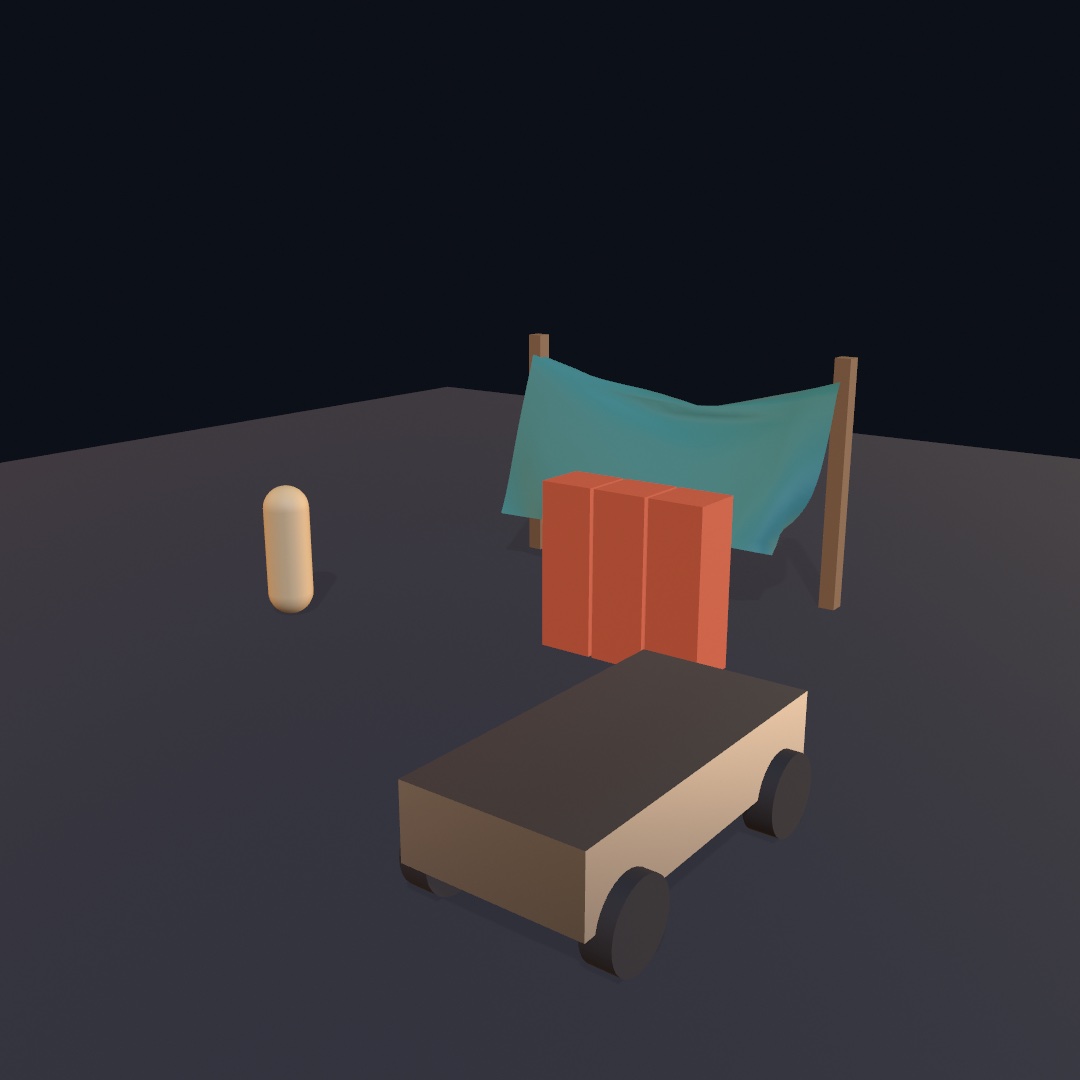
Rigid bodies model a crate well, but a person, a vehicle, or a sheet of cloth badly. You learn the three things the solver keeps for them: a figure that stays upright, a vehicle on sprung wheels, and cloth. In the yard at the top, you walk the figure and drive the truck while a banner blows between two posts. After it come ragdolls, a cape, and ropes, and then all three kinds among the contacts, water, and snapshots of Chapter 30.
Someone to be in there: the character controller
Everything in Chapter 30 was something you watch. A character is something you steer. It is a figure that walks where you send it, climbs what it can climb, and stops at what it can't.
A body with a capsule collider, pushed by forces, does not work for this. A body goes wherever the simulation sends it. Shove it and it tips over, and land it awkwardly and it rolls away. A character is a different kind of thing. It has a shape and it collides, but nothing tumbles it or knocks it down. You hand it a direction and it goes. Game engines call this a character controller, and it is how the people in most 3D games move around.
walker = world.addCharacter(radius: 0.28, height: 1.7, at: Vector3(-1.6, 0.1, 0))Steering it is a poll in draw(), like the mouse. moveAxis reads the W, A, S, and D keys and the arrows as one direction. Each axis runs from -1 to 1, and up on the keys is (0, -1), the way up is on the canvas. isKeyDown asks whether one key is held right now, where Chapter 4's keyPressed() ran once per press. The space bar is the character " ":
let heading = Vector3(moveAxis.x, 0, moveAxis.y)
walker.walk(at: heading.length > 0 ? heading.normalized * 3 : .zero)
if isKeyDown(" ") { walker.jump() }

world.advance(by: deltaTime)
withCharacter(walker) {
    translate(0, 0.85, 0)         // a capsule is drawn from its middle
    drawCapsule(radius: 0.28, height: 1.14)
}
Up on the keys becomes -z, away from a camera that looks down the z axis. The same world.advance(by:) moves the character along with the crates, so there is no second update to forget. walk(at:) sets the speed it is trying to walk at, and it keeps that speed until you say otherwise. Falling and jumping stay the world's business, which is why you only give it a horizontal direction. jump is granted only if the character is on the ground at the next step, so holding the key hops rather than flies.
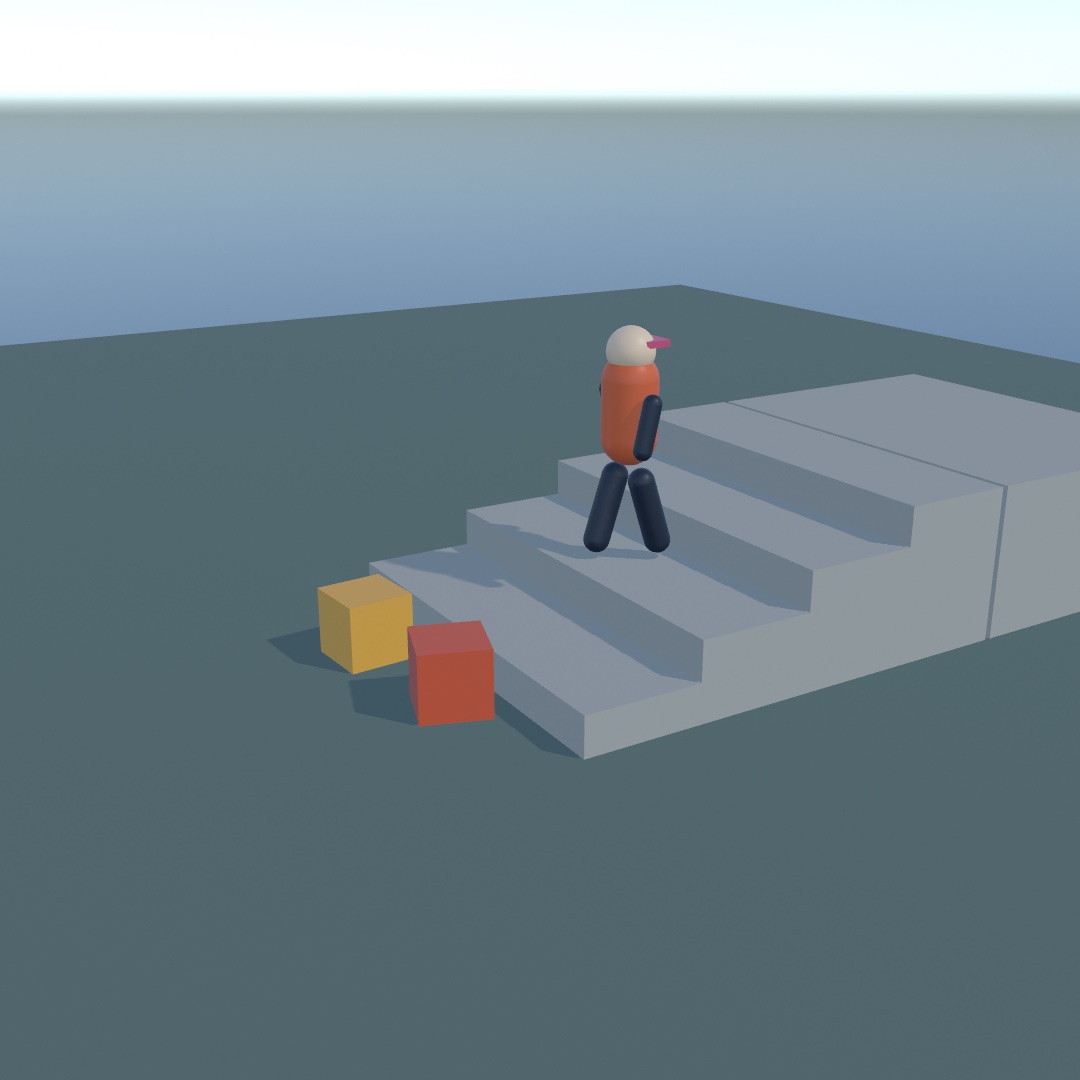
withCharacter is withBody's twin, and it puts the origin at the character's feet. That makes a figure easy to draw. Model it standing on the floor at the origin, and it stands on the floor in the world. A capsule is the exception, because drawCapsule draws from the capsule's middle. Its height is the straight part between the round ends. So the capsule in the loop is 1.7 tall in all, like the character, and the block lifts it by half of that.
Three numbers decide what the scenery does to it. The values below are the defaults, and .degrees(50) turns degrees into the radians every angle here uses. The way to learn each number is to break it:
walker.stepHeight = 0.4           // the tallest step it walks up: a curb, a stair
walker.maxSlope = .degrees(50)    // the steepest hill it can climb
walker.pushStrength = 100         // how hard it can shove a crate, in newtons
Set stepHeight to zero and the stairs in the picture become a wall it stands against. Turn maxSlope down and a hill it climbed last run stops it halfway. Set pushStrength to zero and the two crates it shoved aside stay put, so it stops against them. None of that is scripted. It is the same walk meeting different limits.
A character has two velocities. walker.velocity is what it is trying to do, and walker.actualVelocity is what the world let it do. Walk into a wall and the first still reads a brisk pace while the second reads nothing. Drive a walk cycle from the second, and the legs stop when the figure stops:
let pace = Vector2(walker.actualVelocity.x, walker.actualVelocity.z).length
stride += pace * deltaTime * 3.4
A character is not a body, so on its own the rest of the world cannot see it. It carries a stand-in, walker.body, a kinematic capsule kept out of world.bodies. A kinematic body is one the world places rather than pushes. It shoves whatever it meets, and nothing in the world moves it back. The stand-in lets everything else notice it, including the sensors of Chapter 30:
if lookout.isTouching(walker.body) { /* you're on the platform */ }isTouching(_:) asks a sensor whether one particular thing is inside it right now, where Chapter 30's touching listed everything that was. So a sensor built for balls works for people, unchanged. The 3D/Physics/Stroll example is an eroded island with stairs up to a lookout that lights as you arrive.
Something to drive: the vehicle
A character walks. A vehicle is a body carried on sprung wheels, with an engine behind the pedal. You drive it by setting its throttle, steering, and hand brake each frame, as you set the character's walk.
car = try world.addVehicle(.box(width: 1.7, height: 0.7, depth: 3.8),
                           at: Vector3(0, 0.9, -6),
                           wheels: [
                               .wheel(at: Vector3( 0.8, -0.12,  1.3), radius: 0.38, width: 0.3,
                                      steers: true),
                               .wheel(at: Vector3(-0.8, -0.12,  1.3), radius: 0.38, width: 0.3,
                                      steers: true),
                               .wheel(at: Vector3( 0.8, -0.12, -1.3), radius: 0.38, width: 0.3,
                                      driven: true, handBrake: true),
                               .wheel(at: Vector3(-0.8, -0.12, -1.3), radius: 0.38, width: 0.3,
                                      driven: true, handBrake: true),
                           ],
                           mass: 1300, engineTorque: 520, topSpeed: 26)
That list describes the machine. There are four wheels, placed where you say in the chassis's own coordinates. The front two turn. The back two are the ones the engine reaches and the ones the hand brake grabs. The car drives along its chassis's +z, so model whatever you draw facing that way. mass is its weight, engineTorque how hard the engine pulls, and topSpeed comes up below. Game physics calls this a raycast vehicle. Each wheel is a spring with a probe down to the ground rather than a solid that rolls. Ollin's probe is a short swept cylinder by default.
Driving it is the same shape as walking:
car.throttle = isKeyDown(.upArrow) ? 1 : (isKeyDown(.downArrow) ? -1 : 0)
car.steering = (isKeyDown(.rightArrow) ? 1 : 0) - (isKeyDown(.leftArrow) ? 1 : 0)
car.handBrake = isKeyDown(" ") ? 1 : 0

world.advance(by: deltaTime)

withBody(car.body) { drawBox(width: 1.7, height: 0.7, depth: 3.8) }
for wheel in car.wheels {
    withWheel(wheel) { drawCylinder(radius: wheel.radius, height: wheel.width) }
}
withWheel does the same for a wheel. It knows where the suspension put the wheel, how far it has rolled, and which way it is pointing. Draw a cylinder in that block and you get a tire, turned and spinning, without computing any of it.
Press the throttle and hold a full lock. The car leans, the inside front wheel goes light, the back tires start sliding, and it turns. Pull the hand brake as you turn and only the back wheels lock. They are the ones you gave a hand brake to.
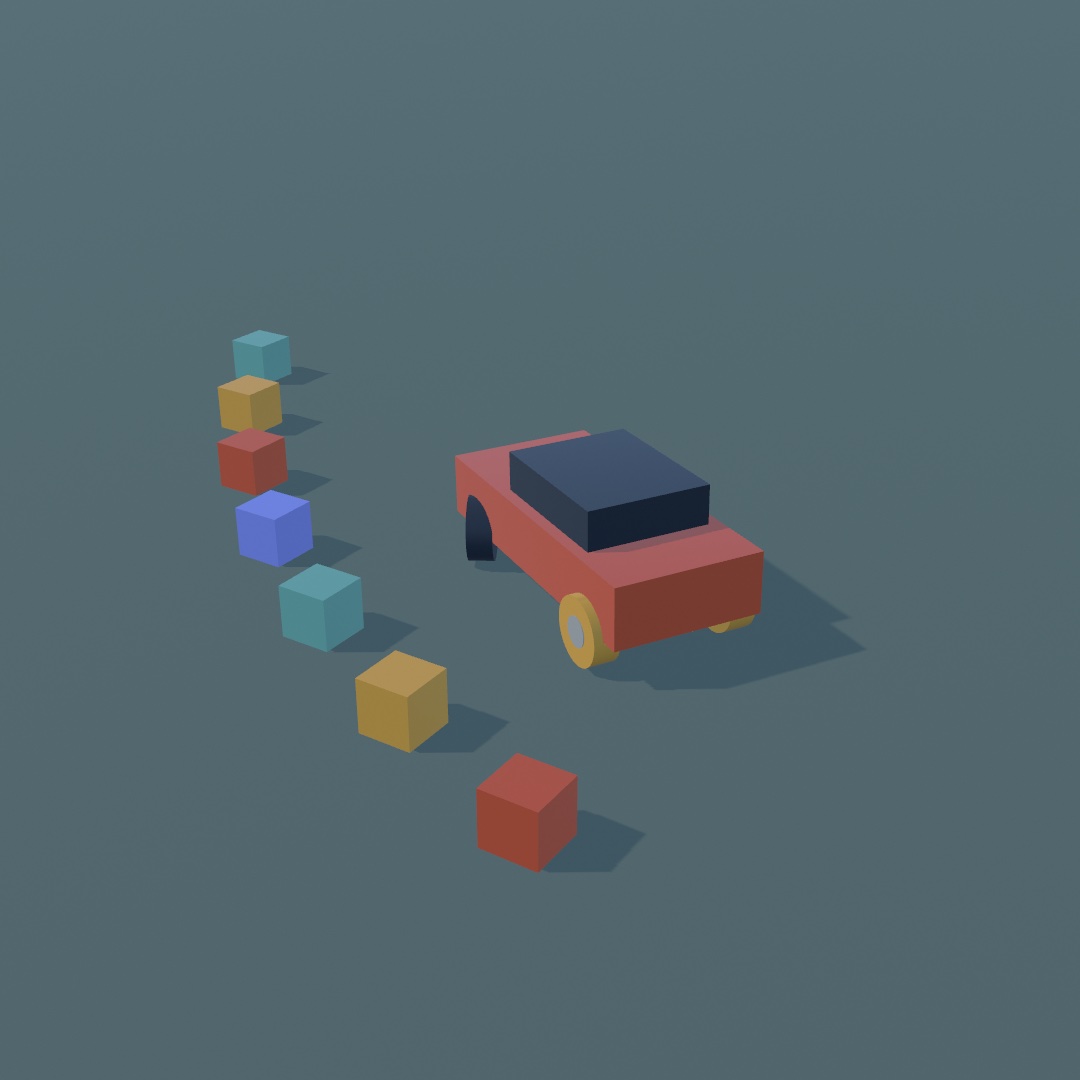
The glowing tires are one line. wheel.slip is how much a tire is sliding rather than rolling, whether it is spinning or locked. Coloring by it turns a number into something you can see:
fill(Color.mix(Color(hex: 0x232B36), Color(hex: 0xF2A93B),
               min(1, wheel.slip)))
suspensionFrequency on each wheel is the spring, in hertz, the number of bounces a second it would make if you pressed it and let go. Around 1.5 is a road car, and at 3 it jolts over every bump. topSpeed sets the gearing, the speed it reaches on a flat straight in top gear. Turn it down and the car pulls harder off the line and runs out of speed sooner. Both can be changed while you drive, so put them on parameters and drive the same corner three ways. A two-wheeler takes a balancing controller and a raked front fork, and the reference has its settings.
The 3D/Physics/Joyride example is a car over an eroded island like the one in Stroll.
Turning without steering: tracks
A machine on tracks has nothing to turn, so it steers by running one track slower than the other. This is skid steering, the way a tank or a digger turns. It is for heavy machines and anything that should turn on the spot. In Ollin it is the same addVehicle call with isTracked: true. The wheels become road wheels, split into a left and a right band by which side of the hull you put them on. A wheel at positive x is on the left track.
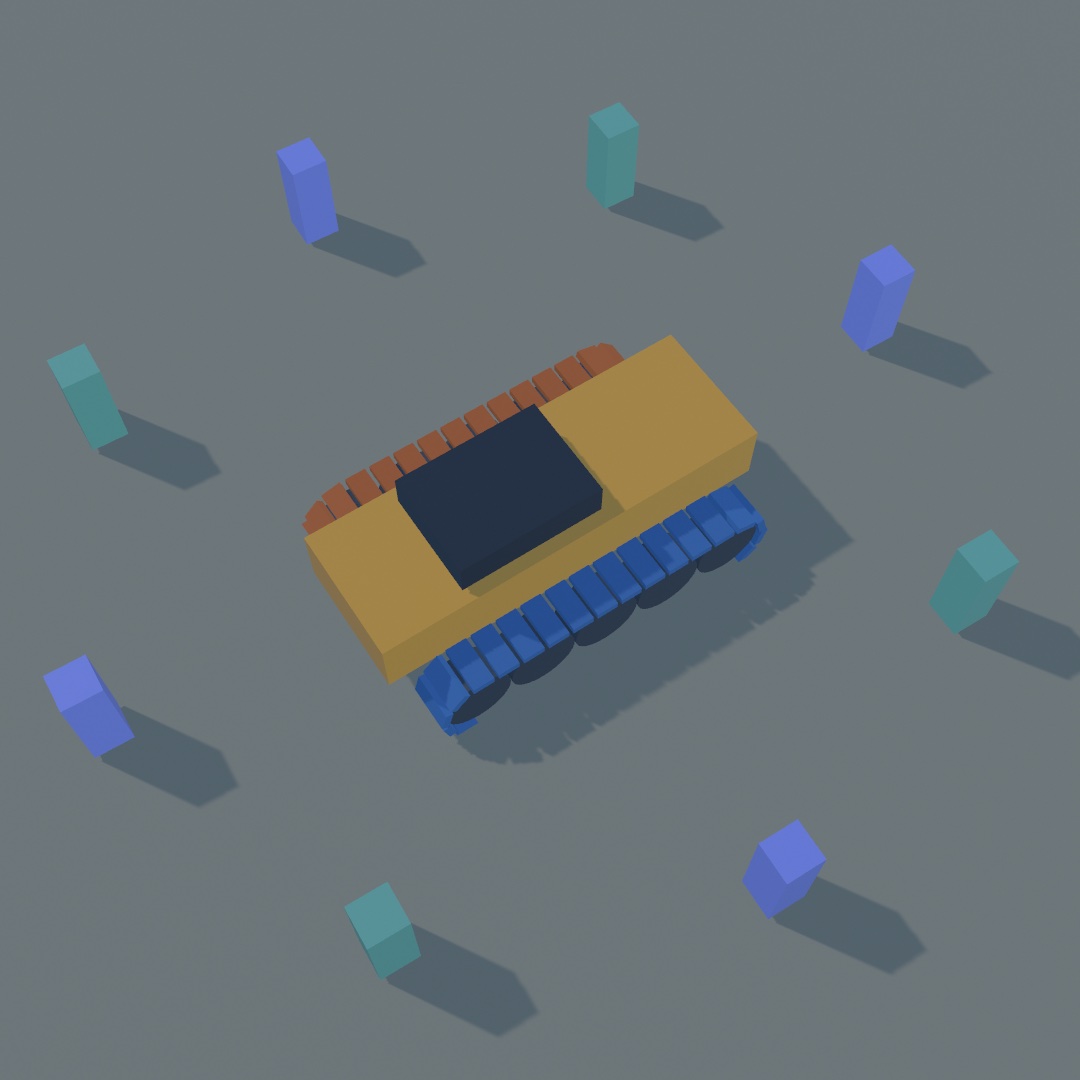
The ring of posts shows that the machine turned where it stood rather than driving past them. The colors are the two bands:
var wheels: [Wheel3D] = []
for side in [1.3, -1.3] {
    for i in 0 ..< 5 {
        wheels.append(.wheel(at: Vector3(side, -0.28, -1.8 + Double(i) * 0.9),
                             radius: 0.44, width: 0.6))
    }
}
let crawler = try world.addVehicle(.box(width: 1.75, height: 0.85, depth: 5.2),
                                   at: Vector3(0, 1.2, -3), wheels: wheels,
                                   mass: 4200, engineTorque: 520, topSpeed: 9,
                                   isTracked: true)
Throttle and brake mean what they did. Steering runs the inside band slower. At half lock that band stops, and the machine turns about its stopped track. At full lock it runs backwards, one band forward and one back, and the machine spins where it stands. A tracked machine steers with its drivetrain, so it needs throttle to turn at all:
crawler.throttle = 1
crawler.steering = 1        // turn on the spot
trackSpeed(.left) and trackSpeed(.right) read how fast each band is running over the ground. Painting one warm when that number is positive and cool when it is negative makes a still picture of a turn readable:
for side in [Vehicle3D.TrackSide.left, .right] {
    fill(crawler.trackSpeed(side) < 0 ? Color(hex: 0x3F6FA8) : Color(hex: 0xC4622A))
    // …draw that band's links…
}
Those two numbers are also what you scroll a drawn track by. wheels(on:) hands you one band's road wheels, front first, to lay the band around. A tire loses grip once it starts spinning, and a band does not. So a crawler climbs a bank that a car would sit at the bottom of. The reference covers which wheel turns each band, and the 3D/Physics/Crawler example works a quarry on tracks.
Cloth that finds its own shape: soft bodies
Everything so far moves as one solid piece. A crate can be anywhere, but it is always crate-shaped. A soft body is the other kind of thing. The vertices of its mesh are the simulation, held to each other by constraints the solver satisfies directly, which behave like springs. So it arrives at a shape rather than carrying one around. It is for cloth, flags, balloons, and anything that sags or drapes.
You build one from any mesh you already know how to draw:
cloth = try world.addSoftBody(from: .plane(width: 2.2, depth: 2.2, segments: 22),
                              at: Vector3(-1.05, 2.1, 0))
The loop has one new call in it:
world.advance(by: deltaTime)
fill(.beige)
drawSoftBody(cloth)
drawSoftBody draws the mesh the simulation just arrived at. It is the mesh you handed over, with new positions and new normals. Its texture coordinates, its colors, and its material all carry through, and shadows and reflections treat it like any other mesh. segments: 22 makes a grid of 23 by 23 vertices, so that sheet is 529 particles. Drop it on a sphere and it drapes over it, each particle finding somewhere to be while the constraints between them pull like springs.
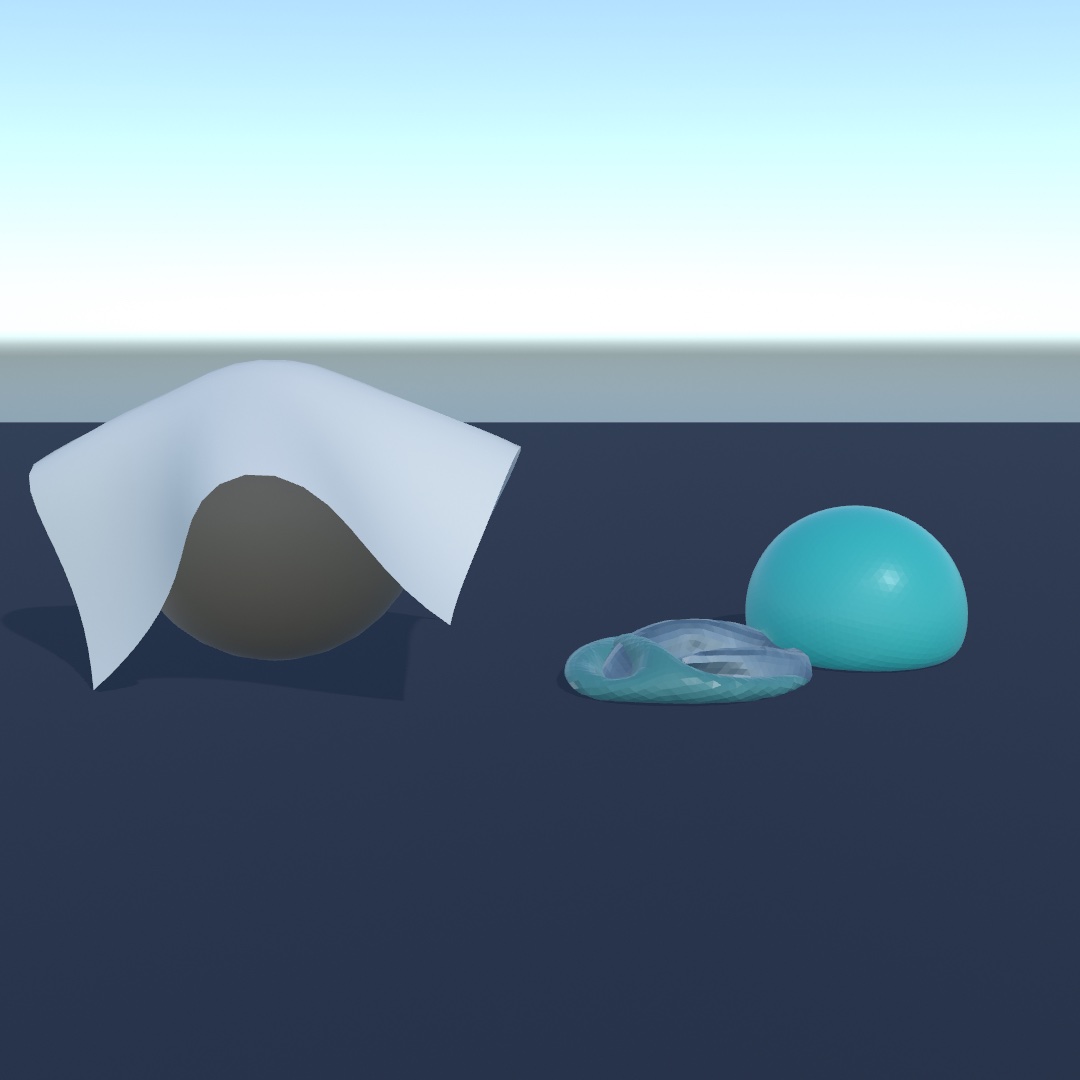
Two arguments decide what fabric it is, one for stretching and one for folding:
stiffness: 1     // how hard it resists being stretched
bend: 0          // how hard it resists being folded
A bedsheet barely stretches and folds freely, which is stiffness: 1, bend: 0, the defaults. Card is stiff in both. A rubber sheet is low in both. Reach for bend when a cloth crumples more than it should, and for stiffness when it sags like a net.
Nothing holds a sheet up unless you say so, and the way you say so is pinned:. It is handed every vertex of the mesh, in the mesh's own coordinates, and answers yes or no:
pinned: { $0.z < -1.4 } // hold the far edge, let the rest hangThat closure decides how a sheet hangs. Two corners make a flag, one edge makes a curtain, and a patch in the middle makes a handkerchief held up by its middle. You can change your mind later with pin and unpin. move(_:to:) drags a particle to a point and lets the rest of the cloth follow.
A closed mesh can do something a sheet cannot. It holds air:
ball = try world.addSoftBody(from: .icosphere(radius: 0.42, subdivisions: 4),
                             at: Vector3(2.0, 1.6, -0.15), pressure: 3)
pressure is in gravities. At 1 the air inside pushes out just hard enough to hold the ball's own weight up. From 2 to 4 it reads as a firm ball that still dents when it lands. Zero is an empty bag, like the slumped ball in the picture. It is a live number, so a ball can go flat while you watch. On a sheet it does nothing, since a sheet has no inside, and Ollin says so once.
A soft body has no single pose for a push to act on, so it has no applyImpulse. applyForce pushes it, spread over all its particles, and it is how you make wind:
banner?.applyForce(Vector3(0, 0, gust))Soft bodies collide with the rigid world but not with each other or with themselves, so a sheet folded double passes through its own layers. The 3D/Physics/Drape example has a banner on a washing line, a sheet over a crate, and a ball you can let the air out of. You can drag all three.
Putting it together: the yard
The yard puts the character, the vehicle, and the soft body in one world. The figure is a character you walk with W, A, S, and D. The truck is a vehicle you drive with the arrows. The banner is a soft body pinned at two corners, with the wind on it. Make a new file, MySketches/Yard.swift:
import Foundation
import Ollin
import OllinPhysics

final class Yard: Sketch {
    @Param("Wind", 0.0...14.0) var wind = 7.0

    let world = World3D()
    let bannerMesh = Mesh.plane(width: 5, depth: 2.4, segments: 16)

    var truck: Vehicle3D?
    var pacer: Character3D?
    var banner: SoftBody3D?

    let clay = Color(hex: 0xD2603F)
    let timber = Color(hex: 0x8A6A4A)
    let teal = Color(hex: 0x3E8E86)

    override func setup() {
        world.ground = 0

        // A floor body for the drawing loop to draw. `world.ground` already
        // holds everything up, but it stays out of `world.bodies`, so the
        // loop below would never see it.
        let floor = world.addBody(.box(width: 34, height: 0.4, depth: 34),
                                  at: Vector3(0, -0.2, 0), kind: .static)
        floor.userData = Color(hex: 0x2C3340)

        // Four wheels: the front pair steers, the back pair is driven and
        // takes the hand brake. The spring is shorter than the default so the
        // body sits down on its wheels rather than up on stilts.
        let wheels = [Vector3(0.85, -0.28, 1.2), Vector3(-0.85, -0.28, 1.2),
                      Vector3(0.85, -0.28, -1.2), Vector3(-0.85, -0.28, -1.2)]
            .enumerated().map { index, mount -> Wheel3D in
                let wheel = Wheel3D.wheel(at: mount, radius: 0.38, width: 0.28,
                                          steers: index < 2, driven: index >= 2,
                                          handBrake: index >= 2)
                wheel.suspensionLength = 0.26
                wheel.suspensionTravel = 0.2
                return wheel
            }
        truck = try? world.addVehicle(.box(width: 1.7, height: 0.7, depth: 3.4),
                                 at: Vector3(2.6, 1.3, 3.0), wheels: wheels,
                                 mass: 1400, engineTorque: 520, topSpeed: 16,
                                 rotated: .pi, axis: .unitY)

        pacer = world.addCharacter(radius: 0.3, height: 1.75, at: Vector3(-4.4, 1.0, 0.4))

        // A soft body is its mesh. Pinning the two top corners is what turns a
        // sheet into a banner rather than a dropped cloth.
        banner = try? world.addSoftBody(from: bannerMesh, at: Vector3(-1.2, 3.1, -3.0),
                                   mass: 1.2, stiffness: 0.7, damping: 0.2,
                                   pinned: { $0.z < -1.0 && abs($0.x) > 2.2 })

        for post in [-3.7, 1.3] {
            let p = world.addBody(.box(width: 0.22, height: 3.4, depth: 0.22),
                                  at: Vector3(post, 1.7, -4.2), kind: .static)
            p.userData = timber
        }

        for i in 0 ..< 9 {
            let crate = world.addBody(.box(width: 0.7, height: 0.7, depth: 0.7),
                                      at: Vector3(-0.6 + Double(i % 3) * 0.75,
                                                  0.4 + Double(i / 3) * 0.72, -1.0))
            crate.userData = clay
        }

        // Let the yard settle before anybody looks at it.
        for _ in 0 ..< 180 { world.advance(by: 1.0 / 60) }
    }

    override func draw() {
        background(Color(hex: 0x0C1018))
        environment(.courtyard.lightingOnly())
        lightingPreset(.studio)
        castShadows()
        perspective(eye: Vector3(7.4, 5.2, 10.4), target: Vector3(-1.1, 1.3, -0.8),
                    fieldOfView: 0.86)

        // The arrows drive the truck, and space pulls its hand brake.
        if let truck {
            truck.throttle = isKeyDown(.upArrow) ? 1 : (isKeyDown(.downArrow) ? -1 : 0)
            truck.steering = (isKeyDown(.rightArrow) ? 1 : 0) - (isKeyDown(.leftArrow) ? 1 : 0)
            truck.handBrake = isKeyDown(" ") ? 1 : 0
        }

        // W, A, S and D walk the figure. `walk(at:)` keeps the velocity it is
        // given, so letting go of the keys has to hand it zero.
        if let pacer {
            let ahead = (isKeyDown("w") ? 1.0 : 0) - (isKeyDown("s") ? 1.0 : 0)
            let across = (isKeyDown("d") ? 1.0 : 0) - (isKeyDown("a") ? 1.0 : 0)
            let heading = Vector3(across, 0, -ahead)
            pacer.walk(at: heading.length > 0 ? heading.normalized * 2.5 : .zero)
        }
        banner?.applyForce(Vector3(sin(time * 1.3) * wind, 0, wind * 0.4))
        world.advance(by: deltaTime)

        noStroke()
        for body in world.bodies where body !== truck?.body {
            fill((body.userData as? Color) ?? .white)
            material(.dielectric(roughness: 0.7))
            withBody(body) {
                if case .box(let w, let h, let d) = body.collider {
                    drawBox(width: w, height: h, depth: d)
                }
            }
        }

        if let truck {
            fill(Color(hex: 0xC7CDD6))
            material(.metal(roughness: 0.35))
            withBody(truck.body) { drawBox(width: 1.7, height: 0.7, depth: 3.4) }
            fill(Color(hex: 0x22262E))
            material(.dielectric(roughness: 0.8))
            for wheel in truck.wheels {
                withWheel(wheel) { drawCylinder(radius: 0.38, height: 0.28) }
            }
        }

        // A character is a swept capsule with no mesh of its own, so something
        // has to stand in for the body it is carrying.
        if let pacer {
            fill(Color(hex: 0xE0C089))
            material(.dielectric(roughness: 0.6))
            // `withCharacter` puts the origin at the character's feet, so
            // the capsule has to be lifted by half its own height.
            withCharacter(pacer) {
                translate(0, 0.875, 0)
                drawCapsule(radius: 0.3, height: 1.15)
            }
        }

        if let banner {
            fill(teal)
            material(.dielectric(roughness: 0.55))
            drawSoftBody(banner)
        }
    }
}
Run it and drive. Here is how the steps show up in it:
- The character controller. The figure is
addCharacter, walked bywalk(at:)and drawn insidewithCharacter. It stands onworld.groundlike everything else. The floor body at the same height is there to be drawn, since the ground stays out ofworld.bodies. - The vehicle. The truck is
addVehiclewith four wheels, the front pair steering and the back pair driven and braked. It reads the arrows as the vehicle step did, and it is drawn withwithBodyfor the chassis andwithWheelfor each tire.suspensionLengthandsuspensionTravelshorten each spring and how far it moves, so the body sits down on its wheels.massis the truck's weight andengineTorquehow hard the engine pulls.rotated:axis:turns it half a turn to face into the yard. - Soft bodies. The banner is
addSoftBody(from:)over a plane.pinned:holds the two top corners, andapplyForceis the wind, swinging from side to side withsin(time * 1.3). - The figure reads W, A, S, and D with
isKeyDownrather thanmoveAxis.moveAxisreads the arrows too, and the arrows belong to the truck.walk(at:)keeps the velocity it is given, so the figure is handed zero when no key is held. - The truck's body is in
world.bodieslike everything else, so the loop over bodies skips it with!==. Otherwise it would be drawn twice, once as a plain box and once as a truck.
Swift note.
[...].enumerated().map { index, mount -> Wheel3D in ... }builds the four wheels from the four mounts. Chapter 2'senumerated()hands each mount its position in the list. The closure names its result type, as Chapter 15's typed closures did, andreturnhands the finished wheel back.if case .box(let w, let h, let d) = body.collideris the one-case form of Chapter 30'sswitch. It runs its block only for a box, with the three sizes named.!==asks whether two names point at different objects, the opposite of===.
Before moving on, make it yours:
- Widen the
pinned:test to hold the whole top edge, and the banner hangs like a curtain in the wind. - Give the truck a ramp made of a tilted static box, and drive at it.
- Build a stair of static boxes 0.3 high and walk the figure up it. Then set
pacer?.stepHeight = 0, and it stops at the first box.
The yard waits for you to drive it, so film it while you play. swift run OllinLive MySketches/Yard.swift --record records the window from the first frame until you quit. An export such as --export-video runs on its own clock with nobody at the keys, so it keeps only the banner. To export a drive, record the take with --record-take drive.json, then run --replay drive.json --export-video yard.mov. Chapter 43 covers the recording, and its replay entry the take file.
A figure that falls: ragdolls
The yard's figure is a character, and nothing ever knocks a character over. Sometimes a figure should fall. A ragdoll is a figure built from rigid bodies, one for each part of its skeleton, so it falls like something with weight in it.
Letting a figure fall: the ragdoll
In Chapter 27 a skinned mesh moved because keyframe tracks told its joints where to be. That is animation, the same pose every time, whatever else is happening. A ragdoll is the other answer, and the world decides where the limbs go. It is for a figure that is hit, thrown, or dropped. Thomas Jakobsen's 2001 talk Advanced Character Physics described the one in the game Hitman: Codename 47. There a body fell differently depending on where it was hit.
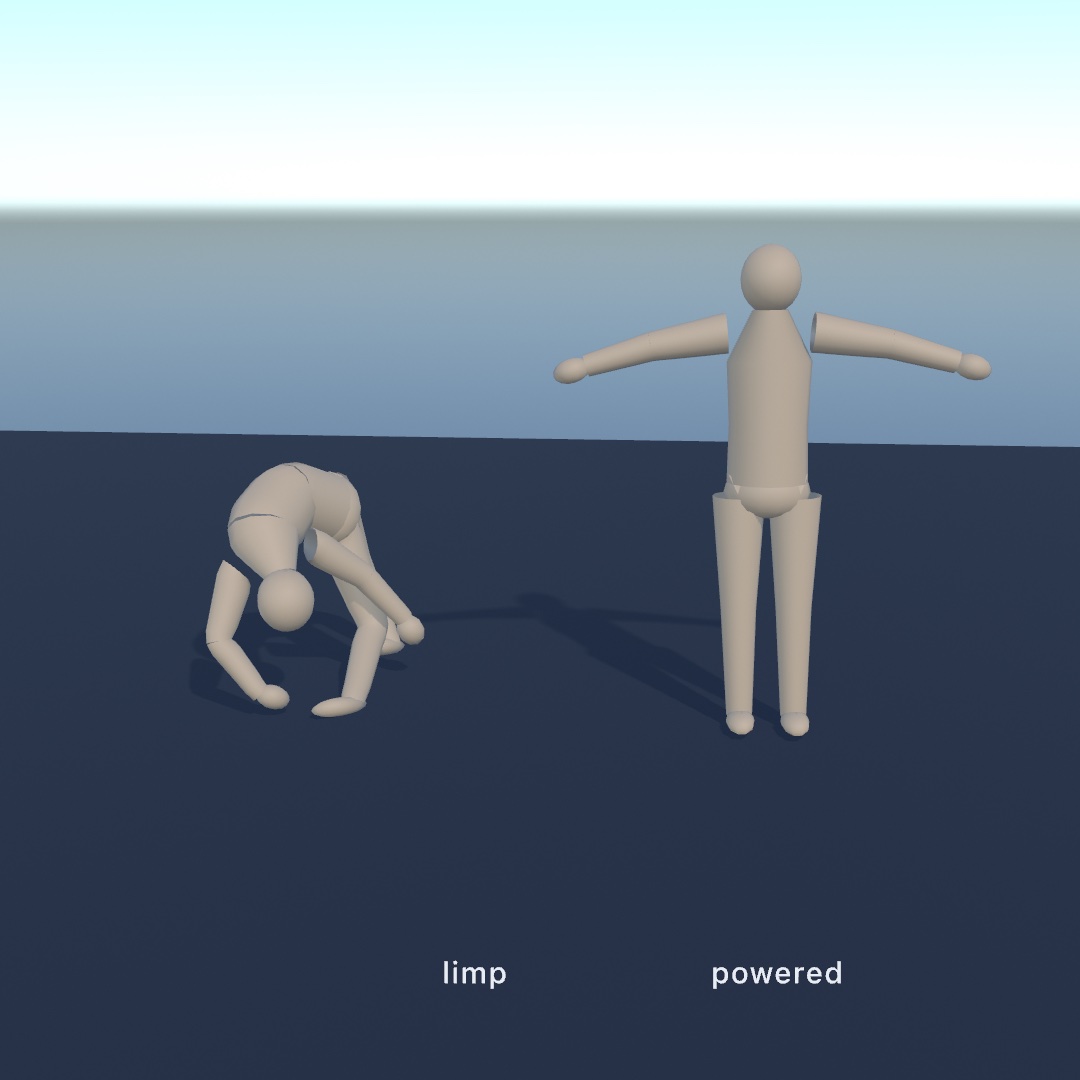
Hand addRagdoll a skinned scene loaded as in Chapter 27, and it reads the skeleton. It builds a rigid body for every joint and hangs each one off its parent on a ball joint. The joint has a cone-shaped limit, so the limb can swing only so far from where it rests, in any direction:
figure = try loadScene("figure.gltf")
ragdoll = try world.addRagdoll(from: figure, at: Vector3(0, 3, 0))
Each limb's shape is fitted to the figure's own mesh rather than guessed from bone lengths. The vertices a joint pulls hardest on are gathered up, and a capsule is laid along the way they spread. So a torso comes out thick and a forearm thin, from two bones of similar length. You never say how wide anything is.
The loop is one line longer than an animation's:
world.advance(by: deltaTime)
figure.apply(ragdoll)     // the pose the solver just found
drawScene(figure)
figure.apply(ragdoll) is apply(_:at:) run backwards. Instead of a keyframe track posing the joints, the simulated bodies do. Everything after that carries on as if a track had, including the skin, the materials, and the shadows. Drop the figure and it folds where it lands. The left figure in the picture is that fall.
Every limb is an ordinary body, so you can grab one with the mouse and drag the figure around by an arm. The limbs of one figure never collide with each other, so a thigh does not fight the pelvis it sits inside. Two figures still knock into each other.
A figure that tries to stand: powered ragdolls
A plain ragdoll lies where it lands forever. A powered ragdoll has a motor in every joint pulling toward a pose, so an animation becomes a request the world can refuse. It is for a figure you can push that pushes back. The right figure in the picture is the same drop with the motors on, so it lands and stands. Games call this an active ragdoll.
var target = figure                      // a second copy, for the animation to pose
if let walk = figure.animation("walk") {
    target.apply(walk, at: time.truncatingRemainder(dividingBy: walk.duration))
}                                        // where the animation wants the limbs
ragdoll.drive(toward: target, strength: 140)
world.advance(by: deltaTime)
figure.apply(ragdoll)                    // where they actually ended up
Push the figure and it resists, gives, and comes back. Keep two copies of the scene. The animation poses one, the target, and the solver poses the other, the one you draw. A Scene is a value, like Chapter 26's materials, so var target = figure is a separate copy. A figure driven toward the scene it was just posed from has nowhere left to pull.
strength is the argument to play with. It is the most torque, the turning kind of push, that a joint may use. Set high, it holds the figure in the pose however it is pushed. Set low, the heavy limbs sag out of the pose, and the figure reads as tired rather than switched off.
Nothing drives the root, so a powered figure still falls over as a whole. The motors hold its shape, not its place. Make the hips kinematic, with ragdoll.limbs[0].body.kind = .kinematic, and it hangs there like a puppet on a hook. The 3D/Physics/Ragdoll example does this, and space lets the hips go.
More cloth: a cape and a rope
The yard's banner is a sheet held still at two corners. Cloth can also be carried by a moving figure, and a soft body can be a line instead of a sheet.
A cape on someone's back: cloth a skeleton carries
A carried cloth is held to the joints of a moving figure instead of to fixed points in the world. The rest of it hangs off them. It is for capes, skirts, and banners carried by a figure. Jolt, the solver under this chapter, ties cloth to a skeleton with what it calls skinned constraints. The cloth then follows the body without colliding its way along.
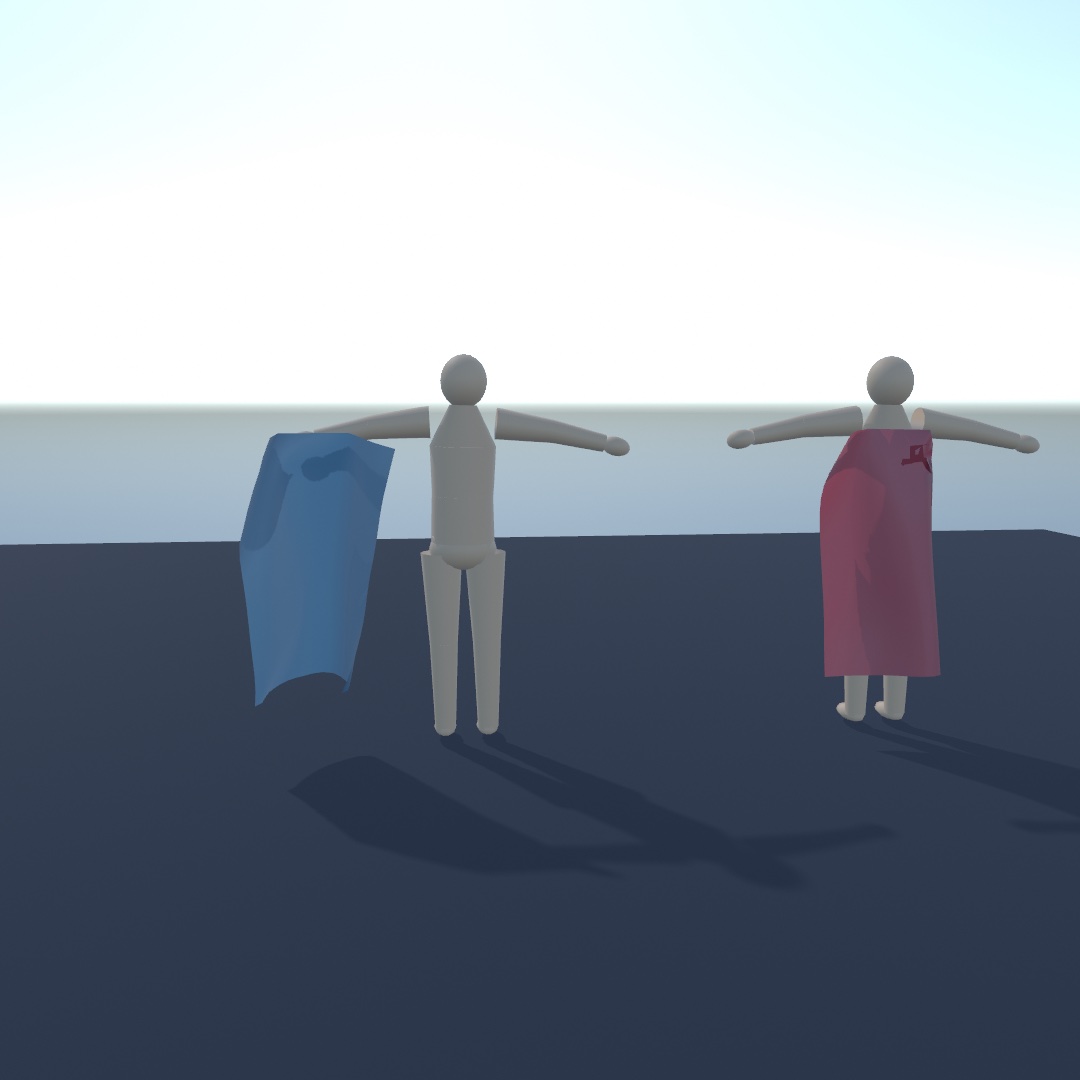
The ragdoll's skinned figure already has the moving thing in it, a skeleton, so you name which joint carries which part of the cloth:
let sheet = Mesh.plane(width: 0.8, depth: 1.15, segments: 16)
cape = try world.addSoftBody(from: sheet, at: Vector3(0, 0.875, -0.13),
                             rotated: .pi / 2, axis: Vector3(1, 0, 0),
                             pinned: { $0.z < -0.55 && abs($0.x) < 0.2 },   // a clasp at the neck
                             skinnedTo: figure,
                             carriedBy: { _ in "chest" })
Both figures in the picture are carried along the same path. The only difference is that the right cape names a joint and the left one does not. Then one call a frame, after the figure is posed and before the world steps:
figure.apply(ragdoll)
cape.follow(figure)
world.advance(by: deltaTime)
You name joints instead of painting weights. The pose the figure is standing in when you build the cloth is the bind pose, the pose everything after is measured from. So you hang the cape where it belongs and name the joints. Everything the figure does after that is read as motion away from that pose. carriedBy: is handed a vertex in the mesh's own coordinates, the same ones pinned: gets. It answers with a joint's name, or nil for a part that is just cloth.
pinned: keeps its meaning here. A pinned vertex is held by whatever holds it. When a joint carries it, it is held to the figure. When no joint does, it is held to the world, as the banner's corners were.
sway, backStop, and maxStretch shape the loose part:
sway: { _ in 0.05 },   // how far from the skin each vertex may get
backStop: 0.05,        // how far into the figure's back it may be pushed
maxStretch: 1.02       // how far it may reach, as a multiple of its rest length
sway is a leash, a distance in world units that the closure can vary from vertex to vertex. At 0 it holds that part to the skin, and 0.05 means five centimeters. Left out, the leash is endless and the cloth swings freely. backStop is a distance too, and it holds the cape out of the back it hangs on before a collision has to. maxStretch helps even for cloth no figure carries. It is a long-range attachment, the method of Tae-Yong Kim, Nuttapong Chentanez, and Matthias Müller-Fischer for cloth that must not stretch. A heavy sheet hung from one edge stretches under its own weight, however stiff you make it. A maxStretch of 1, its own rest length and no more, stops that.
cape.swayScale and cape.followsSkin work while it runs. The first multiplies every leash at once, and followsSkin = false drops the leashes, leaving only the clasp. The 3D/Physics/Cape example puts followsSkin on the F key, and space lets the figure go limp so the cape comes down with it.
A line that knows how it is turned: ropes
A rope is a soft body built from a line of points instead of a sheet. It is for anything long and thin that hangs or bends: a rope, a cable, a chain, a vine, or the stem of a plant. Each of its segments carries an orientation of its own. That comes from the discrete Cosserat rods of Tobias Kugelstadt and Elmar Schoemer (2016), which the solver implements.
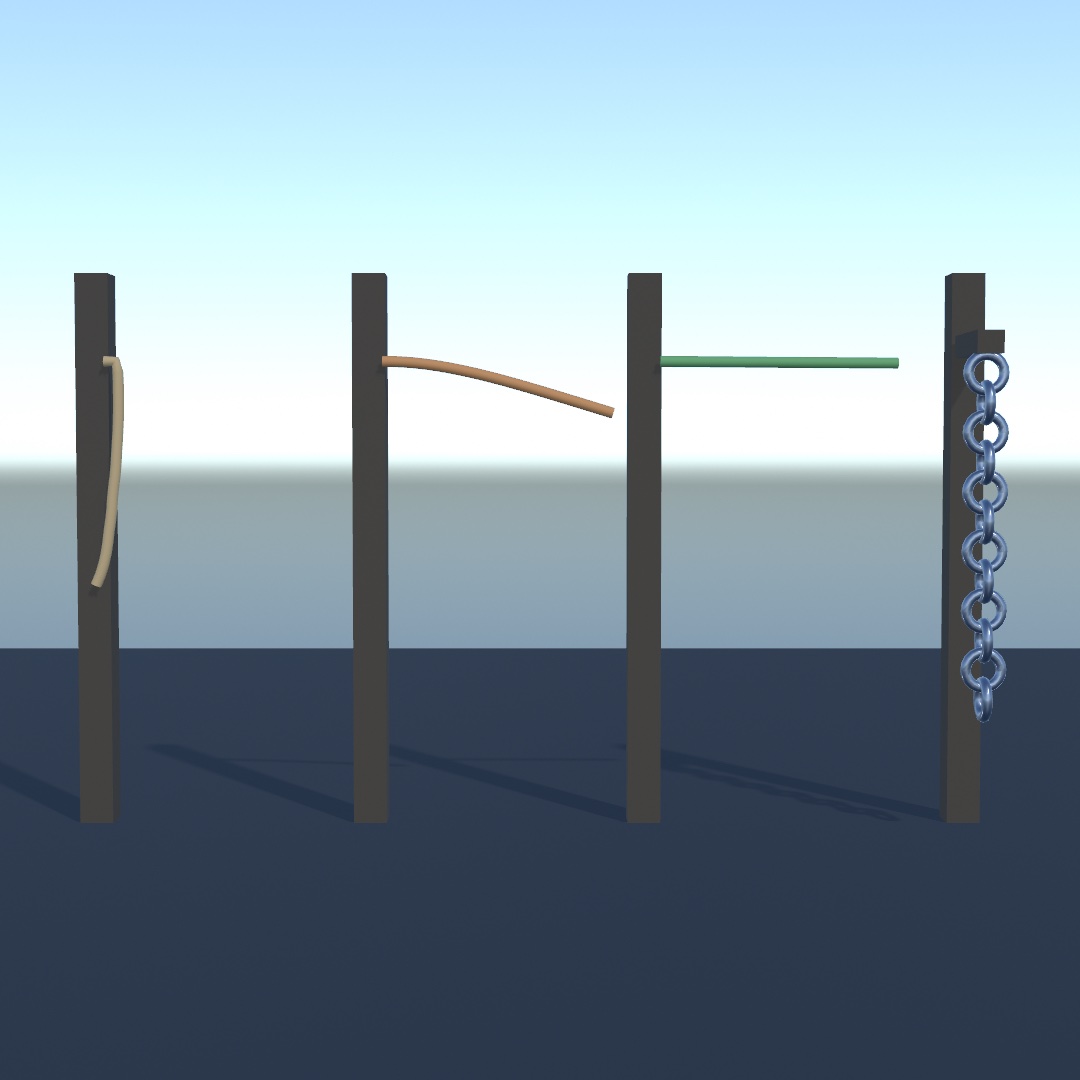
You build one from a list of points:
let rope = try world.addRope(through: (0 ..< 40).map { Vector3(0, -Double($0) * 0.1, 0) },
                             at: Vector3(0, 3, 0),
                             radius: 0.02,
                             pinned: { $0.y > -0.001 })      // hung from the top
Anything that makes points makes a rope. That list could come from a Contour, a sampled Path, a randomWalk, or a ridge you read off a Heightfield. The points become the particles one for one, so pin, move(_:to:), and positions all speak in indices into the list you handed over. drawSoftBody(rope) sweeps a tube of that radius along it. It lands on things, takes applyForce for wind, and can be dragged with grabSoftBody.
stiffness and bend shape it, and both mean the same thing on a twig and on a mooring line:
stiffness: 1,      // how much it resists being stretched
bend: 0            // how much it resists being bent
bend decides what the rope is. At 0 it is limp rope. Around 0.5 a length sticking out sideways droops about a quarter of its own length, which reads as heavy cable. Near 1 it holds itself out like a stem. The three lines on the left of the picture were built as the same straight line sticking out from their posts. They differ in that one number.
The fourth line is where a rope stops being a line of points. You read each segment's orientation with rope.segments. withSegment(_:) stands the transform stack in the middle of one, with +y running along the rope. A cylinder or a capsule drawn inside the block already lies the right way:
for segment in chain.segments {
    withSegment(segment) {
        rotate(.pi / 2, axis: Vector3(1, 0, 0))       // lay the ring across the rope
        if segment.index.isMultiple(of: 2) {
            rotate(.pi / 2, axis: Vector3(0, 0, 1))   // roll every other link
        }
        drawTorus(radius: segment.length * 0.6, tube: 0.028)
    }
}
That second rotate makes the chain. Rolling every other link a quarter turn about the rope's own axis is what makes the links interlock. You can only ask that of something that knows how it is rolled. Three points in a row tell you which way a line is going, and nothing about which way is up. Leaves along a stem, rings on a flag, and beads on a string all use the same move.
Before you build something long, two settings help. maxStretch: 1 caps how far a rope may reach from what holds it, which stops a heavy one creeping longer under load. Each step, the solver goes over the rope several times, and each of those passes carries stiffness one segment further along. So a long rope divided finely needs more passes than the default five before a high bend holds. iterations: on addRope sets how many. Forty points over six units wants about twenty.
A rope does not collide with itself, so a coil passes through its own turns. It also has no surface for a ray to hit, so raycast and the other queries look straight through one. The mouse still finds it. It is a single strand, so a plant with three stems is three ropes. The 3D/Physics/Rigging example has a rope, a chain, and a leafy vine hanging in the same wind.
The rest of the world: contacts, water, and snapshots
The yard never asks its world what touched what, never floats anything, and never saves itself. Chapter 30's families did all three for rigid bodies. The figures, vehicles, cloth, and ropes of this chapter take part in each of them too.
A cloth among the contacts
A cloth is an ordinary member of the world when something touches it. That is for splashes, a net that counts what lands, or a sheet that flinches when hit. It turns up in world.contacts, the list from Chapter 30. A crate landing on a sheet reports where it hit and how hard, like a crate landing on the floor:
for contact in world.contacts where contact.phase == .began {
    splash(at: contact.point, size: contact.speed)
}
A contact names any Colliding3D, not Body3D. That any is Swift's way of saying anything that can collide, whichever kind it turns out to be. Either side may be a cloth, and a cloth is not something you can push with an impulse or hang a joint from. When you want to act on what you found, say which kind you were after:
if let crate = contact.other(than: cloth) as? Body3D {
    crate.applyImpulse(Vector3(0, 3, 0))
}
Everything else about touching works as it does for a crate. cloth.touching is what is lying on it, and a sensor sees the cloth pass into it. raycast stops at cloth, so a curtain blocks a sight line. A settled pile of crates falls asleep and stops reporting its touches, while a settled cloth keeps its list.
A raft made of cloth: soft bodies that float
The sheet you draped floats too, in the water Chapter 30 put into the world. It is for rafts, lily pads, and sails on the sea.
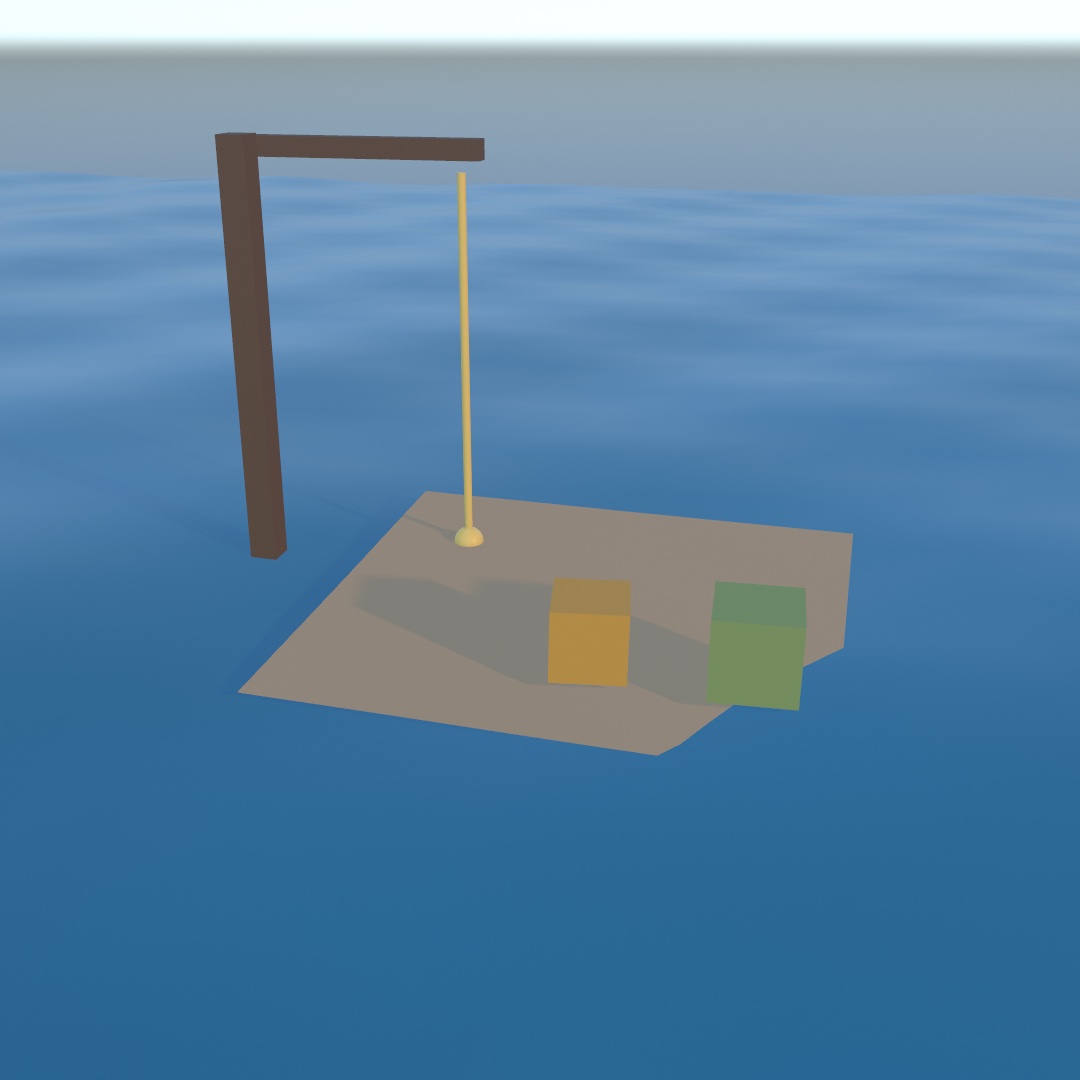
Floating it is one number:
raft.density = 0.25 // floats high; above 1 it sinksThat reads like a crate's density, and it means the same thing: how heavy the thing is for its size, against the water. A closed soft body works its own out, because a mass and a volume are all it takes and a beach ball has both. A sheet has no inside, so there is nothing to work it out from. It starts as heavy as water, lying awash in the surface the way a wet sheet does, and setting density makes it a raft.
Cloth in water behaves like cloth. Its area for its weight is large, and drag is what measures that. So a heavy sheet sinks slowly, and a floating one is carried along by a current rather than left standing in it. The 3D/Physics/Raft example puts a cloth raft on a swell with cargo on it. A sounding line shortens onto its deck when you sail it under the line, and a harbor gate lights when it passes through. Drag the deck to steer.
Snapshots of figures, vehicles, and cloth
Chapter 30 saved a settled heap with snapshot() and brought it back exact. The things in this chapter come back too, which is for a yard you wreck and want back. A character comes back mid-stride. A vehicle comes back drivable and still under power, with its engine turning at the speed it was turning and its wheels already spinning. A ragdoll comes back where it fell.
A ragdoll was built from a skinned figure loaded off disk, and the snapshot does not carry that mesh. What the solver holds is a shape per limb, the tree they hang in, and how far each joint may bend. All of that is small enough to write down. The skin stays your asset, in your sketch, loaded the ordinary way. figure.apply(ragdoll) puts the two halves back together:
try world.restore(saved)
if let ragdoll = world.ragdolls.first {   // the bodies are new ones
    figure.apply(ragdoll)                 // your mesh, over the restored pose
}
Restoring empties the world first, so a Vehicle3D or a Character3D you were holding onto is gone, like the bodies. Take them from world.vehicles and world.characters again.
A cloth needs one more step. It is nothing but its mesh, so it is saved only under a name, the way Chapter 30 named a terrain collider:
banner?.assetName = "banner"The resolver then hands the mesh back on the way in:
try world.restore(saved) { name in
    name == "banner" ? .mesh(bannerMesh) : nil
}
The 3D/Physics/Yard example keeps a whole yard, with a truck in it, a figure pacing across, and another lying where it fell. Wreck it by driving the truck through it with the arrow keys, then press R and it is back exactly. Press S, quit, and run it again, and the same yard is standing there. Its terrain floor and its banner are named by the file rather than held in it.
Where this comes from
Each of the three kinds on the spine exists because a rigid body is not enough. The character controller, a capsule that is moved rather than pushed, comes from games, where a person simulated as a rigid body falls over. The raycast vehicle comes from the same practice. Its chassis is one body, and each wheel is a spring and a probe to the ground. Simulating what a wheel does is much easier than simulating four real wheels well. Both run on Jolt Physics by Jorrit Rouwe, the solver under Chapter 30, whose vehicle follows Marco Monster's Car Physics for Games.
The soft bodies have an academic line you can follow. Position-based dynamics moves points directly to satisfy constraints instead of integrating forces. Ollin's 2D particles in Chapter 11 follow Thomas Jakobsen's Advanced Character Physics from 2001, the talk that made the technique widely known. The 3D soft bodies are solved with its extended form, XPBD, as Matthias Müller presents it in his Ten Minute Physics lessons. The ragdoll, the cape, and the rope entries name their own sources, and the full credits are in the project's attribution notes.
Go deeper
- 3D physics: the full reference for characters, vehicles (the two-wheeler and the tracked machine's sprocket included), ragdolls, soft bodies, ropes, and buoyancy, with every setting on the suspension and the cloth solver, and what a snapshot keeps for each.
- Appendix B draws what the solvers are doing: Vectors, motion, and forces, and Local rules, global structure for the constraint relaxation.
- Worked examples, in
Examples/3D/Physics/:StrollandCrawler(a character and a tracked machine),Joyride(the vehicle with its parameters live),RagdollandCape(a figure and the cloth on its back),Drape,Raft, andRigging(cloth, cloth on water, and ropes),Chain(capsule links on ball joints), andYard, which is this sketch with a saved world, an animated figure, and more going on. - The Gego homage
Reticularea: a soft body whose mesh the sketch builds rather than loads. It is an irregular net of triangles, held at eight of its vertices and left to hang. Each framemove(_:to:)holds those eight points, drifting a little, so the air moves the whole net.positionsis read back to draw the net as lines.
Contents · Previous: Chapter 30, Worlds with weight · Next: Chapter 32, Sculpting with fields