Instanced meshes
Drawing one mesh is cheap. Drawing the same mesh a thousand times with a loop of drawMesh calls is not. Every call expands the mesh's triangles on the CPU again, every frame, once per copy. Instancing removes that loop. drawMesh(_:instances:) uploads the mesh once and gives the GPU a list of placements, and the GPU puts every copy in place. So a field of thousands of copies costs one draw call and one small array.
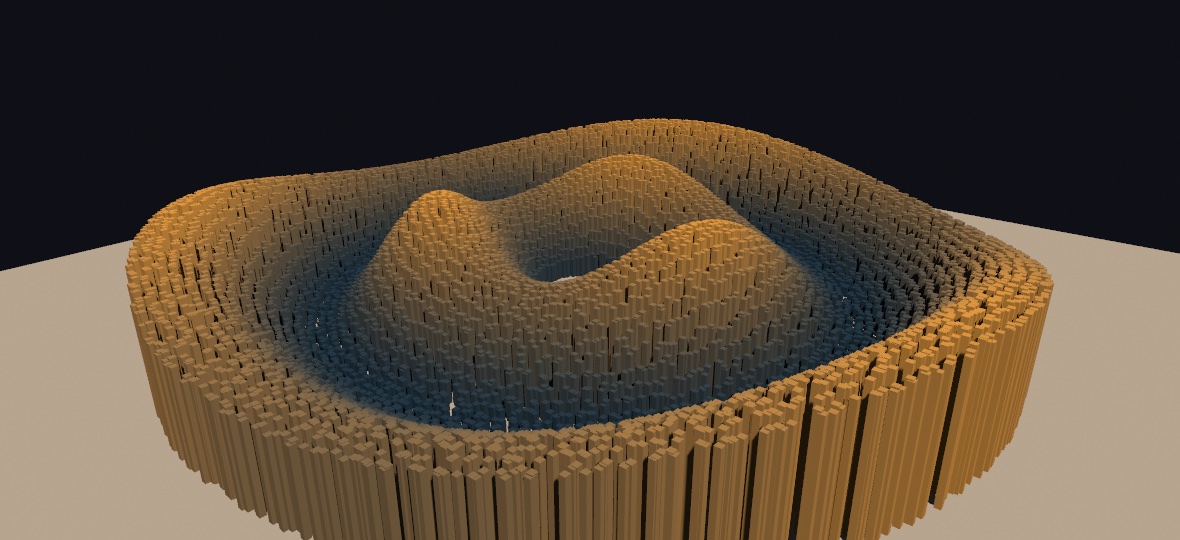
override func draw() {
    background(.black)
    camera(Camera3D(eye: Vector3(0, 6, 14), target: .zero))
    directionalLight(.white, direction: Vector3(-0.5, -0.85, -0.35))
    castShadows()

    let rock = Mesh.box(width: 0.4, height: 0.4, depth: 0.4)
    var copies: [MeshInstance] = []
    for i in 0 ..< 5_000 {
        let a = Double(i) / 5_000 * .tau * 8
        copies.append(MeshInstance(position: Vector3(cos(a) * Double(i) * 0.002, 0.2, sin(a) * Double(i) * 0.002),
                                   rotation: Vector3(0, a, 0),
                                   scale: 0.5 + noise(Double(i) * 0.1)))
    }
    drawMesh(rock, instances: copies)
}
Copies shade exactly like solid meshes. They take the current fill, the material(_:) finish (physically based finishes included), the scene's lights, image-based lighting, global illumination, and fog. They cast into the shadow maps and receive them. Rebuilding the instance list every frame is normal and cheap, and that is how a field moves.
As a reference point, take a 12,400-pillar field, lit and shadowed, at 1080² in a release build on an M2. The per-copy drawMesh loop costs about 12.0 ms of CPU per frame only to record the draws. The instanced call records the same field in about 0.23 ms, which is 53 times less. The GPU time is the same either way, because the copies still rasterize and shade. That is the point. Instancing removes the CPU loop, not the picture. Scripts/benchmark.sh instancing reproduces the measurement on your machine.
Contents
- MeshInstance - one copy's placement
- Instances from a compute kernel - GPU-resident placements
- A field that culls itself -
MeshField, a retained world that the GPU culls copy by copy - What applies to a copy
- Copies that move: withMotion - each copy streaks along its own path
- Notes
MeshInstance
A MeshInstance holds one copy's placement: where the copy sits, how it turns, how it scales, and an optional tint.
MeshInstance(position: Vector3(2, 0, -1),          // world units (applied first)
             rotation: Vector3(0, .pi / 4, 0),     // Euler radians: x, then y, then z
             scale: Vector3(1, 3, 1),              // per axis (applied last); or one Double
             color: Color(hue: 0.6, saturation: 0.5, brightness: 1))
The transform works like the calls it replaces. The copy is placed as if you had written translate(position), then rotateX, rotateY, and rotateZ in that order, then scale. Every parameter has a neutral default, so MeshInstance(position: p) is a plain unrotated copy. The color multiplies the surface color, which is the current fill times the mesh material's base color. A nil color leaves the surface color unchanged.
The whole field still follows the 3D transform stack. A translate or rotate before the draw moves every copy together, and each instance's own transform composes on top of that.
Instances from a compute kernel
When a simulation owns the placements, keep them on the GPU. A kernel writes a ComputeBuffer<OllinMeshInstance> each frame, and the copies draw from it, so the positions never pass through the CPU. GPU particles and point clouds work the same way.
let placements = ComputeBuffer<OllinMeshInstance>(count: 100_000)

override func draw() {
    camera(Camera3D(eye: Vector3(0, 8, 20), target: .zero))
    compute(swirl, over: placements)             // a kernel moves the copies
    drawMesh(rock, instances: placements)        // count defaults to the buffer's
}
OllinMeshInstance is the raw GPU struct. It holds a model matrix (local to world) and a color multiplier. Import COllinShaders to name it in a sketch that writes a kernel. The matrices are in absolute world space, and the transform stack is not composed on top of them, because the kernel owns the placement. The shader derives the normal transform from the matrix itself. So a kernel fills only those two fields, and a non-uniform scale still lights correctly.
A field that culls itself
drawMesh(_:instances:) records its placement list again every frame, which is what lets a field wave. A world is different, because most of it never changes and the camera cannot see most of it. For that, a MeshField goes further. You place copies of any number of meshes into it once, then draw it with one call for as long as you like. Each frame, a compute pass tests every copy against the camera and writes the surviving draws itself. So copies behind the camera or beyond the far plane cost almost nothing, and the CPU never touches a copy again.
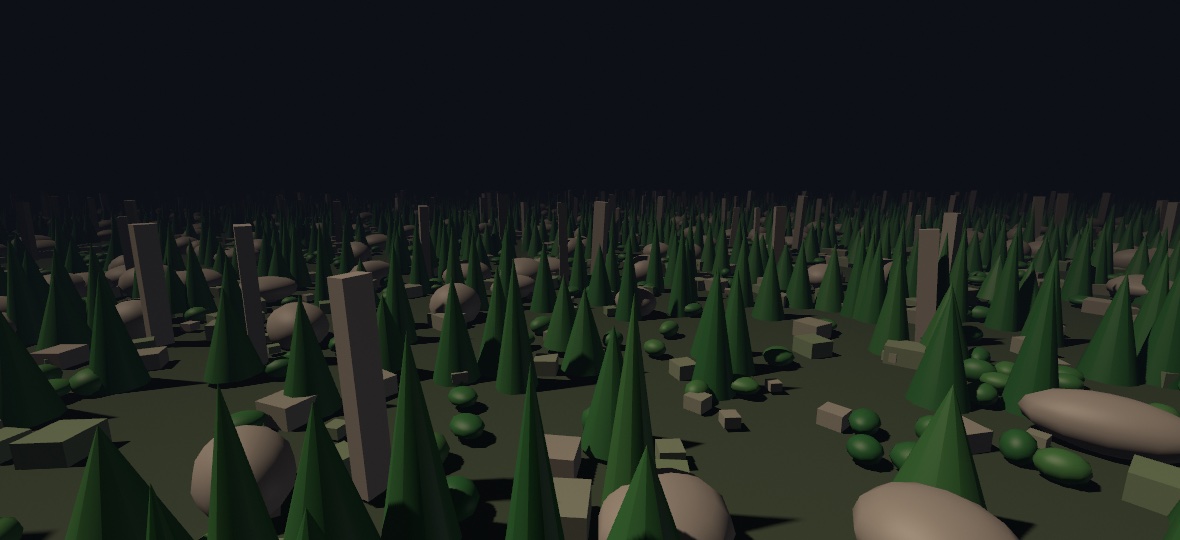
let field = MeshField()

override func setup() {
    field.place(stone, at: stoneSpots)      // [MeshInstance], like drawMesh
    field.place(pine, at: pineSpots)
    field.place(boulder, at: boulderSpots)
}

override func draw() {
    camera(Camera3D(eye: eye, target: ahead, far: 110))
    drawMeshField(field)                    // one call for the whole world
}
A field is retained, like a Batch. Build it in setup() and hold it. Its surface colors bake when a mesh is placed. Each one is the mesh material's base color times its per-vertex colors, tinted per copy by MeshInstance.color. The draw-time fill does not tint a field. The transform stack still moves the whole field as a unit, and the current material(_:) finish shades it. Its copies cast into the shadow maps even outside the camera's view. So a tree behind the camera still casts its shadow into view. Draw a field once per frame. A second draw in the same frame is skipped with a note.
A field says how much it holds: entryCount is how many distinct meshes were placed in it, and copyCount how many copies across all of them.
Culling is on by default. It must never change the picture, only the work, because a culled copy was outside the view by definition. field.isCullingEnabled = false draws every copy regardless, which is the direct way to see the difference (the MeshField example wires it to a parameter). This is how the culling works. A GPU pass tests each copy's bounding sphere against the view frustum. It then compacts the survivors per mesh and writes one indirect draw per mesh kind. So the CPU issues one draw per kind of thing, never one per copy. An export compacts them in the order you placed them. So copies meeting at exactly the same depth settle the same way every time, and a culled export matches an unculled one to the pixel. A live frame takes them in whatever order the GPU finishes, which is cheaper. The shadow pass gets the same test against the light's own frustum. So a caster behind the camera still shadows the view, and everything outside the shadow map is skipped.
As a reference point, take the example's plain of 240,000 copies, lit, shadowed, and fogged at 1080² on an M2. It costs 18.5 ms of GPU per frame with culling on and 50.8 ms with it off, so culling makes the frame 2.7 times cheaper. The CPU cost of recording the one drawMeshField call rounds to zero. Scripts/benchmark.sh field reproduces the measurement on your machine.
What applies to a copy
Everything the solid lit path does applies to a copy. That means fill and per-vertex mesh colors, every material(_:) finish including the physically based ones, lights and lightingPreset, and received shadows. It also means image-based lighting and the procedural sky, global illumination, fog and aerial perspective, clipping, blend modes, and depth(at:) compositing. Instanced copies also cast into the directional and spot shadow map and into the point-light shadow cube.
Under featureEdges(), a list's copies and a compute buffer's copies are drawn as hidden-line solids. Each copy's creases and silhouette go in the stroke, in one more GPU draw placed by the same matrices. A field draws its faces only, with a note.
Copies also reach the ray-traced passes, whichever of the three forms placed them. They show in a ray-traced reflection. They cast a ray-traced point or area shadow, and they bounce light in global illumination. They are in the path-traced export too. In that export they shadow, mirror, and bleed color like the meshes they copy, with the finish of their own draw. Each copy carries its own placement and its own color there. A copy costs a matrix rather than a triangle list, so a field of copies is cheap to trace.
A list hands its placements straight to the traced scene. The compute-buffer form never hands one to the CPU at all, because its matrices live in a buffer a kernel writes. A field builds its placements on the CPU once, then culls them on the GPU, so the CPU never re-reads them per frame. For both, the CPU reserves the slots, because it knows the count, and a kernel fills them from the same placements the draw reads.
Traced copies are not free in the way drawn copies are, because the traced scene is rebuilt every frame. Each copy in it costs roughly two microseconds of GPU time on an M2, whatever placed it. A few thousand copies is comfortable. A few hundred thousand would use the whole frame there, which is why a field carries a budget:
field.tracedCopyBudget = 20_000 // the defaultA field over its budget stays out of the traced passes and says so once, naming both numbers. Its copies still draw, still receive reflections, and still cast into the shadow maps. The reflections are the one place they do not appear. The same holds in the path-traced export, where an over-budget field rasterizes over the traced layer rather than disappearing from it. Raise the budget for an offline render, where seconds per frame are fine. Set it to 0 to keep a field out of the traced passes whatever its size. Camera culling does not affect the budget. A reflection sees what the camera cannot, so the budget counts every copy the field holds.
The following do not apply to a copy yet, by design. Each one arrives with a later slice of the GPU-driven tier:
- Textures and surface maps. A textured mesh draws untextured, though its base color still tints. Wireframe and matcap fall back to the solid look, with a one-time note.
- A glowing copy is not a light in the path-traced export. It glows, and its light does reach the scene. But the tracer never aims at it. The tracer's light table weighs each glowing triangle by its area in the world. A copy's triangles are not placed in the world. So expect more grain than a plain emissive mesh gives.
- The screen-space pre-passes. Contact shadows, ambient-occlusion normals, and subsurface scattering skip the copies.
- Motion for copies from a compute buffer or a field. Copies drawn from a
[MeshInstance]list insidewithMotionmove as movers (see below). Copies placed by a compute buffer, and aMeshField's copies, keep the camera's motion only, with a one-time note: their placements never pass through the CPU, so last frame's would have to be kept on the GPU.
Copies that move: withMotion
Wrap the instanced draw in withMotion and every copy is followed from its place last frame to its place now, so temporal anti-aliasing keeps each copy's edges and motion blur streaks each copy along its own path. It is one draw still, and a copy writes the same motion it would write drawn as a mover of its own.
motionBlur()
withMotion("beads") {
    drawMesh(bead, instances: beads)   // each bead streaks along its own ring
}
Ollin keeps the block's placement list from one frame to the next and matches the copies by their place in it: copy 3 this frame moved from where copy 3 was last frame. So keep the order stable, as drawMesh(_:previous:) asks of its vertices. A frame whose copy count differs from the last one's cannot be matched, so its copies take the camera's motion alone for that frame, and the new count is followed from the next. A copy's tint and the transform stack around the draw are part of the placement as usual: a field moved by translate streaks whole. It applies to the main canvas, like every mover, and to the list form; a compute buffer's copies and a field's keep the camera's motion.
Every instanced draw, mover or not, also hides what stands behind it in the motion pass, so a mover behind a field of copies does not streak through them.
Notes
- A copy field is one batch and never merges with its neighbors. So its draw order against other geometry is exactly call order, and the depth buffer sorts the 3D.
makeBatch { }refuses an instanced draw, as it refuses a plain mesh, because a retained copy would silently lose its shadows. Draw the field where the batch is drawn.- Spatial export records the
[MeshInstance]form as one mesh per placement, exactly like a loop ofdrawMeshcalls. The GPU-buffer form cannot be exported, because the placements live on the GPU, and it says so once. - SVG export skips meshes entirely, instanced or not, because a shaded solid has no vector outline.
- A
MeshFieldexports spatially like a loop ofdrawMeshcalls, because its placements stay on the CPU for exactly this purpose. The list above, of what does not apply to a copy yet, applies to fields too. - The
InstancedMeshexample draws 12,400 pillars on a wave, with a parameter that switches between the instanced path and a per-copydrawMeshloop. The cost difference shows live in the inspector. - The
MeshFieldexample scatters 240,000 solids across a foggy plain and flies through them, with a parameter that turns the culling off. The picture stays the same, but the frame rate does not.