HDR & tone mapping
Ollin composites every frame in a linear, high-precision floating-point buffer, then maps it to the screen in a final pass. That gives you two things:
- Color can exceed full brightness. Additive light that builds up through
blendMode(.add), a bright gradient, or overlapping glows all push past 1.0. The intermediate buffer holds those values instead of clipping them during the render. You usetoneMap(_:)to choose what happens to them when the frame reaches an ordinary 8-bit screen. - No 8-bit banding. Smooth gradients and the many translucent layers a busy sketch stacks all composite at float precision. So a gradient that an 8-bit intermediate would break into visible bands stays smooth. This happens automatically, with nothing to turn on.
By default a sketch behaves exactly like a standard renderer, so anything brighter than full clips to white. You can instead opt into a curve that rolls highlights off, which is what the rest of this page covers.
Contents
- toneMap - map high-dynamic-range color to the screen
- exposure - the brightness dial
- The modes - clamp, Reinhard, ACES
- Notes
toneMap(_:exposure:)
Choose how Ollin brings out-of-range color (brighter than 1.0) back into the range the screen can show.
override func setup() {
    toneMap(.aces)          // roll highlights off with a film-like curve
}
The tone map is a frame-wide setting, not per-shape state. One mapping applies to the finished frame, so unlike fill or blendMode it is not saved by withState { }. Set it once in setup(), and it stays in force until you change it. If you call it with no arguments, it uses .reinhard:
toneMap() // == toneMap(.reinhard, exposure: 1)Combine it with additive light accumulation to get the glow look:
override func draw() {
    background(.black)
    toneMap(.aces, exposure: 1.6)
    blendMode(.add)                 // lights sum past 1.0…
    // …draw bright overlapping shapes; ACES rolls the hot cores off smoothly
}
exposure
exposure scales the whole image before the tone map, like the brightness dial on a camera. It defaults to 1 whichever curve you name, so toneMap(.aces) leaves the brightness where it was. Turn it up to bring faint accumulation into view. Turn it down when a scene saturates:
toneMap(.aces, exposure: 2.0)   // brighter, more of the scene pushed up the curve
toneMap(.aces, exposure: 0.5)   // dimmer
It applies under every mode, including .clamp, where it only brightens the image before the clip.
The modes
| Mode | Curve | Look |
|---|---|---|
.clamp | clip to [0, 1] | The default. Standard dynamic range, so anything past full saturates to white, exactly as before. An in-range frame renders identically. |
.reinhard | x / (1 + x) | Compresses every value to under 1.0, so highlights never fully clip. Cheap and gentle, but it tends to desaturate bright areas. |
.aces | ACES filmic S-curve | Rolls highlights off while keeping contrast and saturation in the midtones. Use it for glow and light-accumulation looks. |
.neutral | the Khronos PBR Neutral curve | Keeps a bright color's hue. .reinhard and .aces bend each channel on its own, so a bright saturated color drifts toward the nearest primary: an orange of linear (4, 1, 0.2) comes out yellow. This one compresses the three channels by one factor and only eases the color toward white as its peak nears the ceiling, so the orange stays orange. Below about 0.76 of full a color keeps its hue exactly and loses only a small toe (0.04 of linear light at most), and the roll-off above is gentler than film: the choice when the colors are the point. |
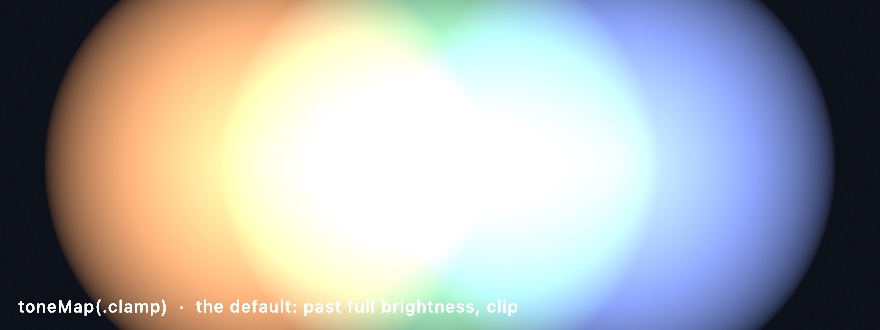
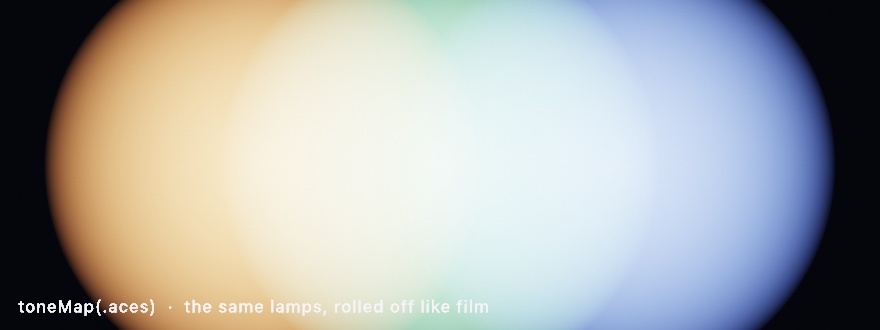
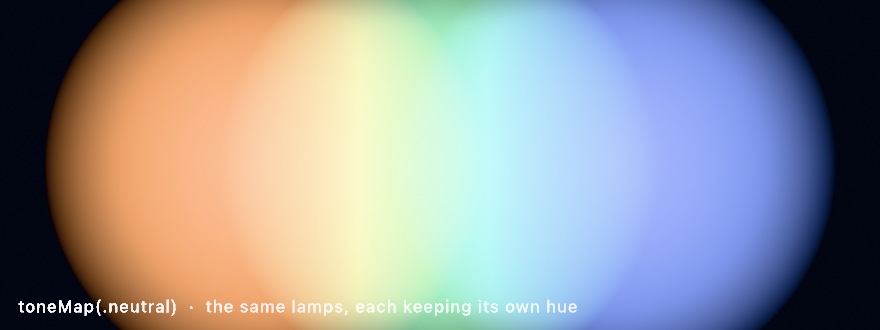
See the Rendering/ToneMapping example. Colored lamps orbit and overlap additively, and a key cycles through the four mappings. Watch the bright cores clip, compress, roll off, or keep their hue as the mapping changes.
Notes
.clampis byte-for-byte the old look. The float pipeline does not change a standard-dynamic-range sketch. With the default.clampandexposure: 1, an in-range frame renders the same as it always did, so tone mapping is opt-in.- The sandpainting look needs a divide, not only a curve. Faint samples summed additively need float precision, or they quantize away before they accumulate. A tone map then rolls the built-up light onto the screen. But a sum on a
noClearsurface keeps growing, so the tone map only postpones the moment the picture goes white. The look is built on the running mean instead, which is the sum divided by the number of passes drawn. AnAccumulatorkeeps that mean.Filter.developthen applies exposure, a Reinhard roll-off, and a ground added after the curve. The depth-of-field particle rendering is built that way. - Output is 8-bit unless you ask otherwise. The screen and exported PNGs are 8-bit sRGB by default. The float precision lives in the intermediate buffer. That is why banding disappears and HDR values survive compositing, even though the final image is 8-bit. At that 8-bit step, a triangular dither keeps gradients smooth. You can widen the last step through
colorOutput. Set it to.wideand Ollin presents through Display P3 in float. Under.extended, values above 1.0 stay as highlights brighter than white instead of being mapped down. - Exports tone-map identically. The headless still
--export, the sequence, video, and GIF exports, and live frame sharing all run the same present pass. Frame sharing covers Syphon and the virtual camera, so what you export and share matches what you see.