Animation
Motion is the default in Ollin, so most movement comes from a term in draw() that reads time. Sometimes you want a value to ease between states instead of snapping or moving at a constant rate. The Easing curves shape a 0...1 progress, and @Eased is a value that eases toward whatever you assign it. When the value comes from a noisy live signal rather than a target you set, @Smoothed cleans it up as it arrives. @Sprung gives the approach momentum, and a Timeline runs a whole sequence of eased values on the clock.
Contents
- Looping progress:
loopProgress,pingPong - Sway: a value that travels between two ends and back
- Wave: the raw sine, written as a center and a swing
- Timers:
every,after,everyFrames - Easing curves
- The curve catalog
- A curve you shape:
ResponseCurve @Eased@Smoothed@Sprung: spring toward a target with momentumTimeline
Looping progress
loopProgress(over duration: Double, phase: Double = 0) -> Double
pingPong(over duration: Double, phase: Double = 0) -> Double
Most repeating motion starts from a 0...1 progress that repeats on a fixed period. loopProgress(over:) reads the sketch clock and returns exactly that: 0...1 over duration seconds, wrapping back to 0 as each lap completes. pingPong(over:) folds the same lap out and back. It runs from 0 up to 1 and back to 0 over the same duration. That makes the motion it drives retrace its path instead of snapping back to the start:
let t = loopProgress(over: 3)                       // 0...1, every 3 seconds
let x = lerp(140, width - 140, t)                   // cross, snap back, cross again

let back = pingPong(over: 3)                        // 0 -> 1 -> 0, every 3 seconds
let y = lerp(200, height - 200, back)               // sweep out and back forever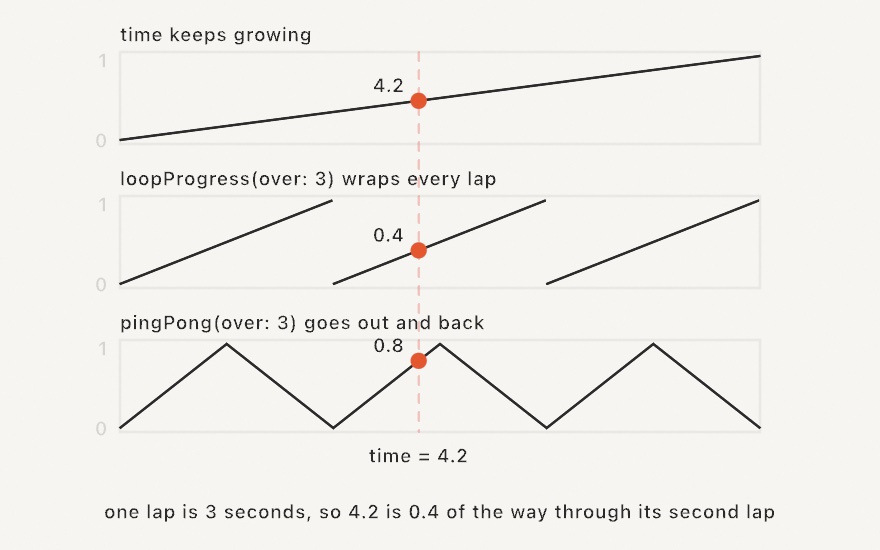
A lap is the clock wrapped by its period, fract(time / duration). The helper writes that out so a sketch does not have to. phase shifts the loop forward by a fraction of its length, so 0.5 starts halfway through. That is how you offset a row of neighbors with one argument:
for (i, cell) in grid(columns: 12, rows: 1).cells.enumerated() {
    let t = pingPong(over: 3, phase: Double(i) / 12)   // each column a little ahead
    drawCircle(center: cell.center, radius: 12 + t * 28)
}
The progress from these helpers feeds everything below. You can reshape it with an easing curve, or pass it straight to lerp, a Ramp, or a rotation.
A sketch built this way repeats exactly, and it can declare that. Set the period as loopDuration, and --export-loop then renders exactly one lap as a seamless GIF or video. See perfect loops.
Sway
sway(over duration: Double, in range: ClosedRange<Double> = 0...1,
     shape: SwayShape = .sine, phase: Double = 0) -> Double
sway is the slow back-and-forth that most sketches write by hand. The value leaves the low end of range and reaches the high end halfway through the lap. It is back at the low end as the lap closes.
drawCircle(width / 2, height / 2, sway(over: 4, in: 100...300))That is loopProgress, a cosine, and a lerp in one call. With no range it returns a plain 0...1 that you can use to drive something else. phase shifts the lap by a fraction of its length, exactly as it does above, so a row of neighbors sways in a traveling wave.
shape is the path the value takes between the two ends. There are five:
SwayShape | The path |
|---|---|
.sine | out and back on a cosine: no corners, slowest at the ends |
.triangle | out and back at one speed, turning sharply at each end |
.saw | a ramp to the high end and a jump back |
.square | one end for half the lap, the other for the rest |
.wander | a smooth drift through the sketch's own noise field |
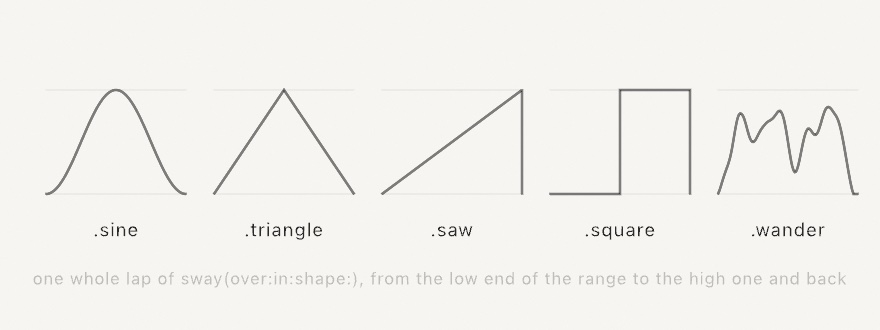
The first four shapes start at the low end, so changing the path never moves where the value begins. .wander starts wherever its noise field does, which is near the middle. .triangle and .saw are pingPong and loopProgress mapped onto the range, so use those two helpers when you want the bare 0...1.
Every shape closes its lap exactly, .wander included. This matters because exact closing is not automatic. A drift read straight off the clock, signedNoise(time), never returns to its start. So .wander instead follows a closed circle through the looping noise field. A swaying sketch can therefore still declare a loopDuration and export a seamless loop.
A sway reads the clock and nothing else, so two calls with the same arguments return the same value. Give them different phases or different durations to tell them apart. For .wander, a phase is a delay along the same circle rather than a different circle. So when you need several independent drifts, drive them with signedNoise(_:loop:) and give each one its own coordinate. A duration of zero or less holds the value at the low end.
Worked example: Motion/Sway.
Wave
wave(_ rate: Double = 1, amplitude: Double = 1, around center: Double = 0,
     phase: Double = 0) -> Double
wave is the sine oscillation that most sketches write out by hand, expressed as a center and a swing: center + sin(time * rate + phase) * amplitude.
let r = wave(0.8, amplitude: 40, around: 150)   // 110...190, slowly
drawCircle(center: center, radius: r)
rate is in radians per second. It is exactly the k of a hand-written sin(time * k), so an existing wave carries over unchanged. phase is in radians too, and it offsets neighbors along one wave. With no arguments the call is sin(time).
sway above is the related helper that works in seconds per lap and a range of values. Prefer it when the sketch declares a loopDuration. A lap of sway always closes exactly, but a wave only closes when loopDuration * rate comes to a whole number of turns.
Timers
every(_ seconds: Double, phase: Double = 0) -> Bool
after(_ seconds: Double) -> Bool
everyFrames(_ n: Int) -> Bool
loopProgress answers how far through, but these three answer now. Each is true on a single frame and false on all the others, so a periodic event needs no counter of its own:
if every(2) { dots.append(Vector2(random(width), random(height))) }   // a dot every 2s
if after(3) { revealed = true }                                       // once, 3s in
if everyFrames(10) { grid.step() }                                    // every 10th frame
every(seconds) is true on the frame that crosses each multiple of seconds. The clock starts at 0, and that counts as a crossing, so the first frame is a beat. Your first dot arrives at once, not two seconds later. phase shifts the beat by a fraction of its own length, exactly as it shifts a lap above. That is how two rhythms with one period interleave:
if every(2) { … }                 // 0s, 2s, 4s …
if every(2, phase: 0.5) { … }     // 1s, 3s, 5s …
after(seconds) fires once. It is true on the single frame that crosses that moment. Use it to start something rather than to test whether the moment has passed. if after(3) { revealed = true } runs the assignment once. if time > 3 { revealed = true } runs it on every frame from then on. That is fine for a flag, and wrong for anything that appends, spends, or plays.
everyFrames(n) counts frames instead. The first frame is the first beat, so the beats fall on frames 1, n + 1, 2n + 1. Use it when the beat belongs to the work rather than to the wall clock. A simulation that steps every tenth frame keeps its rate whether the window runs fast or slow. A beat in seconds does not.
Two properties make a beat reliable:
- A beat reads the clock and nothing else. It carries no state between frames. An export therefore places the beats on the same seconds as the window did, at any frame rate. A recorded take replays them, and a live reload does not lose or repeat one.
- A
Boolcan only say "now" once. A frame long enough to cover two crossings reports one beat, not two. If you need to count events across a slow frame, work fromtimerather than from a beat.
Easing curves
An Easing maps normalized progress (0...1) onto a shaped 0...1. Call it like a function, and pair it with lerp to interpolate between two values along the curve:
let t = loopProgress(over: 2)                                // 0...1, looping
let x = lerp(120, width - 120, Easing.easeInOutCubic(t))     // eased across the canvas
drawCircle(x, height / 2, 40 * scale)
The input t is clamped to 0...1 first, so values past the ends hold flat. The output is not clamped, because the back, elastic, and bounce curves overshoot the range on purpose and then settle exactly on the endpoints. Back dips below zero before overshooting past one. Elastic springs around the target before resting. Bounce settles onto the end in shrinking hops.

Build a custom curve from any closure:
let gentle = Easing { t in t * t * (3 - 2 * t) } // a hand-rolled smoothstepA built-in curve carries its own name, so curves can be compared, persisted, and listed on a menu. That makes @Param var spacing: Easing = .easeInOut a parameter like any other. The short aliases are the cubic curves themselves, so .easeInOut == .easeInOutCubic. A curve built from a closure equals itself and every copy of itself, and nothing else, because two closures cannot be compared.
Two helpers derive a curve from another. reversed() runs a curve from its other end, 1 - curve(1 - t), so an ease-in becomes its ease-out and an ease-out its ease-in. A symmetric curve (every ease-in-out, linear, smoothstep) comes back unchanged. mirrored() puts the curve on the first half of the trip and its reverse on the second. That is how the catalog builds an ease-in-out from an ease-in. Mirroring an ease-out gives an out-in curve, fast at both ends and slow through the middle, which the catalog does not carry.
@Param var curve: Easing = .easeInQuad
let out = curve.reversed()        // the same curve arriving instead of leaving
let both = curve.mirrored()       // slow start, slow finish
Where the catalog already holds the result, the helper hands back the built-in. So Easing.easeInQuad.reversed() == .easeOutQuad and .easeInQuad.mirrored() == .easeInOutQuad, and the value reads by name on a menu. The back and elastic families are the one exception on the mirrored side. Their ease-in-outs were tuned with their own constants, so easeInBack.mirrored() is the plain construction, a curve of its own. Any other derived curve carries its origin as its identity. Two reversals of the same curve compare equal, and the curve stays off the menu like one built from a closure. The DerivedCurves example runs a picked curve beside its two derivations.
The curve catalog
The catalog is linear plus the thirty named curves from Robert Penner's easing equations. They are grouped by family, each with in, out, and in-out variants:
| Family | Ease in | Ease out | Ease in-out |
|---|---|---|---|
| Sine | easeInSine | easeOutSine | easeInOutSine |
| Quadratic | easeInQuad | easeOutQuad | easeInOutQuad |
| Cubic | easeInCubic | easeOutCubic | easeInOutCubic |
| Quartic | easeInQuart | easeOutQuart | easeInOutQuart |
| Quintic | easeInQuint | easeOutQuint | easeInOutQuint |
| Exponential | easeInExpo | easeOutExpo | easeInOutExpo |
| Circular | easeInCirc | easeOutCirc | easeInOutCirc |
| Back | easeInBack | easeOutBack | easeInOutBack |
| Elastic | easeInElastic | easeOutElastic | easeInOutElastic |
| Bounce | easeInBounce | easeOutBounce | easeInOutBounce |
The back, elastic, and bounce families overshoot. Back dips past the start and overshoots the target, elastic springs around it, and bounce settles in steps. The other seven families stay within 0...1.

Three short aliases cover the common case. .easeIn, .easeOut, and .easeInOut map to the cubic forms. .smoothstep is a Hermite smoothstep. It is a gentler S curve than easeInOut, and it is the same curve as the bare smoothstep(0, 1, t).
The EasingGallery example plots all thirty so you can see the shapes side by side.
A curve you shape: ResponseCurve
ResponseCurve(_ points: [(Double, Double)])
ResponseCurve(points: [Vector2])
ResponseCurve.linear
callAsFunction(_ x: Double) -> Double
points: [Vector2]
easing: Easing
A curve shaped by its points rather than by a formula. A number from 0 to 1 goes in and a number from 0 to 1 comes out, read the way an Easing reads. It fits wherever a shape is a matter of taste. A falloff says how strongly a brush paints at each distance from its center. A response turns a pressure, a loudness, or a speed into a size. A tone curve maps one brightness onto another.
let falloff = ResponseCurve([(0, 1), (0.3, 0.85), (0.7, 0.2), (1, 0)])

override func draw() {
    background(.white)
    noStroke()
    for ring in 0..<20 {
        let t = Double(ring) / 19
        fill(Color(white: 1 - falloff(t)))
        drawCircle(width / 2, height / 2, 400 * (1 - t))
    }
}
The curve passes through every point and runs smooth between them, and it never overshoots. Between two points it stays between their heights, so a falloff never dips below zero and a response never runs past one. That is monotone cubic interpolation, the method Fritsch and Carlson published in 1980. A plain smooth spline through the same points would swing past a peak. Left of the first point the curve holds the first point's height, and right of the last it holds the last one's. The points are put in order of x and held inside the unit square, and a second point at the same x is dropped, since a curve has one height at each place.
.linear is the straight line from (0, 0) to (1, 1). easing hands the curve to a call that takes an Easing, such as a parameter's glide or a tween. As a parameter, @Param var falloff = ResponseCurve(...) is a small graph in the inspector whose points drag. Parameters has the row.
@Eased
@Eased is a property wrapper for a Double that eases toward whatever you assign it, a little each frame. Read it to get the current animated value. Assign it to set a new target. The sketch advances it automatically, so there is no update step to call.
final class Follow: Sketch {
    @Eased var x = 0.0                                  // 0.5s ease-in-out (the defaults)
    @Eased(duration: 1, curve: .easeOutBack) var y = 0.0

    override func draw() {
        background(.white)
        x = mouseX                                      // retarget; the dot glides over
        y = mouseY
        drawCircle(x, y, 40 * scale)
    }
}
Assigning the value it is already heading for does nothing, so it is safe to set the target every frame. Only a change restarts the tween, and the tween restarts from wherever the value currently is. The tween is timed in seconds (duration), so it runs the same at any frame rate.
The projected value ($x) exposes a little more:
$x.target          // the value being eased toward
$x.isAnimating     // true while it's still moving
$x.jump(to: 200)   // jump straight there, no animation
The Easing example moves four dots toward the same target on different curves, so you can watch the curves separate as they move.
@Smoothed
@Eased moves toward a target you know. @Smoothed is for a noisy live signal whose true value you don't know. That can be a jittery mouseX/mouseY, or live input from OSC, MIDI, computer vision, or the phone sensors. It cleans the stream with the 1€ filter, an adaptive low-pass filter. The filter stays responsive when the signal moves fast and steady when it moves slowly. A fixed low-pass filter cannot do both.

Assign the raw value each frame and read back a clean one. Like @Eased, the sketch advances it for you, so there is no update step to call:
final class Cursor: Sketch {
    @Smoothed var p = Vector2.zero

    override func draw() {
        background(.white)
        p = Vector2(mouseX, mouseY)                 // feed the jittery input
        drawCircle(center: p, radius: 40 * scale)   // read the smoothed value
    }
}
It works on a Double or a Vector2. Two parameters tune the feel:
minCutoff(default1): lower it to cut jitter while the signal is slow, at the cost of a little more lag.beta(default0.007): raise it to cut lag while the signal moves fast.derivativeCutoff(default1): the cutoff for the filter's own speed estimate. The paper's value is almost always right.
@Smoothed(minCutoff: 0.5, beta: 0.02) var angle = 0.0Both can be changed live through the projected value ($angle.beta = …), so a @Param parameter can tune them by feel. The projected value also gives you $p.rawValue, the last unsmoothed input, and $p.jump(to: v), which jumps there with no smoothing. The filter is timed in seconds, so it behaves the same at any frame rate.
To smooth a value that is not a sketch property, use the public OneEuroFilter<Value> underneath. You own the state and step it yourself.
var filter = OneEuroFilter<Double>(minCutoff: 1, beta: 0.02, derivativeCutoff: 1)
let clean = filter.filter(noisy, deltaTime: deltaTime)
The Smoothing example adds jitter to a moving target so you can watch the filter pass smoothly through the noise.
@Sprung
@Sprung is the third of these wrappers, and it is a damped spring. @Eased replays a fixed curve over a fixed duration, so retargeting it in motion restarts the tween. A spring instead carries momentum. Retarget it and the motion bends smoothly through the turn. That is why a spring suits a target that never stops moving, such as a cursor, a tracked hand, or a beat.
final class Chase: Sketch {
    @Sprung var p = Vector2.zero                      // critically damped
    @Sprung(duration: 0.4, bounce: 0.5) var r = 40.0  // wobbly

    override func draw() {
        background(.white)
        p = Vector2(mouseX, mouseY)                   // retarget freely
        r = mouseIsPressed ? 90 : 40
        drawCircle(center: p, radius: r * scale)
    }
}
Two parameters shape the motion, and both are perceptual:
duration(default0.5) is the response time in seconds, roughly how long a settle takes.bounce(default0) is the character of the motion.0is critically damped, which is the fastest possible arrival with no overshoot. Positive values overshoot and wobble, up to1, which rings forever. Negative values arrive slowly, as if moving through honey.
The projected value exposes the physics. $p.velocity can be read or set. $p.kick(impulse) gives the value an impulse and lets it spring back, which suits a beat or a click. $p.target is the target, and $p.jump(to: v) jumps there with no motion. It works on a Double or a Vector2.
Each frame advances by the exact closed-form solution of the damped oscillator, not a numeric approximation, which means a spring is unconditionally stable. A slow frame can never make it explode or ring, and the motion is identical at any frame rate.
For spring state that is not a sketch property, such as values in an array, use the public DampedSpring<Value> underneath:
var spring = DampedSpring(value: 0.0, duration: 0.6, bounce: 0.3)
let x = spring.advance(toward: target, by: deltaTime)
The Springs example runs five bounce settings side by side and attaches a kickable chaser to the mouse.
Timeline
@Eased eases toward a single moving target. Timeline is for a value that you want to sequence through several timed keyframes, each with its own easing. A timeline starts at a value, glides to another over a duration, holds, and glides on. Build it as a chain of calls, then read value each frame:
let move = Timeline(0.0)
    .to(100, in: 1.5, curve: .easeOut)   // glide 0 -> 100 over 1.5s
    .hold(for: 0.5)                       // sit at 100 for 0.5s
    .to(0, in: 1.0)                       // glide back to 0
// each frame:
x = move.value
The clock advances in seconds, so a timeline runs the same at any frame rate. loops wraps it around, progress is 0...1 over the whole sequence, and isFinished reports when a non-looping run reaches the end. restart() and seek(to:) move the clock. It works on any Tweenable value (Double, Vector2, Vector3), so a Timeline<Vector3> sequences a position through space.
Like @Eased, a Timeline is advanced for you once per frame. That happens only when it is a stored property on the sketch that exists before the first frame. It can be declared as a property or assigned in setup(), and @Eased follows the same rule. A timeline created later inside draw(), or held in a local or a collection, is not picked up. Advance it by hand with tl.advance(by: deltaTime) each frame. The cinematic camera moves drive their own timelines internally, so this rule does not apply there.
The Timeline example moves a dot around a square on one Timeline<Vector2>, with a different easing per side and a hold at every corner. A second timeline animates the dot's size. The bar underneath tracks progress with a tick per keyframe.