Points on a surface
Scatter points over a mesh to place trees on an island, moss on a rock, roots for hair, or a point cloud made from geometry. surfacePoints spreads the points evenly over the skin of the mesh, which is not the same as spreading them evenly over the vertex list.
That difference is what the feature is for. A mesh puts vertices where its shape needs them, so a flat wall carries four and a rounded corner carries hundreds. Points picked from that list crowd the corner and leave the wall bare. Shuffling the list does not help, because the list itself is the wrong thing to draw from.
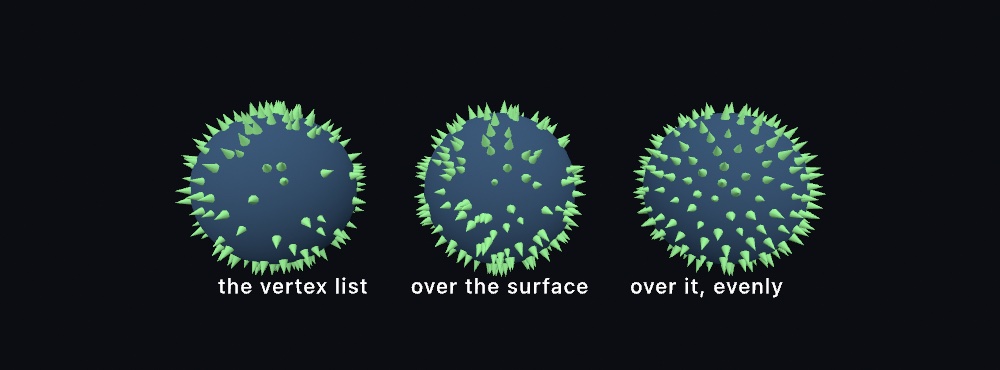
Every point comes back as a SurfaceSample(position:normal:uv:triangle:barycentric:). A sample holds more than the position. It also carries the direction the surface faces there, the texture coordinate, the triangle the point landed on, and where in that triangle it fell.
Contents
- surfacePoints
- By spacing instead of count
- SurfaceSample
- Standing something up
- surfaceArea
- Standalone (outside a sketch)
surfacePoints
surfacePoints(on mesh: Mesh,
              count: Int,
              scatter: SurfaceScatter = .blueNoise) -> [SurfaceSample]
Returns count points scattered over mesh in proportion to area. A triangle twice the size of its neighbor receives about twice as many points, whatever either one cost in vertices. The scatter draws from the seeded random, so seed makes the layout repeat.
seed(3)
let spots = surfacePoints(on: island, count: 400)
drawMesh(tree, instances: spots.map {
    MeshInstance(position: $0.position, rotation: $0.alignment(spin: random(.tau)), scale: 0.4)
})
The scatter argument takes one of two spreads:
scatter | What it does | When |
|---|---|---|
.blueNoise (default) | Keeps neighbors apart, so nothing clumps and nothing leaves a hole | Props, roots, stipple, and anything the eye reads as placed |
.random | Each point is independent of the ones before it | Splatter, thrown seed, and any case where clumping is the look |
.blueNoise draws five times count candidates and thins out the crowded ones, which means searching around every candidate. So it costs more than .random, and the gap widens with the count. In the debug build swift run makes on the M2, five thousand points on a terrain take about eight times as long as .random. A hundred thousand take about thirty-five times as long. Four hundred thousand take 22 seconds there, where .random takes half a second, and under 5 seconds in a release build. For a dense scatter whose marks overlap anyway, .random is still the practical choice. Ask for the count you want rather than trimming the result yourself. The thinning is what makes the spacing even, so cutting the list afterward undoes it.
The mesh is read as it is. Nothing is welded or rebuilt first, so two triangles that meet at a seam stay two separate triangles. A triangle with no area never receives a point.
By spacing instead of count
surfacePoints(on mesh: Mesh,
              spacing: Double,
              scatter: SurfaceScatter = .blueNoise) -> [SurfaceSample]
This is the same scatter asked the other way around, the way poissonDisk takes a radius. You state the distance you want between neighbors, and the count follows from the surface area. Use it when the mesh changes size or resolution and the density is what should stay the same.
let roots = surfacePoints(on: scalp, spacing: 0.01) // a strand every centimeterUnder .random the spacing only decides how many points are drawn, because a plain draw keeps no distance between points.
SurfaceSample
struct SurfaceSample {
    var position: Vector3      // where it landed
    var normal: Vector3        // which way the surface faces there
    var uv: Vector2            // the texture coordinate there
    var triangle: Int          // which triangle, in the mesh's own numbering
    var barycentric: Vector3   // how much of each corner, adding to 1
}
normal is blended from the mesh's vertex normals when the mesh carries them, and taken from the triangle's winding when it does not. uv is Vector2.zero on a mesh with no texture coordinates.
triangle and barycentric let you blend anything else the mesh holds per vertex. A per-vertex color, for example:
let i = spot.triangle * 3
let a = mesh.colors[Int(mesh.indices[i])]
let b = mesh.colors[Int(mesh.indices[i + 1])]
let c = mesh.colors[Int(mesh.indices[i + 2])]
let w = spot.barycentric
let tint = Color.mix(Color.mix(a, b, w.y / max(w.x + w.y, 1e-9)), c, t: w.z)
They also let you filter a scatter by something the surface already knows. This keeps only the spots that face up:
let flat = surfacePoints(on: terrain, count: 800).filter { $0.normal.y > 0.8 }Standing something up
func alignment(spin: Double = 0) -> Vector3Returns the turn that points a mesh's own +y along the sample's normal, as the angles a MeshInstance takes. spin then turns the mesh about that direction, which keeps a scattered field from reading as a field of clones.
drawMesh(tree, instances: spots.map {
    MeshInstance(position: $0.position,
                 rotation: $0.alignment(spin: random(.tau)),
                 scale: 0.4)
})
A mesh built around its own middle sits half-buried, so lift it along the normal by half its height:
MeshInstance(position: $0.position + $0.normal * 0.15, rotation: $0.alignment())surfaceArea
mesh.surfaceArea -> DoubleThis is every triangle's area added up, in the square of the mesh's own units. It is what turns a spacing into a count. Read it directly when a scatter should hold a density rather than a count:
let trees = surfacePoints(on: island, count: Int(island.surfaceArea * 12))Standalone (outside a sketch)
The Sketch methods are sugar over free functions that take any random source. That means geometry code outside a sketch can scatter reproducibly too:
var rng = SplitMix64(seed: 7)
let spots = surfacePoints(on: mesh, count: 500, using: &rng)
Related: Blue noise (the same even spacing on a flat rectangle), Instanced meshes (drawing one prop thousands of times), Strand fields (grass grown inside the draw call), Random (the seeded source everything here draws from).