Math helpers
Ollin has a small and growing set of the familiar creative-coding math functions, and you call them bare in draw().
Contents
- map
- dist
- lerp
- Shaping scalars:
clamp,wrap,fract,step,smoothstep,unipolar,bipolar - Dividing a whole:
fractions,angles - polar
- spherical: the same in 3D, and a vector's
azimuthandelevation - Slopes:
derivative,gradient - Primes
- Constants and angle units
map
map(_ value: Double, _ start1: Double, _ stop1: Double, _ start2: Double, _ stop2: Double, clamped: Bool = false) -> DoubleRe-map value linearly from one range onto another. The result sits at the same fraction along start2...stop2 that value sat along start1...stop1. By default the result extrapolates past the range. Pass clamped: true to hold it inside start2...stop2.

let r = map(sin(time), -1, 1, 60, 200)   // -1...1 → 60...200
drawCircle(width / 2, height / 2, r)      // a breathing circle
dist
dist(_ x1: Double, _ y1: Double, _ x2: Double, _ y2: Double) -> DoubleThe Euclidean distance between two points.
let d = dist(mouseX, mouseY, width / 2, height / 2)
let r = map(d, 0, 400, 80, 10, clamped: true) // large at the center, small toward the edges
drawCircle(width / 2, height / 2, r)
lerp
lerp(_ a: Double, _ b: Double, _ t: Double) -> DoubleThe point t of the way from a to b. t is not clamped, so a value outside 0...1 extrapolates past the ends. For non-linear motion, reshape t with an Easing curve.
let x = lerp(120, width - 120, Easing.easeInOut(progress))For a t that loops with the sketch clock, use loopProgress(over:) and pingPong(over:).
Shaping scalars
clamp(_ x: Double, _ minValue: Double, _ maxValue: Double) -> Double
clamp<T: Comparable>(_ x: T, _ minValue: T, _ maxValue: T) -> T
clamp<T: Comparable>(_ x: T, to range: ClosedRange<T>) -> T
wrap(_ x: Double, _ minValue: Double, _ maxValue: Double) -> Double
fract(_ x: Double) -> Double
step(_ edge: Double, _ x: Double) -> Double
smoothstep(_ edge0: Double, _ edge1: Double, _ x: Double) -> Double
unipolar(_ x: Double) -> Double
bipolar(_ x: Double) -> Double
These are the basic shaping functions. They use the same names and argument order as the shader library, so an expression you write in draw() carries unchanged into per-pixel shader code. The Easing catalog is the curve library, and these functions are the primitives it is built from.
clamp(x, lo, hi)holdsxwithin the range. The generic form clamps any comparable type, for exampleclamp(i, 0, columns - 1)for anIntindex.clamp(t, to: 0...1)takes the range as one value.wrap(x, lo, hi)bringsxback intolo..<hiby whole laps. It is the circular form ofclamp. A walker that leaves one edge of the canvas comes back in at the other, as inx = wrap(x + step, 0, width). An angle stays within one turn withwrap(a, 0, .tau). It is floor-based likefract, so it stays continuous through negative values.fract(x)keeps the fractional part, sofract(2.75)is0.75. It is floor-based, which means it stays continuous through negative values and wrapping a growing value never jumps.step(edge, x)is0belowedgeand1fromedgeon. It works like anifwritten as a function, so use it as a hard switch for a blink or a flip.smoothstep(edge0, edge1, x)is the smooth S-ramp between two edges. It is0at or belowedge0and1at or aboveedge1, with no corners in between. The two edges pick a soft window out of a signal, and swappingedge0andedge1fades the other way. Here the window travels across the shape:
let lit = smoothstep(0.3, 1.0, sin(angle * 3 - time))  // a soft traveling window
fill(Color.mix(.navy, .white, lit))
smoothstep(0, 1, t) is the plain 0...1 reshape. It is the same curve as Easing.smoothstep.
unipolar(x)remaps a signed-1...1signal onto0...1(x * 0.5 + 0.5). This is a common remap, because it turns a wave or a signed noise sample into a usable fraction.bipolar(x)is its inverse (x * 2 - 1). For noise there is a shorter way.noise(x)already returns a value in0...1, sounipolar(signedNoise(x))is the same asnoise(x).
fill(palette.color(at: unipolar(sin(time))))Dividing a whole
fractions(_ count: Int, inclusive: Bool = false) -> [Double]
angles(_ count: Int, from start: Double = 0, turns: Double = 1) -> [Double]
These return the normalized loop index as a sequence, so you no longer write Double(i) / Double(count) by hand. fractions(n) is n evenly spaced fractions of 0...1, running from 0 up to but not including 1. That spacing tiles a circle or a repeating strip with no doubled seam. Pass inclusive: true to get n values from 0 through 1 exactly, which counts the fence posts instead of the panels between them.
for t in fractions(12) {
    drawCircle(lerp(80, width - 80, t), height / 2, 20)
}
angles(n) is the same division expressed in radians, one full turn by default. It gives you the spokes of a wheel as a sequence. from rotates the whole wheel, so pass it time and the wheel turns. turns spreads the spokes over less or more than a full circle.
for a in angles(12, from: time * 0.1) {
    drawCircle(center: polar(a, 300, around: center), radius: 20)
}
polar
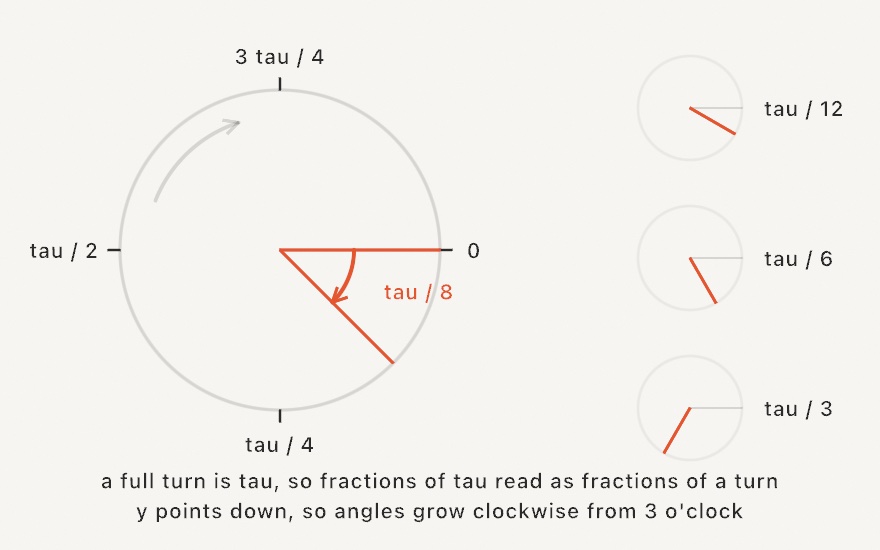
polar(_ angle: Double, _ radius: Double, around center: Vector2 = .zero) -> Vector2The point at angle and radius from center. This is polar coordinates as one call, in place of the spelled-out center + Vector2(cos(a), sin(a)) * r. The angle is in radians. 0 points right, and the angle increases clockwise on screen, because y grows downward. With no around: the point is measured from the origin, which composes with translate. When there is no center to add, use Vector2(angle:length:), which gives the same point as a direction vector.
drawLine(center, polar(time, 300, around: center))spherical
spherical(_ azimuth: Double, _ elevation: Double, _ radius: Double,
          around center: Vector3 = .zero) -> Vector3
The point at two angles and a distance from center in 3D. This is spherical coordinates as one call, the angles first and then the radius, the way polar takes them. The angles are in radians, in the world the 3D calls draw in, where y is up. azimuth turns around the y axis: 0 points along +z, and a quarter turn points along +x. elevation lifts the point above the floor plane of x and z, so 0 is level with it and .pi / 2 is straight up.
It is the camera's own orbit, so spherical(a, e, r, around: target) is where an eye stands that orbits target at those angles, which is the point Camera3D.orbiting(target:radius:azimuth:elevation:) puts its eye. Going the other way, a Vector3's azimuth, elevation, and length read the three numbers back off a direction.
let planet = Vector3(0, 1, 0)
let moon = spherical(time, 0.3, 3, around: planet)    // a body circling another
let lamp = spherical(-0.8, 0.9, 6)                     // a light high and to the left

let toMoon = moon - planet
let heading = toMoon.azimuth                           // which way it lies, seen from above
let rise = toMoon.elevation                            // how far above the planet's level
Slopes
derivative(at x: Double, step: Double? = nil, function: (Double) -> Double) -> Double
gradient(at point: Vector2, step: Double? = nil, field: (Vector2) -> Double) -> Vector2
gradient(at point: Vector3, step: Double? = nil, field: (Vector3) -> Double) -> Vector3
These measure how fast a function you wrote changes. derivative gives the slope of a function of one number. gradient gives the direction a field over the plane or over space climbs fastest. Its length is how steep the climb is. The perpendicular to a plane gradient runs along the field's contour, which is how a particle circles a hill of noise rather than climbing it.
let tilt = atan(derivative(at: 300) { x in 120 * sin(x * 0.01) })      // a curve's angle

var p = Vector2(540, 540)
let uphill = gradient(at: p) { q in noise(q.x * 0.004, q.y * 0.004) }
p += uphill.perpendicular.normalized * 1.5                             // along the contour
Each one reads the function a small step to either side and divides the rise by the run. That is a central difference. Its error falls with the square of the step, so it is exact for any quadratic and very close for anything smooth. When step is nil, the step is sized from the point itself, about six millionths of its largest coordinate (or of 1 near zero). That suits a smooth function computed in Double. Give a larger step for a function with fine grain of its own, such as noise over many octaves or a sampled image. Set it at about the size of the detail you want to ignore.
The 3D form is how an implicit surface gets its normal. The gradient of a signed distance points straight out of the surface:
let ball = { (q: Vector3) in q.length - 1 }
let normal = gradient(at: Vector3(0.6, 0.8, 0)) { ball($0) }.normalized
A fitted field has exact slopes of its own, which need no step.
Primes
primes(upTo limit: Int) -> [Int]
isPrime(_ number: Int) -> Bool
These two functions work with prime numbers. primes(upTo:) is the sieve of Eratosthenes. It returns the whole list at once, so drawing a field of thousands of numbers stays cheap. isPrime is the shorter way for a single number. Negative numbers, zero, and one are not prime.
for p in primes(upTo: 500) { drawCircle(Double(p), height / 2, 3) }The picture these are best known for is the Ulam spiral. It writes the numbers in a square spiral and marks the primes.
Fraction is the exact whole-number type that goes with these. It is a fraction in lowest terms, with mediant, isNeighbor, and comparison by cross-multiplication. It is documented with Ford circles and fareySequence, because that is the picture it was made for.
Constants and angle units
Double.tau is the full turn (2π), and most angle work uses that unit.
rotate(Double.tau / 6) // a sixth of a turnThe drawing calls all take radians. .degrees(_:) and .turns(_:) convert a familiar unit into radians at the call site:
rotate(.degrees(45))
rotate(.turns(0.25))     // a quarter circle