RGBD frames and depth-lifted pose
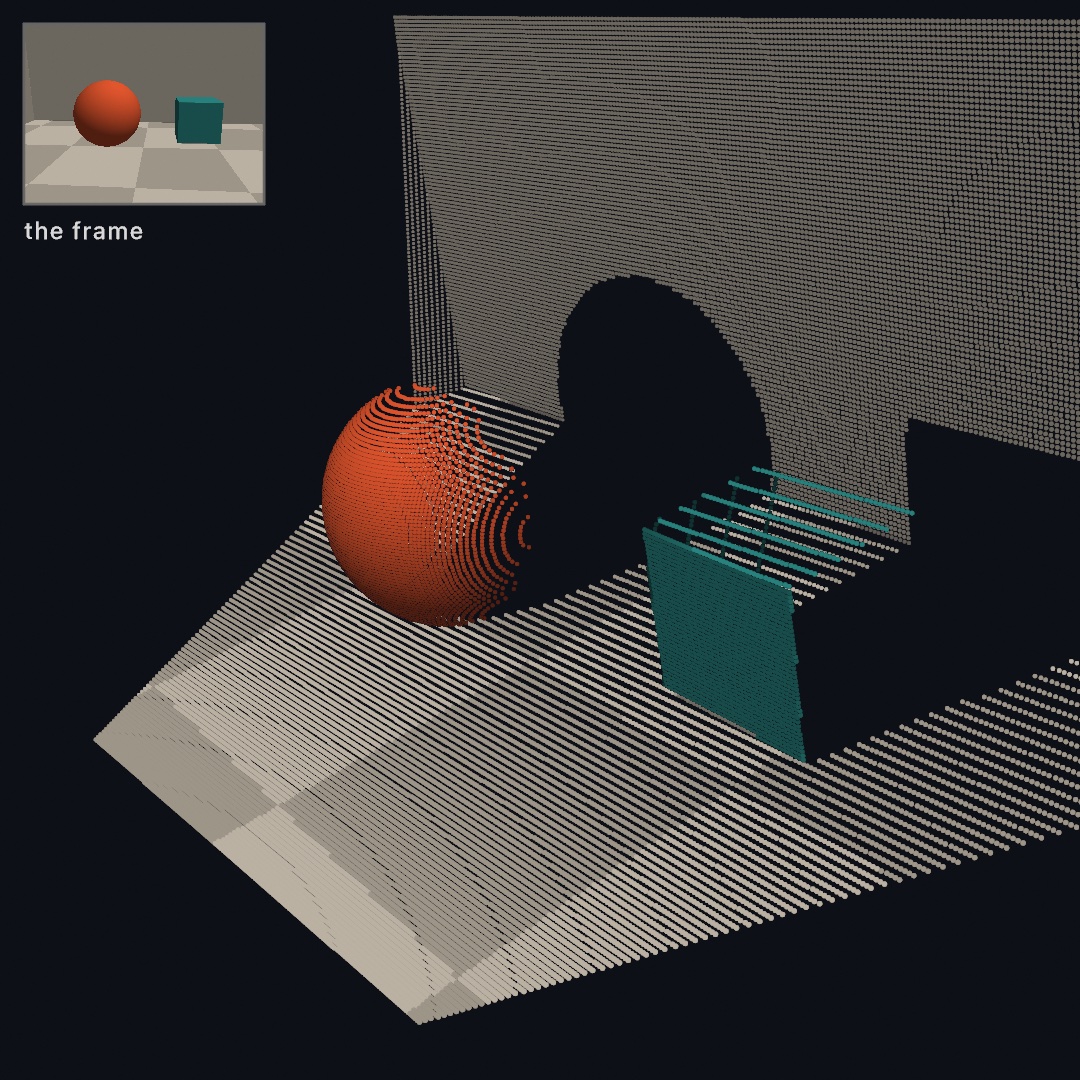
An RGBD frame is a color image, a depth map, and the intrinsics that tie them together. Every depth source produces that shape. A Record3D .r3d file produces that shape, and so does its live USB stream. A webcam paired with a depth model produces it, and so does Ollin's own iPhone capture app. RGBDFrame is that shape, written as a single type in the Ollin core. Anything that lifts the 2D picture into 3D reads that one type, whatever the depth source is.
Lifting a frame gives you two kinds of output. The first is a point cloud, which unprojects every depth pixel (see 3D). The second is a single lifted point, a tracked joint or a tapped pixel back-projected to its true metric position. That second output makes depth-lifted pose possible. A depth-lifted pose is a flat 2D skeleton placed at its real distance in space.
import Ollin
import OllinVision     // BodyTracker (the 2D pose)
import OllinRecord3D   // a depth source

final class Pose: Sketch {
    let device = Record3DDevice()
    lazy var bodies = BodyTracker(device)

    override func setup() { device.start(); _ = bodies }

    override func draw() {
        background(Color(white: 0.04))
        guard let frame = device.latestFrame else { return }

        let pose = bodies.bodies.first?.lifted(through: frame)
        camera(.orbiting(target: pose?.center ?? .zero, radius: 2.5, azimuth: time * 0.3))
        drawPointCloud(frame.pointCloud())     // the person, as depth points
        if let pose { drawPointCloud(pose.cloud()) }   // the skeleton, same space
    }
}
Contents
- The RGBD frame -
RGBDFrame,CameraIntrinsics,DepthConfidence - Lifting one point -
unproject(normalized:),depth(atNormalizedX:y:) - Depth-lifted pose -
Body.lifted(through:),LiftedPose - The coordinate convention
- Where this fits
The RGBD frame
RGBDFrame carries a color Image, a metric depth map, and an optional per-pixel confidence map. The depth map is in meters, row-major from the top-left. The frame also carries the CameraIntrinsics of the depth grid.

struct RGBDFrame {
    let color: Image              // usually higher-res than the depth map
    let depth: [Float]            // metric meters, row-major, depthWidth × depthHeight
    let confidence: [UInt8]?      // 0/1/2 per pixel, or nil
    let depthWidth, depthHeight: Int
    let intrinsics: CameraIntrinsics   // already scaled to the depth grid

    func pointCloud(minConfidence:depthRange:step:pointSize:) -> PointCloud
    func unproject(normalized: Vector2, radius: Int = 2) -> Vector3?
    func depth(atNormalizedX: Double, y: Double, radius: Int = 2) -> Double?
}
You rarely build one by hand, because a depth source hands it to you. Record3DRecording.frame(at:) and Record3DDevice.latestFrame both return one. DepthConfidence is the .low/.medium/.high grade of a depth sample. pointCloud(...) uses that grade as a floor, so it drops the noisy samples below the floor. When a frame has no confidence map, pointCloud(...) ignores the floor.
Lifting one point
unproject(normalized:) takes a Vision-normalized image point and returns its metric 3D position. It returns nil when there is no valid depth at that point. Vision-normalized means 0…1 across the frame, with the origin at the lower-left and y up. That is the convention Body and the other trackers report points in.

if let p = frame.unproject(normalized: Vector2(0.5, 0.5)) {
    // p is in meters, camera space (see below)
}
A single depth pixel is often a hole (zero or invalid), especially at a silhouette edge, which is where limbs sit. So the lookup samples a small window of radius pixels and takes the median of the valid samples in it. The median ignores the occasional dropout. Widen radius for noisier depth, and narrow it for sharper edges. depth(atNormalizedX:y:) returns the metric depth alone, for when you want the distance without the 3D point.
This call works the same way whatever the depth source is. Hand it any 2D image point and any depth source, and you get a 3D position back.
Depth-lifted pose
Body.lifted(through:) calls unproject for every joint. It back-projects each joint of a 2D Body through a frame's depth and returns a LiftedPose, which is the skeleton in metric 3D.
let pose = body.lifted(through: frame)        // body from a BodyTracker
pose.position(.leftWrist)                       // Vector3? in meters, camera space
pose.bones()                                    // [(Vector3, Vector3)] 3D segments
pose.center                                     // centroid, to aim an orbiting camera
pose.cloud(jointSize: 0.06, color: .yellow)     // the skeleton as a PointCloud
BodyTracker finds everyone in view, so you can lift the whole set at once. bodies.bodies.lifted(through: frame) returns one LiftedPose per person, all in the frame's own camera space. Because they share that space, several skeletons land at their true relative positions in the same cloud:
for pose in bodies.bodies.lifted(through: frame) {
    drawPointCloud(pose.cloud(color: .yellow))
}
BodyTracker3D estimates a skeleton's depth from a single flat image. Depth-lifted pose reads the depth instead. With a real depth source, such as an iPhone's LiDAR or TrueDepth camera, the joints sit at their true distance rather than a guessed one. BodyTracker3D also follows only the most prominent person, so depth-lifted pose is the route to 3D skeletons for several people at once.
Run the BodyTracker on the same source as the depth, then lift through the latest frame. That way the 2D poses come from the depth frame's own color image. A joint whose depth was a hole is dropped, in the same way that a low-confidence 2D joint is absent from the source Body.
3D mode has no line primitive, so cloud() is the way to draw the figure. Each joint becomes a splat, and each bone becomes a line of small splats, in the cloud's own space. The skeleton lands inside the person's depth cloud, and the whole scene orbits as one.
The coordinate convention
CameraIntrinsics is a pinhole calibration: the focal length fx/fy and the principal point cx/cy, in pixels, at a stated resolution. Intrinsics are tied to that resolution. So scaled(toWidth:height:) brings the intrinsics of the color frame onto the smaller depth grid. A depth source does this for you.
Everything lifted lands in the camera's right-handed, y-up space: +x is right, +y is up, and the camera looks down −z. A point in front of the lens has negative z, so metric depth maps to −z. That is the same space PointCloud and Camera3D use. So a depth-lifted skeleton drops straight into the person's own cloud, and both draw through one camera.
The input to unproject is Vision-normalized, with a lower-left origin. The output is meters in camera space. The y-flip between the two is handled for you.
Where this fits
A cloud also reports its own measurements. centroid is the mean of its positions, or nil when the cloud is empty. spreadRadius is the root of the mean squared distance around the centroid. Those are the two numbers you need to frame a camera on the cloud. Ease an orbit target toward centroid, at a radius of a few times spreadRadius, and the whole cloud stays in view without hand-tuning. Ease rather than snap, because depth flickers a little from frame to frame.
This page covers the core types RGBDFrame/CameraIntrinsics/DepthConfidence, the unproject/pointCloud calls, and depth-lifted pose (Body.lifted to LiftedPose). If a depth source also reports a camera pose, three more pieces are available to you. PointCloud.transformed(by:) places a camera-space cloud into world space. WorldCloud fuses a sweep of pose-placed frames into one accumulated cloud. It corrects the tracker's drift as it goes, so a long sweep stays registered. ScanGraph covers the other half of that work. It recognizes a place that was already scanned and straightens the whole scan around it. All three are worked through in Phone › World fusion.
From there, depth compositing puts 2D drawing inside a depth scene, so a mark occludes the depth and the depth occludes the mark. Drawing a frame's depth map into a layer also feeds .defocus, which gives depth of field over a live feed.
See also
- 3D - the camera and point clouds the lifted geometry draws through
- Depth compositing - placing 2D drawing inside a depth scene, with occlusion
- Record3D - the iPhone depth sources that produce RGBD frames
- Phone - Ollin's iOS capture app, another RGBD source, plus world fusion
- Vision -
BodyTracker, the 2D pose that this page lifts
Example
Examples/3D/Depth/DepthLiftedPose- a body skeleton lifted to true 3D from a tethered iPhone, drawn inside its own depth cloud