Game controllers
import OllinController to read a game controller in draw(). You get two sticks, two triggers, the buttons, and, on hardware that has them, motion and a touchpad.
import Ollin
import OllinController

@main
final class Sketch1: Sketch {
    var ship = Vector2(540, 540)

    override func draw() {
        background(.white)
        ship += controller.leftStick * 6
        if controller.wasPressed(.a) { fire(from: ship) }
        drawCircle(center: ship, radius: 30)
    }
}
A controller is a satellite rather than part of the core, unlike the mouse and the keyboard. Those arrive as events through the sketch's view, so they need the AppKit and UIKit plumbing behind it. A controller is handed to the process by a system service and touches no view at all, so it needs none of that plumbing. The drawing core then stays free of one more framework.
Reading it
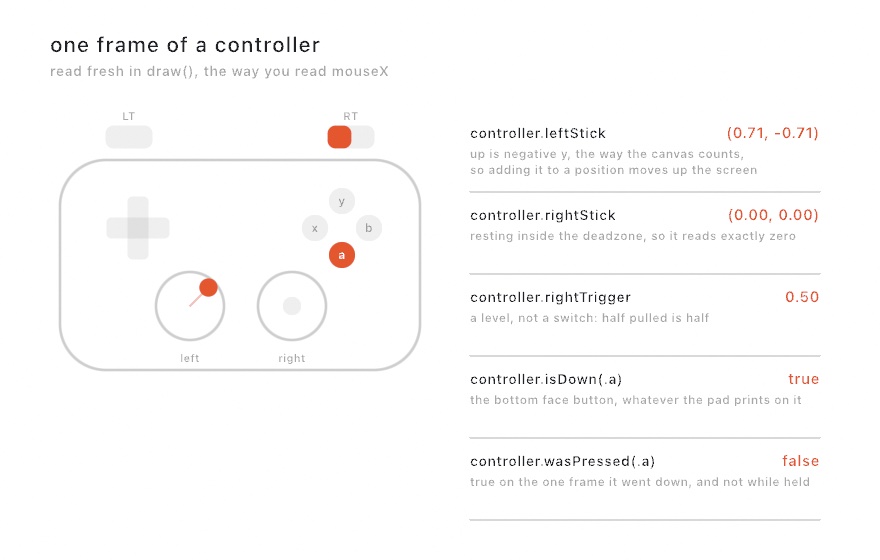
controller is player one as a Controller, taken fresh each frame. It is a snapshot rather than a live object, in the same way that mouseX is a number rather than something that keeps changing under you. Read it inside draw().
| Read | What it is |
|---|---|
leftStick, rightStick | Vector2, centered at zero, reaching 1 |
dpad | Vector2, each axis −1, 0 or 1 |
leftTrigger, rightTrigger | Double from 0 to 1 |
isDown(_:) | whether a button is held right now |
wasPressed(_:), wasReleased(_:) | whether it changed this frame |
anyButtonIsDown, anyButtonWasPressed | for a "press anything to start" |
isConnected, didConnect, didDisconnect | whether one is there, and whether that just changed |
name | what the controller calls itself |
player | which player number the system assigned it, 1 up |
batteryLevel, isCharging | charge from 0 to 1, or nil when the pad does not report it |
The three kinds of question get three shapes of answer, chosen for each question rather than made uniform. A stick is a level, so it is a number you read. A button press is an event, so it fires on exactly one frame however long the button is held. A controller arriving or leaving is a third thing, so it is both. isConnected is the state, and didConnect is the moment.
Unlike MIDI, there is no queue to drain. A press lasts something like a tenth of a second, which is several frames, so a hand cannot press and release a button between two of them. A machine sending MIDI can, which is why that tier has a drain and this one does not.
Nothing plugged in
A controller that is not there still answers. Sticks read centered, triggers read 0, no button is down, and isConnected is false. A sketch runs either way and does nothing in particular, so you do not need a check at every call site. Ask isConnected when it matters, which is usually to tell someone to plug a controller in.
An empty slot names no unavailableReason, because having no controller attached is not a fault. Something that is genuinely wrong does name one, and exports covers that case.
Which way is up
The sticks read in canvas terms. Pushing up gives a negative y, because Ollin's y grows downward from the top left. That means this line moves the position up the screen with no sign to remember:
position += controller.leftStick * speedThe system's own convention is the other way round. Ollin flips it once, on the way in, so you never have to flip it in a sketch. The dpad and the touchpad work the same way.
Buttons
Buttons are named by where they sit, not by what is printed on them. A PlayStation pad prints cross, circle, square and triangle where an Xbox pad prints A, B, X and Y. The system reports them by position, so .a is always the bottom face button, and a sketch written for one controller works on the other.
In the diamond, .y (triangle) is the top face button, .x (square) is the left, .b (circle) is the right, and .a (cross) is the bottom.
The rest: .leftShoulder, .rightShoulder, .leftTrigger, .rightTrigger, .leftStick and .rightStick (clicking a stick in), .up, .down, .left, .right on the dpad, .menu, .options, .home, and .touchpad.
Not every controller has every button. A button the controller lacks never reads as down.
The deadzone
A stick rarely rests at exactly zero, and a worn one rests further off. With no deadzone at all, a sketch that adds the stick to a position every frame drifts on its own. The default deadzone is 0.1:
controllerDeadzone(0.15)   // more, for a well-used controller
controllerDeadzone(0)      // none, reading the hardware untouched
The cut is radial and rescaled rather than flat. A stick just past the edge of the deadzone reads near zero, then grows smoothly to a full 1 when it is pushed all the way. Cutting each axis on its own would make the value jump the moment it escaped, and it would bend a diagonal hold toward the diagonal.
Motion
Some controllers report how they are being moved. PlayStation and Switch controllers do. Xbox controllers have no motion sensors at all and never will, whatever this is set to.
The sensors cost battery, so they stay off until a sketch asks:
override func setup() { controllersReportMotion(true) }

override func draw() {
    guard controller.hasMotion else { return drawStatus("this controller has no motion sensors") }
    rotate(controller.gravity.x * 0.5)
    drawRect(center: center, width: 400, height: 40)
}| Read | What it is |
|---|---|
hasMotion | whether this pad reports motion, and has been asked to |
rotationRate | how fast it is turning, radians per second about each axis |
gravity | which way is down as the controller sees it, so how it is being held |
acceleration | how hard it is being moved, gravity taken out, in g |
hasMotion is false when the hardware has no sensors, and also when nothing has asked for them. Check it rather than assuming.
Attitude, the controller's absolute orientation, is not available yet, because there is no public quaternion type to hand it back in. gravity covers the common case of "which way is this being held".
The touchpad
PlayStation controllers have a touchpad. hasTouchpad says whether this one does, touch is where the finger is with each axis from −1 to 1, and isTouching says whether a finger is on it at all. Check isTouching before you read touch, because touch holds its last position when no finger is on the pad.
if controller.hasTouchpad && controller.isTouching {
    drawCircle(center: center + controller.touch * 200, radius: 20)
}
.touchpad is the button, for pads whose surface also clicks.
Several controllers
for player in 1...4 {
    let pad = controller(player)
    guard pad.isConnected else { continue }
    draw(paddle: player, at: pad.leftStick)
}
connectedControllers is every attached pad, player one first, and controllerCount is how many there are.
A controller keeps its number for as long as it stays connected, and a new one takes the lowest free number. So unplugging player two does not turn player three into player two, and the next controller to arrive becomes the new player two. For the first four players, Ollin also writes the number to the controller itself, which is what lights the player indicator on hardware that has one.
Running behind another window
This is off by default, which matches the system's own default. A controller feeds whichever app is frontmost, so a sketch behind another window reads centered and unpressed.
controllersRunInBackground(true)Turn it on for an installation, or for a set where the sketch is projected while you type into a different window.
Pairing
A controller already paired with this Mac connects on its own. Pair one that has never been paired in System Settings, or from the sketch:
discoverControllers() // puts the system into pairing modePermission
A controller needs none. There is no consent prompt and no entitlement, and a plain swift run binary reads one with nothing configured. This was probed rather than assumed. The screen needs recording permission, but nothing here is gated.
Exports
A controller is live input, so --export and the other export flags read it as centered and unpressed. That way a render does not bake in whatever a hand happened to be doing when it started. Ollin says so once on stderr, and unavailableReason carries the same sentence for a sketch that wants to draw it:
if let reason = controller.unavailableReason { drawStatus(reason, style: .info) }What is not here
- Rumble and haptics. Controller vibration is an output, so it belongs with the rest of the haptics work rather than bolted onto the input side.
- Adaptive triggers. The DualSense's resistive triggers are an output too, for the same reason.
- The light bar. It is an output as well.
- Apple Pencil. Tilt, azimuth and force arrive with the iOS leg, where a Pencil exists. Its force will join the
pressurea sketch already reads, rather than becoming a second thing. - Racing wheels and spatial accessories. The system describes these, and nothing here reads them yet.
See also
- Input for the mouse, the keyboard, and trackpad pressure
- MIDI for knobs and faders, the other shape of hardware control
- Parameters for
@Paramparameters, which MIDI and OSC can drive - The
Integration/ControllerInputexample