Looks: a grade from a .cube file
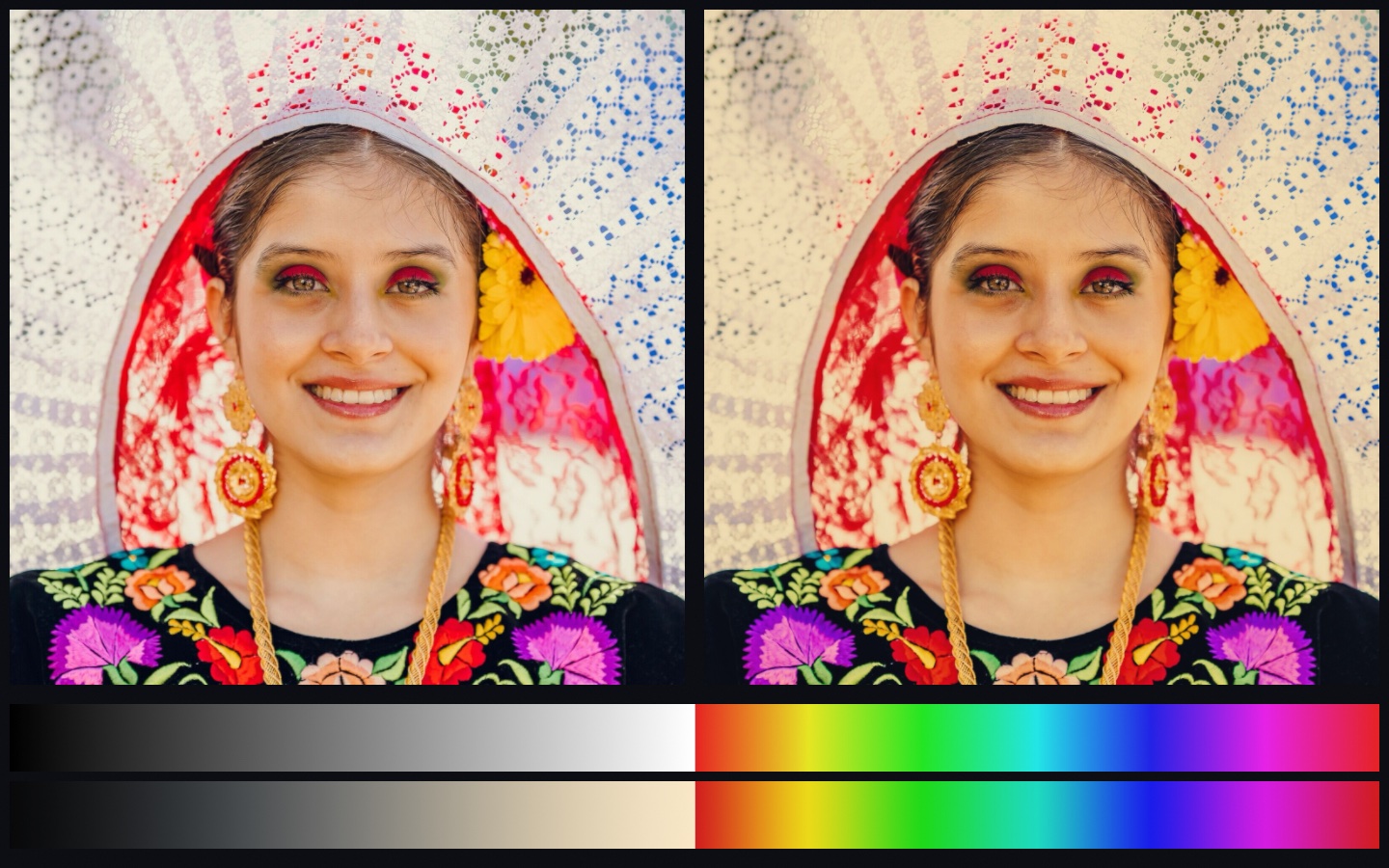
Color tools trade grades as .cube files. The file is a table that says, for every color, which color to show instead. A colorist builds one and hands it over. A film stock's look ships as one. A camera maker publishes one for its footage. Ollin reads that file into a ColorLUT and applies it with Filter.lut, on one layer or on the whole frame, and a look can also be written in code and saved as a .cube for any other tool to read.
Contents
- Quick start
- What a
.cubefile holds - Reading one
- Applying it
- How it reads a color
- Writing one of your own
- The bundled look
- On the web page
- Notes
Quick start
import Ollin

final class Graded: Sketch {
    var look = ColorLUT.warmPrint                      // the bundled look

    override func setup() throws {
        // Your own, beside the sketch. Read it once: it is a whole table.
        look = try ColorLUT(resource: "teal-orange", withExtension: "cube", in: .module)
    }

    override func draw() {
        drawImage(photo, 0, 0)
        postProcess(.lut(look, amount: 0.8))           // most of the way there
    }
}
What a .cube file holds
The format is plain text, published by Adobe and written by DaVinci Resolve, Premiere, Photoshop, and the rest. It comes in two forms, and a file holds one of them.
- A cube (
LUT_3D_SIZE n) holds an output color for every node of ann-sided lattice over the input's red, green, and blue. Any color can go anywhere, which is what a film look, a grade, or a print emulation needs. Grading tools export 33 on a side; 17 is common for a preview, 65 for a master. - Curves (
LUT_1D_SIZE n) hold one curve per channel withnnodes each. Each channel bends on its own and none can see the others. That is a tone curve or a transfer function, and it cannot turn one hue into another.
A # opens a comment, TITLE "…" names the table, and DOMAIN_MIN and DOMAIN_MAX (or Resolve's LUT_3D_INPUT_RANGE) say what input range the table covers, which is 0 to 1 unless the file says otherwise. Every other line is one entry of three numbers. In a cube the entries run with red changing fastest, then green, then blue, so the second line is one step of red and not one of blue.
Reading one
let look = try ColorLUT(contentsOf: "/Users/me/Looks/kodachrome.cube")   // a path
let look = try ColorLUT(resource: "kodachrome", withExtension: "cube", in: .module)
let look = try ColorLUT(data: bytes)                                     // from anywhere
let look = try ColorLUT(text: "LUT_3D_SIZE 2\n0 0 0\n1 0 0\n…")            // from a string
Every reader throws. A file that is not a .cube is refused with a ColorLUT.ReadError that names the line that stopped it, so a bad download or a truncated export says where it went wrong:
line 3: unknown keyword 'COLOR_SPACE'
line 12: an entry is three numbers; this line has 4 fields
the size declares 4913 entries and the table holds 4912
A read table carries its title, its form (.cube or .curves), and its size. Read in setup(), since a 33-sided cube is thirty-six thousand entries, and keep the value: the renderer keeps the table on the GPU by its contents, so a table built every frame is uploaded every frame.
Applying it
postProcess(.lut(look))                       // the whole frame
layer.filtered(.lut(look, amount: 0.5))       // one layer, half way toward the look
.lut(_:amount:) is a Filter like any other in the catalog, so it chains, runs inside a compose block, and applies to a layer or to the frame. amount fades the look in, from 0 (the picture as drawn) to 1 (the table's answer), mixed in linear light like the other color filters.
How it reads a color
A table is authored on the picture as a display shows it, the encoded values, not the linear light a layer holds. So the filter encodes each pixel before the read and decodes the answer after it, and a value above white reads as white, since a table has no node past its last. What the table does to white is still applied to a brighter value, which keeps the rest of it, so a tone map still sees the highlight.
A cube is read by tetrahedral interpolation, the way a grading tool reads it. The cell around the input is cut into six tetrahedra along its gray diagonal, and the four corners of the one that holds the point are weighed. Every one of those tetrahedra has the cell's black and white corners, so a gray input meets only the two gray corners, whatever the six colored corners around it hold. A table that leaves gray alone then does so between its nodes too, where the sampler's trilinear read would pull the colored corners in and tint a neutral. Curves are read linearly between their nodes, which is all a curve wants.
The same read is there on the CPU as color(for:), for a swatch, a palette, or a check:
let printed = look.color(for: .red)A table value below black reads as black. A file with a domain other than 0 to 1 has its input scaled into it first, and an input past the domain holds at the nearest end.
Writing one of your own
A cube can be built from a function of color, one node at a time, and written out as a .cube file that any grading tool reads:
let cooler = ColorLUT(size: 17, title: "Cooler") { c in
    Color(red: c.red * 0.92, green: c.green, blue: min(1, c.blue * 1.08))
}
postProcess(.lut(cooler))
try cooler.write(to: "cooler.cube")
ColorLUT.identity(size:) is the table that changes nothing: the control for a comparison, and the starting point for a look written by hand. cubeText is the file's text without the file, for a table that goes somewhere other than disk.
The bundled look
ColorLUT.warmPrint is a warm print, written by Ollin from four rules: blacks lifted a little, a gentle S through the midtones, the highlights warmed toward amber and the shadows cooled toward slate, and the whites held just short of paper. It is there to try the filter on, and the file itself (Sources/Ollin/Resources/Looks/WarmPrint.cube in the framework) carries the rules in its header, so it doubles as a template for a look of your own.
On the web page
A curves table crosses to the recorded web page as a strip, the way a gradient map does, and the page reads it live. A cube stays with video for now: the export stops and names the .lut filter.
Notes
- Two forms, one file. A file that declares both a
LUT_1D_SIZEand aLUT_3D_SIZE(Resolve can write a shaper curve ahead of a cube) is refused at the second size. Export the cube alone. - Sizes. A cube may be 2 to 256 on a side; curves 2 to 16,384 nodes.
- Where the look lands. A look applied with
postProcessreads the whole frame after every layer has composited, so it grades the marks, the pictures, and the effects alike. A look on one layer grades that layer alone. - Precision. An identity table hands the picture back byte for byte. The table's change is applied as a difference, and a difference under a millionth is taken as none, so the round trip through the transfer curve never moves a pixel the table did not.
- See
Examples/Color/Lookfor the bundled look wiped across a portrait, a look written in code, and any.cubedropped on the window.
See also Effects for the layers and the rest of the filter catalog, Color for Color, Ramp, and Palette, and Print color for the other table a picture goes through, a press profile.