SDF combinators
Compose signed-distance fields so shapes merge instead of stacking. A smooth union melts two shapes into one blob, and their colors blend across the seam. Subtraction carves one shape out of another, intersection keeps only the overlap, and morph blends between two shapes. Domain operators tile or mirror the whole field. The result fills as a single region, and a stroke traces the merged outline.
This is the geometry counterpart of the image-space layered effects. There you composite finished layers. Here you combine the distance fields before they are ever drawn, so the shapes fuse rather than overlap.
You build a field with the SDF value type and draw it with drawSDF. The value type is the core, and the scoped block form is sugar over it. A solid fill colors the leaves individually, so they melt at smooth seams. A linear or radial fill or stroke paints the whole merged region or outline as one continuous surface instead. See Gradient paint.

Contents
- Quick start
- Building a field
- Combining
- Modifiers: round and onion
- Placing and coloring
- Domain operators
- Scoped blocks
- 3D fields
- Fractal leaves
- Notes and limits
Quick start
Two shapes melt together, and the melt amount breathes:
override func draw() {
    background(.black)
    noStroke()
    let k = 20 + (sin(time) * 0.5 + 0.5) * 80   // how much they melt

    let blob = SDF.circle(radius: 150).colored(.init(hex: 0xff5470))
        .smoothUnion(
            SDF.rect(width: 260, height: 150, cornerRadius: 30)
                .colored(.init(hex: 0x3a86ff))
                .at(120, 0),
            k: k)
        .at(width * 0.5, height * 0.5)

    drawSDF(blob)
}
SDF.circle(...) and the other constructors are field values. .colored, .at, and .smoothUnion each return a new field, and drawSDF rasterizes the whole composition in one pass.
Building a field
The leaf constructors are the common centered region shapes. Each one sits on the field origin, and you move it with .at.
| Constructor | Shape |
|---|---|
SDF.circle(radius:) | a circle |
SDF.ellipse(radiusX:radiusY:) | an axis-aligned ellipse |
SDF.rect(width:height:cornerRadius:) | a rectangle, optionally rounded |
SDF.rect(width:height:cornerRadii:) | a rectangle with a radius per corner (CornerRadii) |
SDF.square(_:cornerRadius:) | a square |
SDF.square(_:cornerRadii:) | a square with a radius per corner |
SDF.ngon(radius:sides:) | a regular polygon, one vertex up |
SDF.star(outerRadius:innerRadius:points:) | a star |
SDF.rhombus(width:height:cornerRadius:) | a diamond |
SDF.ring(innerRadius:outerRadius:) | a filled ring |
SDF.triangle(radius:) | an equilateral triangle, point up |
The scoped block form reaches every fillable shape Ollin can draw, such as drawNgon, drawHeart, drawTrapezoid, and the rest. Use a block when you want a shape the value type does not name directly.
Combining
Each combinator takes another field and returns the combined one, so they chain. The smooth variants take a smoothing radius k in canvas points, which sets how wide the blend is. They also blend the two operands' colors across that blend, so a melt reads as one object.

let a = SDF.circle(radius: 100).colored(.red)
let b = SDF.circle(radius: 100).colored(.blue).at(120, 0)

a.union(b)              // hard union: the area covered by either
a.smoothUnion(b, k: 40) // melt them together (colors blend at the seam)
a.subtract(b)           // a with b carved out
a.smoothSubtract(b, k: 40)
a.intersect(b)          // only where both overlap (a lens)
a.smoothIntersect(b, k: 40)
a.morph(b, amount: 0.5) // blend the shape itself between a and b (0 = a, 1 = b)
subtract and smoothSubtract keep the first field's color, because it is the body that remains. morph is a field blend rather than a crossfade, so at amount: 0.5 the boundary is halfway between the two shapes.

The joint family sits beside the smooth, melted family, and it shapes the seam like machined work instead of melting it. chamfer* cuts a crisp 45° bevel of the given size along the seam, and stairs* carves the seam into a staircase of steps steps. Each comes in the same three forms, and the color is picked cleanly from the nearer side with no blend, which is what makes the joint read as two parts fitted together.
a.chamferUnion(b, radius: 20)             // joined with a 45° bevel along the seam
a.chamferSubtract(b, radius: 20)          // b carved out, the cut's rim beveled
a.chamferIntersect(b, radius: 20)         // the overlap, its edge beveled
a.stairsUnion(b, radius: 24, steps: 4)    // joined through a 4-step staircase
a.stairsSubtract(b, radius: 24, steps: 4) // the cut's rim stepped
a.stairsIntersect(b, radius: 24, steps: 4)
The joint family continues with the same three forms wherever a boolean makes sense. columns* joins, cuts, or intersects through a row of count circular ribs, which gives a fluted, reeded seam. Four detailing ops then shape one body along another's outline rather than combining them. engrave scores a v-notch of the given depth. groove cuts a flat-bottomed channel, depth deep, reaching width to each side of the other's outline. tongue raises the mating ridge, the carpentry joint of that name. pipe is not a boolean: it keeps only a round bead running along the two outlines' crossing, and both bodies vanish.
a.columnsUnion(b, radius: 30, count: 4)     // joined through a row of 4 ribs
a.columnsSubtract(b, radius: 30, count: 4)  // the cut's rim fluted
a.columnsIntersect(b, radius: 30, count: 4)
a.engrave(b, depth: 10)                     // a v-notch scored along b's outline
a.groove(b, depth: 12, width: 10)           // a flat channel cut along it
a.tongue(b, height: 12, width: 10)          // the ridge that mates into that groove
a.pipe(b, radius: 16)                       // only the bead along the crossing remains
The joint ops shape the seam exactly where the two surfaces cross at a clear angle, near a right angle. Where surfaces graze or run nearly parallel within the joint radius, the pattern can echo faintly past the seam. Keep the radius smaller than the gap between any parallel faces. Examples/Shapes/CombinatorsJoinery and Examples/Shapes/CombinatorsDetailing are contact sheets of the whole family.
Modifiers: round and onion
field.rounded(12)   // grow the field outward by 12 with rounded corners
field.onion(8)      // hollow it into an 8-wide shell straddling its outline
onion turns any field into a band, which is the same method drawRing uses, so you can hollow out a melted blob or a morphed star.
Placing and coloring
field.at(540, 540)   // move the field's origin to a point
field.at(somePoint)        // ... given a Vector2
field.rotated(.pi / 6)     // rotate about the origin
field.scaled(1.5)          // uniformly scale about the origin
field.colored(.orange)     // paint the unpainted leaves this color
Order matters, because every transform applies to whatever it wraps. circle.at(p).scaled(2) scales the moved circle, so the circle also moves twice as far from the origin. circle.scaled(2).at(p) scales in place and then moves. colored fills only leaves that have no color yet. So set a leaf's own color before combining when you want a two-color melt, and use colored on the whole field as a fallback. A leaf with no color and no enclosing colored takes the current fill.
Gradient paint. Solid leaf colors are one way to paint a field. The other is a single gradient over the whole merged region. Set a linear or radial fill, the same Gradient any 2D shape uses, and the ramp paints the field by position. It flows unbroken across a smooth-union seam, where the leaves' own colors would instead meet and melt:
fill(.linear(from: Vector2(-160, -140), to: Vector2(200, 160), warmRamp))
drawSDF(SDF.circle(radius: 120).smoothUnion(SDF.rect(width: 210, height: 120).at(135, 0), k: 60))
A gradient stroke traces the merged outline the same way. The gradient is sampled in the field's own coordinates, so it turns with rotated and at, and a gradient fill bypasses the per-leaf .colored colors. Along-path gradients are not supported on a merged field, because there is no single path to run along, so that paint falls back to no gradient. See Examples/Shapes/CombinatorsGradient. The 3D fields paint a gradient too, but in screen space. See 3D fields.
Per-axis sizing. scaled(_:) scales uniformly. Two other tools size each axis on its own, and the difference between them matters:
field.stretched(x: 80)         // elongate along x by inserting straight space (circle -> stadium)
field.scaled(x: 1.5, y: 0.6)   // non-uniform scale (circle -> ellipse)
stretched is an elongation. It splits the shape and inserts straight space, so a circle becomes a stadium and a sphere becomes a capsule, and it stays an exact distance field. That means smooth blends, rounding, and onion shells keep their even width. scaled(x:y:) is a true non-uniform scale, but a non-uniform scale is not a valid distance field, so it gives a conservative bound. The outline is right, yet the smoothing distorts under strong anisotropy, and it holds up to about 2-3×. Prefer stretched for per-axis sizing, and reach for scaled(x:y:) only when you want the squashed-ellipse look. Both have 3D forms, stretched(x:y:z:) and scaled(x:y:z:).
Domain operators
Domain operators transform the space the field lives in, so one shape becomes many.
field.mirrored(x: true)                       // reflect across the y axis (kaleidoscope)
field.mirrored(x: true, y: true)              // reflect across both axes
field.repeated(spacing: Vector2(160, 0), count: 3)   // tile: 3 copies each side, on a 160 grid
field.at(120, 0).repeatedRadially(count: 8) // fold a wedge into a ring of 8 (a mandala)repeated's count is the number of copies to each side of the origin on each axis, and a spacing component of 0 leaves that axis untiled. repeatedRadially's count is the number of copies spaced evenly around the origin. Offset the wedge from the origin first with .at, so the copies fan out around it. A domain operator wraps a whole field, so you can tile a melted cluster, mirror a carved shape, or ring a wedge into a mandala.

Scoped blocks
The block form is sugar over the value type. Bare draw calls inside a block are captured and merged under the block's operator, then drawn with the current fill and stroke when the block closes. It reads like ordinary immediate-mode drawing, and it reaches every fillable shape.
fill(.orange)
smoothUnion(k: 18) {
    drawCircle(0, 0, 120)
    drawRect(90, 0, 200, 80)
    drawNgon(-90, 0, 60, sides: 6)
}
The blocks mirror the combinators and domain operators: union { }, smoothUnion(k:) { }, subtract { }, smoothSubtract(k:) { }, intersect { }, smoothIntersect(k:) { }, the joint family (chamferUnion(radius:) { }, chamferSubtract(radius:) { }, chamferIntersect(radius:) { }, stairsUnion(radius:steps:) { }, stairsSubtract(radius:steps:) { }, stairsIntersect(radius:steps:) { }, columnsUnion(radius:count:) { }, columnsSubtract(radius:count:) { }, columnsIntersect(radius:count:) { }), mirrored(x:y:) { }, repeated(spacing:count:) { }, repeatedRadially(count:) { }. morph and the detailing ops (engrave, groove, tongue, and pipe) are value-type-only. They read as "detail this body along that surface", so the two operands are not interchangeable the way a block's captured children are. The blocks nest, so a domain block can wrap a combine block:
fill(.indigo)
repeated(spacing: Vector2(150, 0), count: 2) {
    smoothUnion(k: 12) {
        drawRect(-30, -30, 60, 60, cornerRadius: 14)
        drawCircle(34, 0, 22)
    }
}
Each captured call's own fill becomes that leaf's color, so colors melt at a smooth seam exactly as they do with .colored. Set up position with the transform stack, translate and rotate, around the block. Non-region draws inside a block, such as lines, text, and images, are ignored.
The sculpt block. The blocks above fix one operator for everything inside them. sculpt { } instead makes the operator and the melt amount mutable state, so a form reads top to bottom like working clay. Shapes add() on, which is the opening mode, or carve() away. Each one melts over the current blend(_:) radius, and the opening value of 0 is a hard seam. The first shape is the base, and each later one folds under the state active when it was drawn. A nested block, such as a mirrored { } pair or a sub-assembly, lands as one piece under the state at its close. Flipping one verb turns a bump into a dent, which is what makes this the natural block for live coding:
sculpt {
    blend(0.3)                 // melt amount for what follows
    fill(.init(hex: 0xd96f4e))
    drawSphere(radius: 1.0)                                        // the body
    withState { translate(0, 0.95, 0)
                drawTorus(radius: 0.5, tube: 0.16) }               // a lip melts on
    carve()                    // now shapes cut away
    withState { translate(0, 1.1, 0); drawSphere(radius: 0.52) }   // the hollow
    add(); blend(0.05)         // back to adding, nearly hard
    withState { translate(0, 0.35, 1.05); rotateX(.pi / 2)
                drawTorus(radius: 0.34, tube: 0.09) }              // a crisp handle
}
The verbs apply only inside a sculpt { } block, and elsewhere they log once and do nothing. Each block keeps its own state, so nested sculpts do not leak into each other. Examples/3D/Raymarching/RaymarchedClay throws a small vessel this way, and the same block sculpts 2D region shapes.
3D fields
The same idea works in space. SDF3D builds a 3D field, and drawSDF3D sphere-traces it as one merged surface inside an active 3D camera. The surface is lit by the scene's lights and depth-composited with the rasterized meshes, so each occludes the other where they meet. It is the 3D sibling of SDF and drawSDF, with the same combine, modifier, and transform vocabulary.

override func draw() {
    camera(.orbiting(target: .zero, radius: 5.5, azimuth: time * 0.35,
                     elevation: 0.4, fieldOfView: .pi / 4))
    directionalLight(.white, direction: Vector3(-0.6, 0.7, 0.5))
    material(.jade)

    let blob = SDF3D.sphere(radius: 1).colored(.init(hex: 0x39d0ff))
        .smoothUnion(SDF3D.sphere(radius: 0.8)
            .at(cos(time) * 1.2, 0, sin(time) * 1.2)
            .colored(.init(hex: 0xff4f97)), k: 0.6)
        .smoothSubtract(SDF3D.sphere(radius: 0.7).at(0, 1, 0), k: 0.2)

    drawSDF3D(blob)
}
The leaf constructors are the common centered solids:
| Constructor | Solid |
|---|---|
SDF3D.sphere(radius:) | a sphere |
SDF3D.box(width:height:depth:) / SDF3D.box(size:) | a box / cube |
SDF3D.roundBox(width:height:depth:radius:) / SDF3D.roundBox(size:radius:) | a box / cube with filleted edges |
SDF3D.torus(radius:tube:) | a torus, lying in the xz-plane |
SDF3D.capsule(radius:height:) | a capsule along the y-axis |
SDF3D.cylinder(radius:height:) | a cylinder along the y-axis |
SDF3D.cone(radius:height:) / SDF3D.cone(bottomRadius:topRadius:height:) | a cone / frustum along the y-axis |
SDF3D.octahedron(radius:) | an octahedron |
SDF3D.ellipsoid(radiusX:radiusY:radiusZ:) | an ellipsoid |
SDF3D.line(from:to:radius:) | a capsule stroke between two free points (the armature primitive) |
SDF3D.hexPrism(radius:height:) | a hexagonal prism along the y-axis (radius to the flat sides) |
SDF3D.pyramid(base:height:) | a square pyramid |
SDF3D.cappedTorus(radius:tube:angle:) | an open torus arc in the xz-plane (a horseshoe; angle to each side of +z) |
SDF3D.link(height:radius:tube:) | a chain link along the y-axis (a torus stretched straight in the middle) |
SDF3D.plane(normal:offset:) | an infinite plane (default a horizontal floor; offset is its height) |
line is the sculptor's stroke. Unlike the centered solids it takes two arbitrary endpoints, so a few chained lines sketch limbs, branches, or scaffolding for the smooth unions to build on. link stacks into chains with alternating rotatedY(.pi / 2). See Examples/3D/Raymarching/RaymarchedJoinery.
plane is the one unbounded leaf. It has no finite extent, so its field marches to the camera's far plane rather than to a bounding box, and a ray that sees only open sky steps quickly out to the horizon. It is value-type-only, because a plane has no mesh primitive, so the scoped block form cannot capture it. Merge it with the scene's shapes as one field and call castShadows(), and the shapes drop soft self-shadows onto it, which gives a true infinite floor. See Examples/3D/Raymarching/RaymarchedPlane.
Fractal leaves
Three classic fractals are leaves too. None of them has a distance anyone can write down, so each one estimates it. The estimate iterates the fractal's own map from the query point and reads how fast the orbit escapes, and the same sphere tracer draws the result:
| Constructor | Solid |
|---|---|
SDF3D.mandelbulb(power:iterations:radius:) | the Mandelbulb: the triplex power-power map (8 is the classic, seven lobes around its equator), fitted inside radius |
SDF3D.mengerSponge(iterations:size:) | the Menger sponge: a cube size on a side with the middle third of every face bored through, iterations times over |
SDF3D.mandelbox(scale:iterations:size:) | the Mandelbox: a box fold, a sphere fold, and a scale, iterated; scale is its own parameter (-1.5 is the classic), and the set is fitted into a cube size on a side |
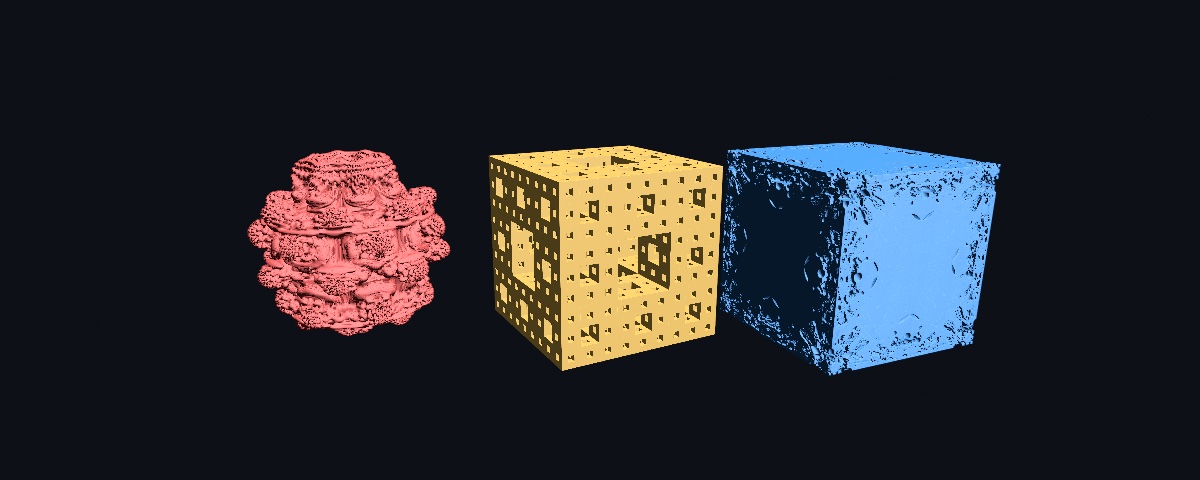
// The breathing bulb: a fractional power is a different picture, so sweep it.
drawSDF3D(SDF3D.mandelbulb(power: 8 + 4 * sin(time * 0.3), iterations: 8, radius: 1.2))
Three things are worth knowing. First, iterations trades detail against cost. Every march step runs the loop, so raise it for a close-up and lower it for a busy scene. The sponge's holes drop below a pixel around level 5 at an ordinary framing. Second, a fractional power is a different bulb, and sweeping it slowly is the classic breathing animation. Third, the finest detail a picture shows is set by the march itself, not by the fractal. So to see deeper, make the leaf bigger and raise iterations rather than moving the camera closer. Each leaf carries its own bound, and the Mandelbox is clipped to its cube, so it stays finite whatever its scale. The estimates lean on the tracer's step fudge the way a smooth union does. The fractal leaves are value-type-only, because no mesh primitive stands in for them in the scoped block form. The example is Examples/3D/Raymarching/RaymarchedFractals, a menu over the three with a dial for each one.
The combinators all behave exactly as they do in 2D: .union, .smoothUnion(_:k:), .subtract, .smoothSubtract(_:k:), .intersect, .smoothIntersect(_:k:), and .morph(_:amount:), plus the joint family, which is the chamfer, stairs, and columns trios along with the engrave, groove, tongue, and pipe detailing ops. So do the modifiers (.rounded and .onion), the domain operators (.mirrored(x:y:z:), .repeated(spacing:count:), and .repeatedRadially(count:around:)), and .colored. The smooth ops blend the leaf colors across the seam, and the joint ops pick the color cleanly from the nearer side for the machined look. Positioning works in three dimensions, through .at(_:_:_:), .at(_ p: Vector3), .rotated(_:axis:) with .rotatedX, .rotatedY, and .rotatedZ beside it, and the uniform .scaled(_:). The domain operators rewrite the query point as point-space scopes, so the whole mirrored, tiled, or radially repeated field is still one sphere-traced surface with no per-copy draw cost. Method-chain order stays exact, so a.at(p).repeated(…) tiles the moved field and a.repeated(…).at(p) shifts the tiling. repeated is finite, at count copies to each side, so the field stays bounded. repeatedRadially folds a wedge into a ring of count copies around axis, which defaults to the y-axis, so offset the wedge off the axis first with .at(r, 0) for the copies to fan out.
Three dimensions also add the sculpting distortions. Each one is a point-space scope like the domain operators, so the whole distorted form stays one traced surface:
SDF3D.box(width: 0.8, height: 2.4, depth: 0.8)
    .twisted(1.2)      // the cross-section screws around y: radians per unit of height
SDF3D.box(width: 2.4, height: 0.5, depth: 0.7)
    .bent(0.6)         // the form curls about z: radians per unit along x
SDF3D.sphere(radius: 1)
    .displaced(amplitude: 0.1, frequency: 6)   // sine-product surface ripples
SDF3D.sphere(radius: 1)
    .roughened(amplitude: 0.15, frequency: 3)  // signed value-noise relief (the rock look)
Twist runs around the y-axis and bend runs about z, so rotate the field first for another axis. All four are distance bounds rather than exact fields, and the march compensates automatically with a rescale sized to the distortion's strength. Strong settings therefore trade some tracing speed for a surface that never breaks up. Examples/3D/Raymarching/RaymarchedDistort shows all four.
The scoped block form works in 3D too, through the same smoothUnion(k:) { } and the other combine blocks as in 2D. Inside a block with a camera set, the bare mesh primitives are captured and merged as raymarched fields rather than rasterized as separate solids. Those primitives are drawSphere, drawBox, drawCapsule, drawCone, drawTorus, drawCylinder, drawRoundedBox, and drawOctahedron. The transform stack works inside the block, and each call's own fill becomes that lobe's color:
material(.jade)
smoothUnion(k: 0.35) {
    fill(.init(hex: 0x3ad6c5))
    withState { translate(0, -0.6, 0); drawSphere(radius: 0.95) }   // body
    withState { translate(0, 0.7, 0);  drawSphere(radius: 0.62) }   // head
    fill(.init(hex: 0xff5d73))
    withState { translate(0, 1.5, 0); drawCone(radius: 0.45, height: 0.7) }  // hat
}
The block form's domain blocks work in 3D too: mirrored(x:y:z:) { … } and repeated(spacing:count:) { … }, which takes a Vector3 spacing for 3D tiling. Wrap a combine block in one to mirror or tile a whole built cell. A primitive that has no analytic field, such as drawIcosphere, drawTorusKnot, or a custom Mesh, is ignored inside a block with a one-time note.
Self-shadowing and cast shadows. With castShadows(), a merged field drops soft shadows onto itself. The shadow comes from a penumbra march toward the casting light, and it contact-hardens, so it is sharper where shapes meet and softer as the shadow falls away. This is the same opt-in as mesh shadows, so a field without castShadows() shades unshadowed and stays byte-identical. A field also casts onto rasterized meshes under every light. Under a directional or spot caster, the field renders into the 2D shadow map the meshes sample, so a mesh floor catches a floating field's shadow. A point or ray-traced caster has no such map, so the lit mesh fragments march the field inline toward the light instead. See Examples/3D/Raymarching/RaymarchedCastShadow, whose key swaps the caster kind. A field also receives a mesh's shadow in return, under every light type. It samples whichever shadow the caster wrote: the 2D map for a directional or spot light, and the omnidirectional cube or the traced mesh structure for a point light. A floating mesh therefore drops its shadow onto the field just as it does onto another mesh. See Examples/3D/Raymarching/RaymarchedReceiveShadow, whose key swaps the caster kind.
Materials and environment light. A field shades through the same material and lighting model as the meshes. The active material(_:) applies per drawSDF3D call, so a jade melt takes its sheen and subsurface glow, and a .metal(roughness:) field is a true metal. Under an environment(_:) the field gathers the same image-based ambient a mesh does: a physically based field reflects the HDRI, and the other materials take its diffuse irradiance. A field and a mesh sharing a material therefore read identically in one scene. See Examples/3D/Raymarching/RaymarchedEnvironment.
The merged surface's silhouette is anti-aliased analytically, because a sphere-traced fullscreen pass gets no MSAA at its hit or miss edge. The march measures how closely a ray that misses the surface grazed it, relative to the pixel's own footprint, and the edge fades by that coverage. This is automatic, so any field's outline stays smooth without supersampling.
Gradient paint. A solid fill colors the leaves individually, and they melt at smooth seams. A gradient fill paints the whole merged surface instead, sampled by each hit's projected screen position. It is the same canvas-space Gradient every 2D shape uses, fill(.linear(from:to:_:)) and .radial(center:radius:_:), so it stays fixed to the frame as the field turns beneath it. See Examples/3D/Raymarching/RaymarchedGradient. A per-leaf .colored is bypassed while a gradient fill is active.
The 3D path is opt-in like the rest of 3D mode, so a 2D sketch never pays for it. Coloring is either solid per leaf or the screen-space gradient described above, and scaling is uniform only.
Frame rate: raymarchQuality(_:). A field is a fullscreen sphere-tracer, so its cost is bound to pixel count. The more of the window it covers, the more it costs. The raymarchQuality dial trades resolution for frame rate on the live preview:
raymarchQuality(.performance)   // quarter-resolution: the heaviest fields
raymarchQuality(.default)       // half-resolution (the default, keeps a busy field smooth)
raymarchQuality(.detail)        // full resolution
.default is a half-resolution budget, and it is already in effect with no code, so most fields stay smooth out of the box. Reach for .performance only on the heaviest scenes, such as an infinite plane or dense self-shadows. The budget is coverage-adaptive. It applies in full when the field fills the window, and a field covering less of the screen is traced denser, up to full resolution, for the same marched-pixel cost. A dollied-out camera or a small form in a big scene is one of those cases. So zooming out keeps the surface crisp instead of dissolving it into upsampled blur, and the dial only ever softens a field while it is large on screen, where the softness is hardest to see. A depth-preserving upsample composites the field back to full size, and meshes still occlude it correctly. With the automatic .default, --export and headless renders sphere-trace at full resolution, so exported art is never downscaled. See Export ▸ Render quality. For an exact budget instead of the tiers, raymarchResolution(_:) takes a custom fraction, so raymarchResolution(0.75) traces at 75% at full coverage. The tiers are 1.0, 0.5, and 0.25. For an exact, machine-independent march budget use raymarchSteps(_:), which always runs at full resolution. Scripts/benchmark.sh raymarch measures the per-GPU cost.
Notes and limits
- Solid or linear/radial gradient. A field fills with solid leaf colors, or with a single linear or radial gradient over the whole merged region and outline, as described above. Along-path gradients have no single path on a merged field, so they are not supported there.
- Closed regions only. Combinators merge fillable shapes. Open marks such as lines, open arcs, and Bézier strokes have no interior to merge, so they are not combinator leaves.
- Per-axis sizing is
stretched, which is exact, orscaled(x:y[:z]), which is a bound, as described above. Plainscaled(_:)is uniform. - 2D and 3D.
SDFanddrawSDFare the 2D fields on this page.SDF3DanddrawSDF3Dsphere-trace the same kind of field in space, described under 3D fields. The 3D form is opt-in and shares the same per-axis tools, and its gradient paint is screen-space rather than field-space. - A composition is bounded by a large node and nesting budget. A field past that budget is skipped with a console note rather than mis-drawn.
See also Drawing for the immediate-mode shapes and the transform stack, Geometry for the vector Shape booleans, which combine filled outlines and are the polygonal counterpart to these field operators, Color for the color types the leaves carry, and 3D for the camera and lights the 3D fields draw through. The examples are Examples/Shapes/Combinators (2D), Examples/Shapes/CombinatorsGradient (2D gradient fill + stroke on a merged field), Examples/Shapes/CombinatorsStretch (2D per-axis stretch + non-uniform scale), Examples/3D/Raymarching/RaymarchedSDF (merged metaball, depth-composited with a mesh), Examples/3D/Raymarching/RaymarchedShapes (the 3D primitive catalog), Examples/3D/Raymarching/RaymarchedSculpt (the scoped block form), Examples/3D/Raymarching/RaymarchedDomain (the mirror and repeat domain operators), Examples/3D/Raymarching/RaymarchedRadial (the radial/polar repeat operator), Examples/3D/Raymarching/RaymarchedFractals (the fractal leaves: a Mandelbulb, a Menger sponge, and a Mandelbox), Examples/3D/Raymarching/RaymarchedPlane (the infinite plane grounding shapes with self-shadows), Examples/3D/Raymarching/RaymarchedShadow (self-shadowing under castShadows()), Examples/3D/Raymarching/RaymarchedCastShadow (a field casting its shadow onto a rasterized mesh, under a directional or point caster), Examples/3D/Raymarching/RaymarchedReceiveShadow (a field receiving a mesh's shadow, under a directional or point caster), Examples/3D/Raymarching/RaymarchedStretch (per-axis stretch and non-uniform scale), Examples/3D/Raymarching/RaymarchedGradient (a screen-space gradient painting the merged surface), and Examples/3D/Raymarching/RaymarchedEnvironment (fields lit by an environment beside mesh parity spheres).