Swarm
Swarm runs a crowd of steering agents on the GPU. It offers the same set of behaviors as the CPU Vehicle and Boids, and it runs them over the SpatialHash neighbor search. A flock here is therefore tens or hundreds of thousands of agents rather than a few hundred. It ships with import Ollin, so you need no satellite.
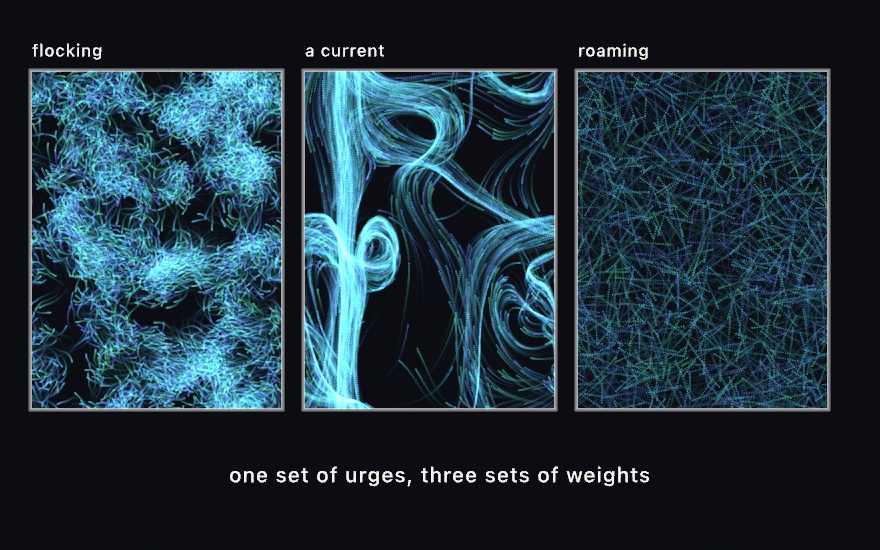
Every behavior is a weight, and a weight of zero turns that behavior off. The numbers you set decide what the swarm becomes: a flock, a crowd chasing the cursor, or a set of agents roaming with no goal.
Contents
Making one
var flock: Swarm!

override func setup() {
    background(.black); noClear()
    flock = makeSwarm(count: 30_000, perceptionRadius: 16)
    flock.separation = 1.5
    flock.alignment = 1.5
    flock.cohesion = 0.8
}

override func draw() {
    background(.black)
    blendMode(.add)
    stepSwarm(flock)
    drawParticles(flock)
}
makeSwarm(count:perceptionRadius:colors:size:bounds:seed:) builds a swarm over the whole canvas by default, seeded from the sketch's variation. You fix count and perceptionRadius when you build it. Everything else is a live property, so you can set it on any frame or bind it to a @Param.
The world is a torus. An agent that leaves one edge comes back at the opposite one, and the neighbor search reaches across the seam too. There are no edges for a flock to pile up against.
The behaviors
Each behavior works out a desired velocity, then returns the difference between that and the velocity the agent already has. The weighted sum of those differences is capped at maxForce, and it drives the agent. The agent's own speed is capped at maxSpeed.
| Behavior | What it does | Needs neighbors |
|---|---|---|
separation | steers away from whoever is inside separationRadius | yes |
alignment | steers toward the average heading of the neighbors it can see | yes |
cohesion | steers toward the middle of them | yes |
seek | steers at target | no |
flee | steers away from target | no |
arrive | steers at target but slows to a stop over slowingRadius | no |
wander | roams, turning by a random walk rather than jittering on the spot | no |
flow | follows a swirling flow field, with flowScale setting the size of its swirls | no |
Turn the three flocking rules on at once and you get the classic flocking model. With only flow on, the agents follow streamlines through a field. With only wander on, you get a crowd of independent roamers.
flee is not seek with a negative weight. An agent that flees wants to travel away at full speed. That is a different desired velocity, not the opposite force, which is why both behaviors exist.
Pursuit and evasion are not separate behaviors, because you can build them from the ones that are here. Pursuit is seek aimed at where the quarry will be, so lead the target yourself and seek becomes pursuit:
flock.target = prey.position + prey.velocity * 0.4   // where it will be in 0.4s
flock.seek = 2
Parameters
| Parameter | Meaning | Default |
|---|---|---|
target | the point seek / flee / arrive steer by | .zero |
maxSpeed | top speed, points per second | 190 |
minSpeed | slowest an agent may travel, and 0 lets it stop | 0 |
maxForce | strongest steering force, points per second squared | 620 |
separationRadius | how close is too close (clamped to perceptionRadius) | 14 |
viewAngle | field of view in radians, where .tau sees all the way round | 4.6 |
slowingRadius | where arrive begins to ramp down | 140 |
wanderRadius | how far the roaming can swing | 26 |
wanderDistance | how far ahead the wander circle sits, where larger gives a gentler arc | 62 |
wanderRate | how fast the wander walk turns, radians per second | 5.5 |
flowScale | flow-field frequency, where smaller gives broader swirls | 0.0022 |
flowLookAhead | how far ahead the field is read | 40 |
Speeds and forces here are per second, while the CPU Vehicle's are per step. A swarm therefore keeps its pace whatever the frame rate.
Choosing the numbers
Three of these parameters are tied to each other. When a swarm looks wrong, one of the three is usually the cause rather than a weight:
perceptionRadiussets how many others an agent sees, which iscount · π · radius² / canvas area. Around twenty works well. With far more than that, every agent averages over most of the swarm. Alignment and cohesion then pull toward the same global mean, and the structure washes out.separationRadiusshould be one or two times the mean spacing between agents, which is roughly√(area / count). Set it much larger and every agent pushes at every other one all the time, which flattens the swarm into an even gas.- The turning circle is
maxSpeed² / maxForce. Make it a few timesperceptionRadius. If it is much tighter, agents orbit inside their own neighborhood instead of traveling. If it is much wider, agents leave their neighbors behind before they can answer them. An agent should also take several frames to cross its perception radius.
minSpeed is the fix for a swarm that sets solid. In the plain steering model, an agent pushed at from every side simply stops. In a crowd, the stalled agents become a wall that the rest jam against, so the whole swarm freezes into a fixed pattern. A floor on speed keeps it moving, on the grounds that a bird cannot hover. It is off by default, because stopping is what the published model does.
Seeing the movement
A single frame of a swarm shows you where every agent is, so it is a picture of density and not of movement. Agents typically move a few points per frame, so their marks overlap and nothing reads as direction. Draw a translucent rectangle over an accumulating canvas instead, and each agent leaves its own recent path:
override func setup() {
    background(.black); noClear()
    ...
}

override func draw() {
    blendMode(.normal)
    noStroke()
    fill(Color(white: 0.02, alpha: 0.16))
    drawRect(0, 0, width, height)     // fade what is already there
    blendMode(.add)
    stepSwarm(flock)
    drawParticles(flock)
}
Use a rectangle here, not background(_:). While accumulating, background(_:) wipes the canvas however little alpha its color carries, so it leaves no trail at all.
Notes
- Speed. On an M2 at 1080² in a release build, 30,000 flocking agents draw at 60 fps. At 120,000 agents, each seeing about 80 others, the rate is 34. The neighbor search is the cost, and it grows with how many neighbors each agent has, not just with
count. A swarm with none of the three flocking weights on skips the neighbor sort entirely. A million wandering or seeking agents then step at 60 fps, and what limits them is drawing a million marks rather than steering them. - Frame-exact on one machine. An export, or a take playing back, puts the agents in each cell of the neighbor search in index order, as every system built on
SpatialHashdoes, so the same seed draws the same frames. Flocking is chaotic, so another GPU's arithmetic can still take a run somewhere else. A live window keeps the faster one-pass order, where the wall clock means no run repeats anyway. - A dense swarm organizes into lanes and cells. Fill the canvas at high density with all three flocking rules on. You then get bands, vortices, and a maze of streams rather than separate flocks in open space. That is what the rules do at that density, and it is not a fault. For distinct flocks, use fewer agents relative to the canvas.
viewAngleleaves a blind spot behind each agent by default, and that is what keeps a flock from folding back through itself. Widen it to.taufor all-round vision.
Example: Examples/Simulation/Swarm.