Surface reconstruction
Two tools turn a set of 3D points back into a surface. Each one returns a triangle Mesh, and they answer two different questions.
particleSurfacetreats the points as material. Every point becomes a small ball, and nearby balls melt together into one smooth skin. Use it for a splash, a blob, or a swarm dense enough to read as a body.reconstructSurfacetreats the points as samples of a surface that existed, such as a depth-camera room sweep, a scanned object, or a sampled form. It rebuilds that surface, holes and all.
let skin = particleSurface(of: positions, radius: 0.1)

let room = reconstructSurface(of: world.cloud, spacing: world.voxelSize * 2,
                              orientedToward: cameraPath)
drawMesh(room)
Both are deterministic for the same inputs. Both come back as ordinary meshes, which take materials, lighting, shadows, subdivision, and export. Both are CPU work that belongs in setup, so build the mesh once and keep it.
Contents
- Skinning points
- Rebuilding a sampled surface
- The fitting: planes or robust
- Orientation: cameras first
- Holes are honest
- Colors carry
- Sweeping a room
- Cost and parameters
Skinning points
particleSurface(of:radius:blend:resolution:) needs nothing but the points. Each point becomes a ball of radius. Where balls overlap, the surface follows a smooth local average instead of the lumpy union of the spheres. That is the surfacing look particle fluids use. blend sets how far that averaging reaches, as a multiple of radius. A higher value melts neighbors together from farther apart, and 1 comes close to separate spheres. A single isolated point comes back as an exact ball.
let blob = particleSurface(of: points, radius: 0.08, blend: 2.5, resolution: 96)There is no orientation problem here, and no idea of a hole, because the skin always closes around whatever points you give it. That is why it is the right tool for generated point sets. It is the wrong tool for a scan, because it would wrap a wall in a two-sided shell instead of giving the wall back.
Rebuilding a sampled surface
reconstructSurface(of:spacing:resolution:orientedToward:maxGap:neighbors:fitting:keepingLargestComponent:) is the faithful tool. It fits a small plane to the neighborhood of every point, then turns the planes so they agree on which side is outside. That gives a signed distance field, and marching cubes pulls the surface out of it. The result passes through the true positions of the samples, and the plane fits average the noise out rather than reproduce it. The reconstruction keeps topology, so a sampled knot comes back knotted, and it reports missing data honestly.
spacing is the typical distance between neighboring samples. Leave it nil and Ollin estimates it. If the cloud came from a WorldCloud, pass the accumulator's voxelSize, or slightly more, because that is exactly this number.
The fitting: planes or robust
fitting: chooses how the fitted neighborhoods turn into a distance. It is an artwork parameter like resolution, so it changes the work and not only the cost.
.planesis the default. Every evaluation reads its single nearest plane, which is fast and faithful. On noisy or unevenly captured data the piecewise planes can look slightly faceted. Where coverage runs out, planes that disagree can shed stray shreds of surface..robustis robust kernel regression over the same planes, the RIMLS method. Every evaluation blends all the nearby samples, then re-weights the blend a few times. Samples that disagree with the local consensus fade out of the fit, which covers noise, outliers, and the far side of a crease. The result is smoother where the surface is smooth, and it keeps its edges where the surface is not. It also resists phantom shreds around partly observed objects. The cost is higher than the plane fit, from a few percent on a real scan to roughly double on dense synthetic clouds.
let room = reconstructSurface(of: world.cloud, spacing: world.voxelSize * 2,
                              orientedToward: path, fitting: .robust)
.robust takes two parameters when you want them, as .robust(sharpness:iterations:). sharpness sets how readily a disagreeing sample is set aside. The balanced default is 1, and a value below 1 is softer. The sharpest useful setting is 2, and the value clamps there, because past it the fit would start to disconnect. iterations is the number of re-weighting passes. The first pass is always the plain unweighted blend, so iterations: 1 gives a smooth blend with no re-weighting at all. The default of 3 is enough for nearly everything.
Orientation: cameras first
A plane fitted to points has two sides, and the reconstruction needs every plane to agree on which side faces out. There are two ways to settle that.
- Pass viewpoints.
orientedToward:takes the positions the cloud was seen from. Those are the camera translations of a sweep, one per captured frame or a handful along the path. Each plane turns by a distance-weighted vote of the cameras near it. A sample that its nearest camera only grazed is still settled by the better angles along the sweep. A far camera never outvotes a near one through a wall. Use this whenever the cloud came from a camera of any kind. - No viewpoints. Orientation spreads from point to point along a spanning tree of the neighbor graph, preferring to cross flat ground. This works well on a single smooth surface, so a sampled sphere or terrain needs nothing. It is the fallback for clouds you generated yourself. Its known limit is thin double-sided structure. Where two sheets face away from each other, they can come closer than the neighborhood size. The spread can then walk through the wall and flip a region.
Holes are honest
Where the cloud has no samples, the reconstruction makes no guess. The distance field is undefined there instead, so an unscanned region stays an open hole rather than growing an invented cap. maxGap is the control. A gap smaller than maxGap closes, and a larger one stays open. Leave it nil and Ollin derives it per point from the local sampling density, which is roughly the neighborhood radius. It caps that value so a region nobody sampled reads as a hole. That is the right default for scans. For a cloud you know samples a closed surface, pass .infinity and every gap closes.
Because the reconstruction is honest about missing data, coverage matters. A body observed from only one side keeps an unobserved back. Under the default plane fit the rebuilt surface then frays into a fringe just past where its data stops. That happens because each fitted plane extends a little beyond its last samples. The .robust fitting removes most of that fraying. On a staged partial-coverage scene it removed over 99% of the mid-air shreds while keeping every observed surface. Use it when the open edges of a scan look torn. The real fix is still coverage, so sweep around the things you care about and the fringe goes away with the gap it marks.
Scan noise also tends to leave a few small shells floating off the real surface. keepingLargestComponent: true keeps only the largest connected piece by area, and it keeps exactly one. A real separate object in the scan goes out with the noise, such as a ball whose contact with the floor fell below the sampling. Use it when the scan is one connected space.
Colors carry
Give reconstructSurface a PointCloud instead of bare positions, and the colors of the cloud carry onto the mesh. Each vertex takes the color of its nearest sample, so a captured scan rebuilds in the colors it was seen in. The colors travel on the mesh as per-vertex Mesh.colors, which multiply the current fill at draw time. That is the same contract a texture follows. With the default white fill the scan shows its true colors untouched. fill stays a tint for the whole mesh, so fill(Color(white: 0.5)) dims the room without changing its hues. An all-white cloud skips the transfer.
The same transfer is available on any mesh as colored(from:). A related call, colored(by:), computes a color from the position and normal of each vertex:
let skin = particleSurface(of: cloud, radius: 0.05).colored(from: cloud)

let globe = Mesh.sphere(radius: 1).colored { p, _ in
    p.y > 0 ? .white : Color(hex: 0x2B6CB0)
}
Lighting shades a vertex color exactly as it shades the fill. A wireframe ignores vertex colors and draws its edges in the stroke color. Drop the colors with mesh.colors = [] when you want the plain fill back.
Sweeping a room
The reconstruction works with the depth stack. You sweep a phone through a room, fuse the frames, then rebuild the room as one mesh.
var world = WorldCloud(voxelSize: 0.02)
var path: [Vector3] = []

// Each frame, while scanning:
if let frame = device.latestFrame, let pose = device.latestPose {
    world.add(frame.pointCloud(), transformedBy: pose)
    path.append(Vector3(Double(pose.columns.3.x),
                        Double(pose.columns.3.y),
                        Double(pose.columns.3.z)))
}

// When the sweep is done:
let room = reconstructSurface(of: world.cloud, spacing: world.voxelSize * 2,
                              orientedToward: path,
                              keepingLargestComponent: true)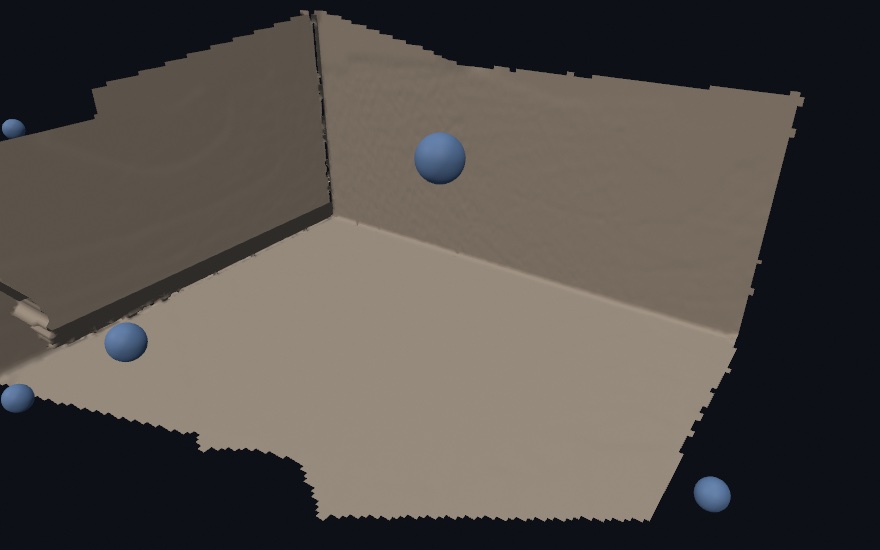
The camera path supplies the orientation. The fused cloud carries the colors of the capture, so the room comes back colored. Doorways, windows, and everything else the sweep missed stay open, which is the true shape of a scan.
A recorded clip works the same way with no live connection. Record3DRecording exposes poses, which are camera-to-world, one per frame. So a sweep saved on the phone fuses frame by frame with pose(at:), and reconstructs with the pose translations as the camera path.
Cost and parameters
| Parameter | Does | Notes |
|---|---|---|
resolution | grid cells across the longest side | detail finer than the sampling cannot be recovered, so past bounds / spacing it only adds cost |
spacing | the sampling density the cloud was taken at | nil estimates it, and a WorldCloud knows it as voxelSize |
neighbors | how many samples fit each plane | more smooths noise, fewer keeps fine detail |
maxGap | how large a data gap still closes | nil adapts to the local density, .infinity closes everything |
fitting | nearest plane, or the robust blend | .planes is fast and faithful, .robust smooths noise, keeps creases, and resists phantom shreds |
blend | (particleSurface) how far balls melt together | 1 is separate spheres, 2 to 3 is the liquid look |
The cost sits in two places: one plane fit per point, and the field samples near the surface. The grid far from the surface is skipped cheaply. Both parts grow with what you ask for, so reconstruct once in setup() and keep the mesh, the way you use the other mesh generators.
See also
Isosurfaces- the marching-cubes step both tools use to contour the fieldRGBD & WorldCloud- the depth frames and the sweep accumulator that the room recipe usesMesh growth- grow a surface instead of recovering oneSubdivision surfaces- smooth the rebuilt mesh further