Textures
A material texture is a surface a sketch asks for by name. They come in two kinds. The pixel kind is painted by the generators on the Effects page, .rust, .verdigris, and .terrazzo, with the .bubbleWrap filter beside them. Under two of them is geometry a sketch can hold, draw, and plot. A Patina is the blooms a corrosion grows from, and a Terrazzo is the chips of a floor. The line kind is nothing but lines, so a pen can draw it. WoodGrain, Frost, Crackle, and Ikat are wood grain, hoarfrost, cracked wax, and the stepped edge of a resist-dyed stripe, each as strokes and shapes a sketch holds. Every one is made from a seed. The blob a plotter draws is the blob the screen shows, and the same seed draws the same texture.
let blooms = Patina.scatter(in: canvasRectangle, count: 12, seed: 3)
drawImage(generate(.rust(blobs: blooms)).image, 0, 0)
stroke(.black); noFill()
for blob in blooms.blobs { drawPolygon(blob.outline.points) }   // lands on the paint

let plank = WoodGrain.trace(in: canvasRectangle, spacing: 6, knots: 2, seed: 3)
for line in plank.strokes { drawPolyline(line.points) }         // a plotter's plank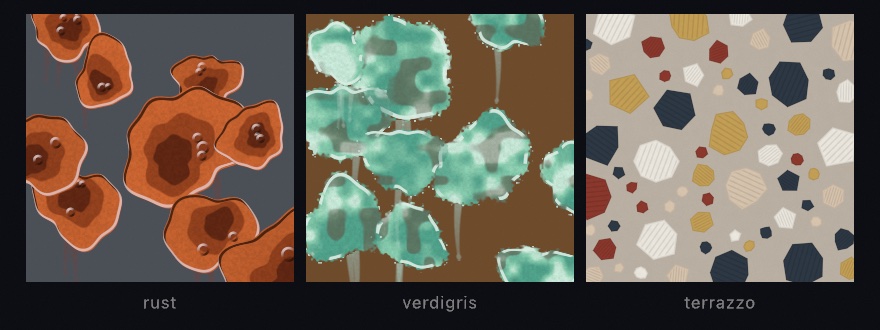
Contents
- A patina's blooms
- A terrazzo's chips
- The generators that read them
- A crease in a sheet
- Textures drawn as lines
- A drop that spread: chromatography
A patina's blooms
let region = Rectangle(x: 0, y: 0, width: 600, height: 400)
let blooms = Patina.scatter(in: region, count: 12, radius: 40 ... 140, seed: 1)
let blob = blooms.blobs[0]
blob.outline                     // a closed Contour of 96 points
blob.masses                      // the two nested masses, contours too
blob.blisters                    // [Circle]
blob.boundaryRadius(at: 0.5)     // the outline's radius at an angle
blob.contains(Vector2(100, 80))
blooms.outlines                  // every bloom's outline
A Patina.Blob, a Blob for short, is a circle whose radius wavers around it. The outline's radius is the mean radius times one plus four harmonics of the angle: two and three waves around for the big lobes, five and eight for the ragged edge (Patina.Blob.harmonics). Each harmonic has an amplitude in amplitudes and a start in phases. boundaryRadius(at:) reads the outline's radius at an angle. swing is how far it can wander from the mean as a fraction, so the outline always lies between radius * (1 - swing) and radius * (1 + swing). outline samples it as a closed contour.
Inside the bloom sit two masses, the darker cores. They are the same waver at Patina.Blob.massScales of the radius, 0.62 and 0.36, with their phases turned so they are not pure copies. Their centers are moved by massOffset, a fraction of the radius for the first and 1.7 times it for the second. Two to four blisters, small circles inside the bloom, complete it. tone is a draw in 0…1 the generators use to vary each bloom's color a little.
scatter(in:count:radius:seed:) throws up to count blooms over a region, each with a mean radius drawn from radius. A bloom is placed only where its center is at least three quarters of the two radii away from every bloom already placed. Blooms overlap at their ragged edges and never stack, and a crowded region takes fewer than asked. The same seed makes the same patina, down to every blister. The using: form takes any random generator, and Patina(blobs:) builds one from blobs of your own when the scatter should follow your own rule, each made with Patina.Blob(center:radius:amplitudes:phases:massOffset:blisters:tone:).
A terrazzo's chips
let region = Rectangle(x: 0, y: 0, width: 600, height: 400)
let floor = Terrazzo.scatter(in: region, chipRadius: 44, density: 0.55, gap: 3, tones: 5, seed: 1)
let chip = floor.chips[0]
chip.shape                       // the chip as a Shape, for drawShape or a clip
chip.points                      // its corners
chip.tier                        // 0 the largest tier, 2 the smallest
chip.tone                        // an index into a palette
floor.outlines
A Terrazzo.Chip, a Chip for short, is a polygon inside a circle. center and radius are the circle, and every corner lies within it. rotation is the angle of the first corner, and corners holds each corner's distance from the center as a fraction of the radius, in 0.72…1, going around. A chip has five to eight corners, no two chips are alike, none is regular, and one corner is always on the circle. sides, points, outline, shape, and contains(_:) read it.
scatter(in:chipRadius:density:gap:tones:seed:) lays the floor by dart throwing (Cook, 1986) in three size tiers, largest first. The circles are at chipRadius and at Terrazzo.tierScales of it, 0.55 and 0.3. Each tier places chips at random until together they cover about density of the region in the shares Terrazzo.tierShares, half, three tenths, and two tenths, or until its darts keep missing. A chip lands only where its circle clears every chip already placed by gap, so no two chips ever touch, and the floor reports the gap it was laid with. Each chip takes one of tones colors by index. Dart throwing jams before a floor is full, so a density past about 0.5 lays little more than 0.5. The using: form takes any random generator, and Terrazzo(chips:gap:) builds a floor from chips of your own, each made with Terrazzo.Chip(center:radius:rotation:tier:tone:corners:).
The generators that read them
.rust(blobs:...), .verdigris(blobs:...), and .terrazzo(chips:...) take the scatter and paint it (the rust reads a Patina as blooms with their masses and lip, the verdigris reads the same blobs as a mottled crust with a frayed edge): the GPU reads the very blobs and chips the sketch holds, so an outline stroked from one lands on the paint, and a scatter rebuilt every frame (a bloom growing, a floor laid chip by chip) is repainted every frame. With no scatter handed in, each generator scatters its own over the layer from its seed with the same calls, so generate(.rust(seed: 3)) paints the blooms Patina.scatter(in: layer, count: 14, radius: 40 ... 150, seed: 3) builds over a rectangle the layer's size, byte for byte. Every parameter of the paint (the tones, the lip, the blisters, the tide, the hatching) is on the Effects page, beside the catalog they belong to.
A crease in a sheet
The fourth pixel texture is a fold rather than a scatter. Heightfield.creased(along:width:amplitude:) presses a crease into any heightfield along a polyline, shaped by one closed-form kernel (Heightfield.creaseProfile(at:)): a cusp with a rounded tip, an asymmetric step that lifts one flank, and a trough two widths out on both sides. The same kernel shapes the folds of .paperTexture. It lives on the Terrain page with the rest of Heightfield.
Textures drawn as lines
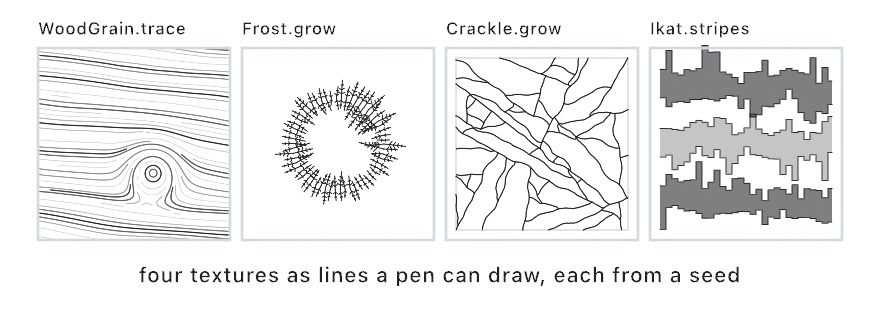
The line kind hands back polylines and shapes and nothing else, so a plotter draws the material. --export-svg writes them as paths and --export-gcode as a route. Each is a value you trace or grow once and hold, and each repeats from its seed. The Patterns/LineTextures example draws all four the way a plotter would, stroke by stroke. Line work laid along one drawn path and its width, rather than over a region, is on Gesture marks.
Wood grain
let plank = WoodGrain.trace(in: canvasRectangle, direction: 0.12, spacing: 6, knots: 2,
                            ringSpacing: 48, ringContrast: 0.6, wobble: 0.35, seed: 3)
noFill()
for line in plank.strokes {
    stroke(Color(hex: 0x4A2A14).withAlpha(0.3 + 0.7 * line.tone))
    if line.isClosed { drawPolygon(line.points) } else { drawPolyline(line.points) }
}
plank.lines                       // every stroke's points
plank.knots                       // the knots it flowed around
plank.across(Vector2(300, 200))   // the ring coordinate at a point
plank.tone(at: Vector2(300, 200)) // the ring tone there
plank.field                       // the angle field, a FlowField
WoodGrain is streamlines traced through an angle field. The lines run with the grain, bend around the knots, and bunch up every so often across the grain where a ring is. Under it is a ring coordinate, across(_:), the distance across the grain lifted by a bump at every knot and wandered by two octaves of noise. A Knot has a center, a radius (the width of its bump), and a height in radii. Past WoodGrain.Knot.closingHeight, about 1.65, the rings close into loops around the knot. Every Stroke is a level curve of the ring coordinate. So strokes never cross, a stroke that circles a knot closes (isClosed, so draw it as a polygon), and each belongs to one ring along its whole length. The stroke carries that ring as its tone, 0 on the light wood between rings and 1 on the darkest ring. tone(at:) reads the tone anywhere. field is the angle field itself, a FlowField, for a sketch that wants to trace its own lines through it.
trace(in:direction:spacing:knots:ringSpacing:ringContrast:wobble:seed:) traces the grain over a region. direction is the grain's angle, spacing the distance between strokes on a ring, and ringSpacing the distance from ring to ring. ringContrast is how much sparser the strokes are between rings, 0 for even spacing and 1 for three times the spacing, which is how a plotted plank shows its rings. wobble is how far the grain wanders as a fraction of the ring spacing. Past about 0.5 the wander can pinch a stroke off into an island. knots is a count, thrown over the region from the seed by WoodGrain.Knot.scatter(in:count:seed:), or a list of knots of your own, each made with WoodGrain.Knot(center:radius:height:). The strokes are evenly spaced. A seed closer to a stroke than its spacing allows is skipped, a stroke stops at half its spacing from another, and every traced stroke seeds the next ones beside it, so the whole region fills. WoodGrain(strokes:knots:direction:ringSpacing:wobble:seed:) builds one from strokes of your own.
Frost
let pane = Frost.grow(along: canvasRectangle.contour, spacing: 7, length: 90, clump: 0.6,
                      barbSpacing: 6, barbAngle: .pi / 3, side: .inside, seed: 2)
stroke(.white); strokeWeight(1); noFill()
for line in pane.strokes { drawPolyline(line) }
let needle = pane.needles[0]
needle.root; needle.tip           // the spine's ends
needle.angle; needle.length
needle.spine                      // the spine as a two-point stroke
needle.barbs[0].base              // where a barb leaves the spine
needle.barbs[0].tip
needle.barbs[0].station           // where along the needle, 0 the root to 1 the tip
needle.barbs[0].side              // 1 on the left of the needle, -1 on the right
pane.roots                        // where the needles stand
Frost.barbStations(length: 60, spacing: 5)   // the barb law
Frost is hoarfrost. Needles sprout along an outline's normals, each a straight spine with barbs leaning toward its tip, the way frost grows on a pane's edge or a twig. grow(along:spacing:length:clump:barbSpacing:barbAngle:side:seed:) takes a Contour or a whole Shape. It stands a Needle every spacing along the outline, pointing away from it on side (.outside, .inside, or .both), each tilted a little. For an open path, outside is the left of its direction of travel. A needle's length is length scaled by a mix of a slow noise along the outline and a draw of its own. clump weights the noise, so at 1 long needles come in runs and at 0 every needle draws alone. The mix is squared, so most needles are short.
The barbs follow one law, barbStations(length:spacing:). They start Frost.barbStart of the way up the spine, a quarter, sit barbSpacing apart from there, and stop half a spacing short of the tip. At each station a pair of Barbs leans forward barbAngle off the spine, sixty degrees by default with a little jitter, one on each side. A barb reaches Frost.barbReach of the needle at the root's station, never past Frost.barbCap barb spacings, and shortens to nothing at the tip. strokes is every spine and barb, each a two-point stroke. Frost(needles:) builds a frost from needles of your own, each made with Frost.Needle(root:angle:length:barbs:) and Frost.Barb(base:tip:station:side:).
Crackle
let panel = Rectangle(x: 70, y: 70, width: 940, height: 940)
let folds = [[Vector2(450, 70), Vector2(500, 1010)]]
let wax = Crackle.grow(in: panel, spacing: 34, creases: folds, forkChance: 0.5, wobble: 0.3, seed: 5)
stroke(Color(hex: 0x1F2B5B)); strokeWeight(1.4); noFill()
for line in wax.lines { drawPolyline(line) }
let vein = wax.veins[0]
vein.points
vein.order                        // 0 seeded, 1 a fork, 2 a fork of a fork
vein.parent                       // the vein it forked from, or nil
vein.length
wax.cell                          // the Shape the veins cross
Crackle is the veins of cracked wax. Each is a wandering walk across a cell that stops at the cell's edge or where it meets another vein, forking once near its middle, and the veins are denser along the creases where the wax was folded. grow(in:spacing:creases:forkChance:wobble:seed:) takes a Shape as the cell, or a Rectangle. It seeds about one Vein for every two spacing squares of the cell's area. A third start on the rim and walk in, and the rest start inside and walk both ways from their root. A vein's heading wanders by a slow noise (wobble, in radians) with a little jitter at every step, so it reads as a crack rather than a curve. It ends on the rim, bisected to the edge so a plotter reaches it, or on the first vein it meets, which it touches and never crosses. When it is done it may fork (forkChance, lower by two fifths for each order). A child sets out from a point between a third and two thirds along it, fifty to eighty degrees off, and may fork once more itself, up to Crackle.maxOrder. Every polyline in creases seeds an extra vein every two fifths of a spacing along itself, headed along it, so the crackle crowds where the sketch says the wax creased. Every point of every vein lies inside the cell. Crackle(veins:cell:) builds one from veins of your own, each made with Crackle.Vein(points:order:parent:).
Ikat
let cloth = Ikat.stripes(in: canvasRectangle, count: 5, bundle: 13, bleed: 24,
                         spikes: 0.14, intrusions: 0.14, skew: 1.2, warp: .vertical, seed: 3)
noStroke()
for stripe in cloth.stripes {
    fill(Color(hex: 0x1F2B5B))
    drawShape(stripe.shape)
}
let stripe = cloth.stripes[0]
stripe.band                       // the stripe as designed, a Rectangle
stripe.bundles                    // how many bundles it spans
stripe.leading                    // the leading edge's offset per bundle
stripe.trailing
stripe.leadingEdge                // the stepped polyline, two points per bundle
stripe.trailingEdge
stripe.edges                      // both
cloth.shapes; cloth.edges         // every stripe's
let one = Ikat.stripe(across: Rectangle(x: 40, y: 200, width: 1000, height: 80), bundle: 12, seed: 1)
Ikat is the stepped, bleeding edge of a resist-dyed stripe. In ikat the threads are tied in bundles and dyed before they are woven. Every bundle lands a little out of place on the loom, so a stripe's edge is not a line but a stair, one step per bundle, each at its own height. A Stripe is a band, the stripe as it was designed, with an offset per bundle at each of its two edges, leading and trailing. The offsets run along the Warp, the direction the threads run. For a .vertical warp the leading edge is the top and the bundles step across x. leadingEdge and trailingEdge are the stairs as polylines, two points per bundle with a riser between bundles. shape is the stripe between them, closed, for a fill.
stripe(across:bundle:bleed:spikes:intrusions:skew:warp:seed:) dyes one stripe over a band. Each bundle slips along the warp, moving both its edges together, by a slow noise of up to a third of bleed plus a lean of skew times bleed from one end of the stripe to the other. Each edge then bleeds on its own. It flares up to half of bleed either way by a slow noise, spikes one to two bleeds out on a spikes share of the bundles (a spike runs into the next bundle a third of the time), and intrudes half to one bleed in on an intrusions share, never past two fifths of the band. stripes(in:count:...) lays count stripes across a region, each half as tall as its share of the region along the warp and centered in it, every one dyed from its own draw of the seed. Ikat(stripes:) builds a cloth from stripes of your own, each made with Ikat.Stripe(band:bundle:warp:leading:trailing:).
A drop that spread: chromatography
Chromatography is the stain a drop of ink leaves as it spreads through paper. The pigments in the ink travel at different speeds, so each stops at its own distance. The stain is a set of rings around a core, each a band of one tone, noisy where the paper's grain pulled the front. Fibers of the outermost front wick a little past the edge. Several drops that spread into each other stop where they meet. Every ring yields to its neighbor along the line their fronts share, nearer the smaller drop, with a ruffle where it was stopped, and no ring ever enters a neighbor's core. The stain is geometry the sketch holds. Each ring is a closed outline with a tone, 0 at the core and 1 at the outermost front. Each band between two rings is a Shape, and each fiber is a short open line. So a sketch fills the bands, strokes the rings, or plots both.
let stain = Chromatography.scatter(in: canvasRectangle, count: 6, radius: 70 ... 150, seed: 2)
let inks = Ramp([Color(hex: 0x1B1A2E), Color(hex: 0x24449A), Color(hex: 0xC43E7A), Color(hex: 0xE9B84A)])
noStroke()
for drop in stain.drops {
    for (band, ring) in zip(drop.bands, drop.rings) {
        fill(inks.color(at: ring.tone))
        drawShape(band)
    }
    noFill(); stroke(Color(hex: 0x1B1A2E))
    for fiber in drop.fibers { drawPolyline(fiber) }
}
stain.lines                 // every ring closed, then every fiber, for a plotter
stain.drops[0].core         // the core's radius, which no neighbor's ring enters
Chromatography.spread(at: Vector2(300, 300), radius: 120, rings: 6, ruffle: 0.5, fibers: 0.8, seed: 1)
Chromatography.spread([(Vector2(200, 200), 90), (Vector2(360, 240), 140)], seed: 1)   // drops you placed
spread(at:radius:) is one drop. scatter(in:count:radius:) throws count drops over a region with no two cores touching. spread(_:) takes drops you placed yourself as centers and radii. rings is how many fronts a drop leaves. ruffle, 0 to 1, is how much a stopped front crinkles. fibers, 0 to 1, is how densely the outer front wicks past the edge. Every value repeats from its seed. A stain can also be built by hand. Chromatography(drops:) takes Chromatography.Drop(center:radius:rings:fibers:) values, and each ring is a Chromatography.Ring(points:fraction:tone:): a closed outline, its nominal radius as a fraction of the drop's, and its tone. Chromatography.coreFraction is the core's share of a radius, 0.22, the distance from a neighbor's center no ring enters. The Effects/Phenomena example grows a set of drops in over its loop, beside five optical looks.